




Solved

Set Values from different columns with PythonCaller

  • May 13, 2021
  • 4 replies
  • 26 views

canerakin
Contributor
Forum|alt.badge.img+6

I have a polygon that has 200 Zone and Bottom fields as Zone1, Zone2, Zone3,...., Zone200 and Bottom1, Bottom2, Bottom3,...., Bottom200 . I am trying to split the polygon to 200 units and create fields called "Zone" and "Bottom". Then populate these fields as Zone1/Bottom1 for unit 1, Zone2/Bottom2 for unit 2 and so on.

I am at the writing the attribute stage. I was able to get the values but I couldn't set the values to the final attributes. I attached the workbench template.

My current code looks like this:

import fme
import fmeobjects
 
def processFeature(feature):
    
    for i in range(1, 201):
        zone = "Zone" + str(i)
        bottom = "Bottom" + str(i)
        zoneValue = feature.getAttribute(zone)
        bottomValue = feature.getAttribute(bottom))
        feature.setAttribute("Zone", zoneValue)
        feature.setAttribute("Bottom", bottomValue)
 

Best answer by daveatsafe

Hi @canerakin​ ,

To create multiple outputs from a single input, you will need to use a class in the PythonCaller, with 'self.pyoutput(feature)' in the close method.

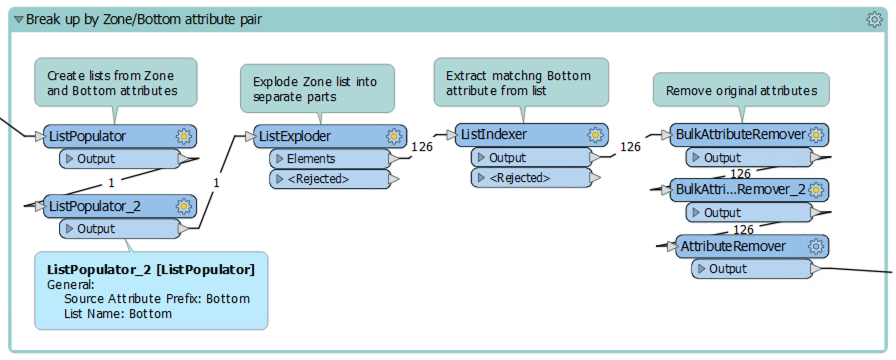
However, I think you can get the results you want using list handling transformers instead. I am attaching a simple workspace to illustrate.

Screen Shot 2021-05-13 at 4.32.17 PM

This post is closed to further activity.
It may be an old question, an answered question, an implemented idea, or a notification-only post.
Please check post dates before relying on any information in a question or answer.
For follow-up or related questions, please post a new question or idea.
If there is a genuine update to be made, please contact us and request that the post is reopened.

4 replies

daveatsafe
Safer
Forum|alt.badge.img+20
  • Safer
  • Best Answer
  • May 13, 2021

Hi @canerakin​ ,

To create multiple outputs from a single input, you will need to use a class in the PythonCaller, with 'self.pyoutput(feature)' in the close method.

However, I think you can get the results you want using list handling transformers instead. I am attaching a simple workspace to illustrate.

Screen Shot 2021-05-13 at 4.32.17 PM


canerakin
Contributor
Forum|alt.badge.img+6
  • Author
  • Contributor
  • May 14, 2021

Hi @canerakin​ ,

To create multiple outputs from a single input, you will need to use a class in the PythonCaller, with 'self.pyoutput(feature)' in the close method.

However, I think you can get the results you want using list handling transformers instead. I am attaching a simple workspace to illustrate.

Screen Shot 2021-05-13 at 4.32.17 PM

Hi Dave,

Yes the workspace you sent does the job! Thanks for that. But I would like to know how we can achieve this.

I was going through the technical forums and tried to update the code but doesn't still work. Do you think you can help me out with the code?

import fme
import fmeobjects
 
 
class FeatureProcessor(object):
 
    def __init__(self):
        self.zone = ''
        self.bottom = ''
 
    def input(self, feature):
        for i in range(1, 201):
            zone = "Zone" + str(i)
            bottom = "Bottom" + str(i)
            self.zone += feature.getAttribute(str(zone))
            #bottomValue += feature.getAttribute(str(bottom)
    def close(self):
        new_feature = FMEFeature()
        
        new_feature.setAttribute("Zone", self.zone)
        #self.zone = feature.setAttribute("Bottom", bottomValue)
        self.pyoutput(new_feature)


ebygomm
Influencer
Forum|alt.badge.img+46
  • Influencer
  • May 14, 2021

Hi Dave,

Yes the workspace you sent does the job! Thanks for that. But I would like to know how we can achieve this.

I was going through the technical forums and tried to update the code but doesn't still work. Do you think you can help me out with the code?

import fme
import fmeobjects
 
 
class FeatureProcessor(object):
 
    def __init__(self):
        self.zone = ''
        self.bottom = ''
 
    def input(self, feature):
        for i in range(1, 201):
            zone = "Zone" + str(i)
            bottom = "Bottom" + str(i)
            self.zone += feature.getAttribute(str(zone))
            #bottomValue += feature.getAttribute(str(bottom)
    def close(self):
        new_feature = FMEFeature()
        
        new_feature.setAttribute("Zone", self.zone)
        #self.zone = feature.setAttribute("Bottom", bottomValue)
        self.pyoutput(new_feature)


You could just put your existing code into the input class and output the features there, e.g.

import fme
import fmeobjects
 
class FeatureProcessor(object):
    def __init__(self):
        pass
    def input(self,feature):
        for i in range(1, 201):
            zone = "Zone" + str(i)
            bottom = "Bottom" + str(i)
            zoneValue = feature.getAttribute(zone)
            bottomValue = feature.getAttribute(bottom)
            feature.setAttribute("Zone", zoneValue)
            feature.setAttribute("Bottom", bottomValue)

            self.pyoutput(feature)
    def close(self):
        pass

This will keep the existing geometry and attributes which you may or may not want


canerakin
Contributor
Forum|alt.badge.img+6
  • Author
  • Contributor
  • May 14, 2021

Hi Dave,

Yes the workspace you sent does the job! Thanks for that. But I would like to know how we can achieve this.

I was going through the technical forums and tried to update the code but doesn't still work. Do you think you can help me out with the code?

import fme
import fmeobjects
 
 
class FeatureProcessor(object):
 
    def __init__(self):
        self.zone = ''
        self.bottom = ''
 
    def input(self, feature):
        for i in range(1, 201):
            zone = "Zone" + str(i)
            bottom = "Bottom" + str(i)
            self.zone += feature.getAttribute(str(zone))
            #bottomValue += feature.getAttribute(str(bottom)
    def close(self):
        new_feature = FMEFeature()
        
        new_feature.setAttribute("Zone", self.zone)
        #self.zone = feature.setAttribute("Bottom", bottomValue)

        self.pyoutput(new_feature)


I literally tried that and I was getting empty values. The code you sent works though, thanks a lot





