


Question

Google Fusion: insert not successful

  • August 9, 2018
  • 3 replies
  • 25 views

sashal
Supporter
Forum|alt.badge.img+13

I am using FME to update (Insert mode) an existing Google Fusion table. My FME Workspace runs successfully with no errors and shows that it writes the features. However, the Google Fusion table shows no edits or features inserted. Any ideas? My Google Fusion writer has the credentials of the owner of the Google Fusion table so permissions should not be an issue.

Thanks,

Sasha

This post is closed to further activity.
It may be an old question, an answered question, an implemented idea, or a notification-only post.
Please check post dates before relying on any information in a question or answer.
For follow-up or related questions, please post a new question or idea.
If there is a genuine update to be made, please contact us and request that the post is reopened.

3 replies

chrisatsafe
Contributor
Forum|alt.badge.img+2
  • Contributor
  • August 9, 2018

Hi @sashalockamy,

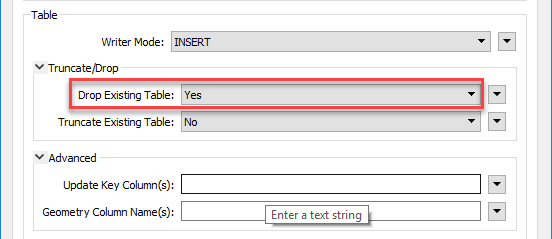
I believe the issue you are experiencing has to do with the Google Fusion Table Writer Parameters. Since you are writing to an existing table, you will have to set the Drop Existing Table parameter to Yes.

According to the Google Fusion Table Writer Documentation, Drop Existing Table should be used "if the table exists by this name, it should be dropped and recreated before any features are written to it. This option is only valid when creating a new table."

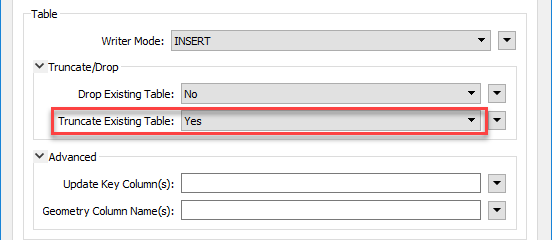
Alternatively, you can achieve a similar result by setting the Truncate Existing Table parameter to yes - "If the table exists by this name, it should be truncated before any features are written to it. This option will result in an empty table if combined with UPDATE or DELETE mode."

After you change the Writer parameters, run the workspace and open the Google Fusion Table or refresh the page and you should see the changes.

Hope this helps.

- Chris


sashal
Supporter
Forum|alt.badge.img+13
  • Author
  • Supporter
  • August 9, 2018

Hi @sashalockamy,

I believe the issue you are experiencing has to do with the Google Fusion Table Writer Parameters. Since you are writing to an existing table, you will have to set the Drop Existing Table parameter to Yes.

According to the Google Fusion Table Writer Documentation, Drop Existing Table should be used "if the table exists by this name, it should be dropped and recreated before any features are written to it. This option is only valid when creating a new table."

Alternatively, you can achieve a similar result by setting the Truncate Existing Table parameter to yes - "If the table exists by this name, it should be truncated before any features are written to it. This option will result in an empty table if combined with UPDATE or DELETE mode."

After you change the Writer parameters, run the workspace and open the Google Fusion Table or refresh the page and you should see the changes.

Hope this helps.

- Chris

Thank you @ChrisAtSafe!

So, is it not possible to update the existing table with new records when writing to Google Fusion Tables? Sounds like you are suggesting this and that I will need to create a new or overwrite it completely.

-Sasha


sashal
Supporter
Forum|alt.badge.img+13
  • Author
  • Supporter
  • August 9, 2018

Thank you @ChrisAtSafe!

So, is it not possible to update the existing table with new records when writing to Google Fusion Tables? Sounds like you are suggesting this and that I will need to create a new or overwrite it completely.

-Sasha

I was able to update the table after all using Insert Mode to an existing table (that I just want to add records to). My issue was caused by attributes not mapping correctly. Once I wrote to a new file per Chris's suggestion, I saw no records were inserting. Then I inspected my data further upstream in the workspace and discovered that the data was not being selected and attributed properly and this was causing me to get blank inserted records (which is why I saw records writing, but they were blank :)). Thanks @ChrisAtSafe