Question

Specifing order of the column in pivot table?

  • March 29, 2017
  • 2 replies
  • 18 views

Forum|alt.badge.img

Hi,

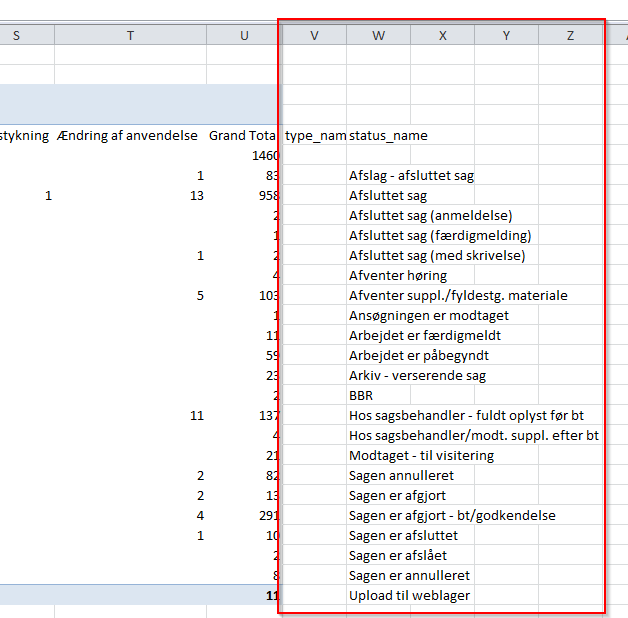
I using FME to generete a Pivot table using a template (existing Excel table) which is working just fine. The only problem is that I can´t seem to control where the column (with the explaining text) is located. In the original excel-table it´s located in the beginning (column A) but in the FME generated excel-file it´s located in the last column of the sheet. Is it possible to change that?

Christian
 

This post is closed to further activity.
It may be an old question, an answered question, an implemented idea, or a notification-only post.
Please check post dates before relying on any information in a question or answer.
For follow-up or related questions, please post a new question or idea.
If there is a genuine update to be made, please contact us and request that the post is reopened.

2 replies

zzupljanin
Contributor
Forum|alt.badge.img+5
  • Contributor
  • March 29, 2017

That's interesting. Are you appending type_name and status_name to source data.

Just a question. what will happen if you rearrange order of user attributes in writer and put type_name and status_name on first position?


Forum|alt.badge.img
  • Author
  • March 30, 2017

Hi,

type_name and status_name are coming from the original file. To answer your question, the only columns that are exposed from the user attributes are status_name and type_name and it doesent seem to do anything rearranging the two attributes.

Christian