


Solved

GeometryValidator repaired features become invalid again after writing to GeoPackage

  • June 30, 2026
  • 4 replies
  • 129 views

a.sabzevari69
Contributor
Forum|alt.badge.img+4

Hi everyone,

I'm seeing some unexpected behaviour when writing repaired geometries to a GeoPackage.

My workflow is:

GeometryValidator (Attempt Repair = Yes)       → GeoPackage Writer       → GeoPackage Reader       → GeometryValidator

Before writing:

  • Input: 32,572
  • Passed: 10,720
  • Repaired: 21,852
  • Failed: 0

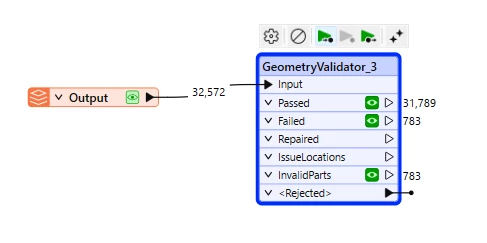
After reading the GeoPackage back:

  • Input: 32,572
  • Passed: 31,789
  • Failed: 783 (Invalid Parts)

I also noticed another behaviour:

  • When Spatial Standard Compliance is included in the first GeometryValidator, the written GeoPackage appears to preserve more polygon coverage.
  • When I disable Spatial Standard Compliance, all features still pass after repair, but after writing and reading the GeoPackage back, more features fail validation.

Has anyone experienced this before?

Is this expected behaviour of GeometryValidator/GeoPackage, or should the repaired geometries remain valid after being written and read back?
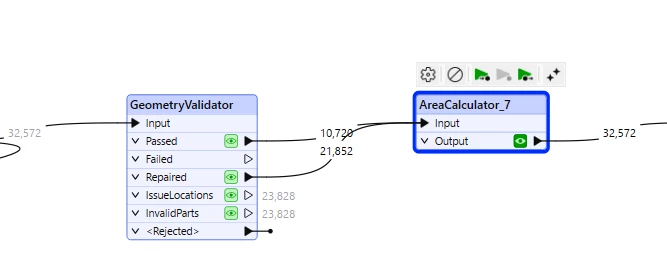
Before writing
After writing


Best answer by a.sabzevari69

Thanks everyone for your suggestions. I managed to track down the issue, so I'm posting the solution here in case it helps someone else.


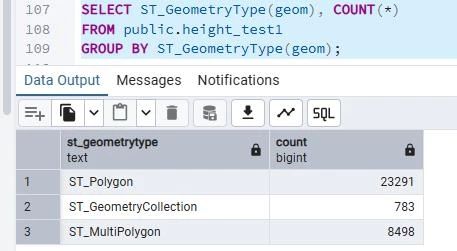
After writing to both GeoPackage and Esri File Geodatabase, I noticed that the same features were always missing. To investigate further, I wrote the data to PostGIS and checked the geometry types:

Interestingly, 783 was exactly the same number of features that were causing problems in FME.

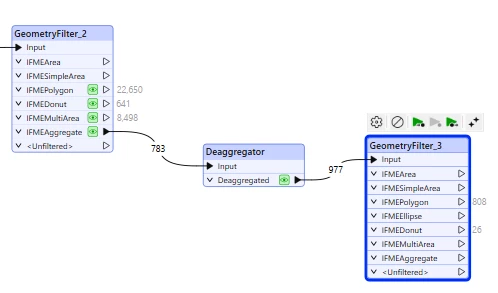
Using a GeometryFilter (Detailed) showed those 783 features as FMEAggregate geometries.

The solution was:

  1. Send the FMEAggregate output to a Deaggregator.
  2. Set:
    • Mode = Flatten All Levels
    • Split Composites = Yes
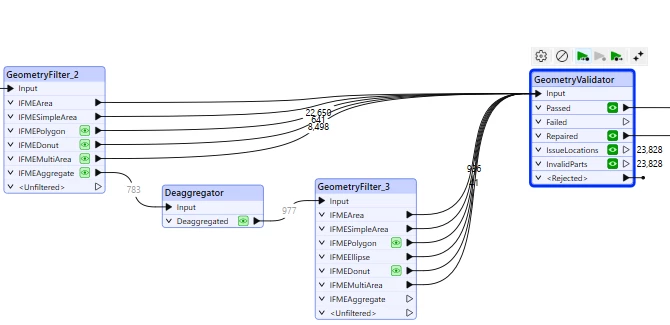
  1. Pass the deaggregated output through another GeometryFilter.
  1. Merge all area geometries (FMEPolygon, FMEMultiArea, FMEDonut, FMESimpleArea, etc.) back together.
  1. Run a final GeometryValidator before writing.

Finally, No more Geometry Collection geometries were written and GeoPackage, File Geodatabase, PostGIS and QGIS all produced matching results.


Hopefully this helps anyone else who runs into the same issue.

4 replies

davidlee
Supporter
Forum|alt.badge.img+8
  • Supporter
  • June 30, 2026

I ran into the same geodatabase issue and found out it was caused by 2D self-intersection tolerances. Even though the data meets OGC standards, certain software and formats have their own specific requirements. You might want to test the tolerance with different values—like 0.1, 0.01, or 0.001—and try again to find the precision that works.

Hope this helps!


s.jager
Influencer
Forum|alt.badge.img+26
  • Influencer
  • June 30, 2026

It could be that you have the wrong type of geometry for the definition of the geopackage. The default for the writer is <from first feature>, if you set the geometry type to geopackage_geometry, it will accept all types of geometry. 

It could happen that there is for example a multi-polygon in there, and the first feature is a polygon. Then the multi polygon feature will be written without geometry. It can also happen that a polygon is actually a collection, because one part of the polygon is an arc for example - which will also be denied by the geopackage writer if the geometry type is set to geometry_polygon.

Add an inspector to the InvalidParts port, and check what those invalid parts are - that should tell you more.


a.sabzevari69
Contributor
Forum|alt.badge.img+4
  • Author
  • Contributor
  • Best Answer
  • July 1, 2026

Thanks everyone for your suggestions. I managed to track down the issue, so I'm posting the solution here in case it helps someone else.


After writing to both GeoPackage and Esri File Geodatabase, I noticed that the same features were always missing. To investigate further, I wrote the data to PostGIS and checked the geometry types:

Interestingly, 783 was exactly the same number of features that were causing problems in FME.

Using a GeometryFilter (Detailed) showed those 783 features as FMEAggregate geometries.

The solution was:

  1. Send the FMEAggregate output to a Deaggregator.
  2. Set:
    • Mode = Flatten All Levels
    • Split Composites = Yes
  1. Pass the deaggregated output through another GeometryFilter.
  1. Merge all area geometries (FMEPolygon, FMEMultiArea, FMEDonut, FMESimpleArea, etc.) back together.
  1. Run a final GeometryValidator before writing.

Finally, No more Geometry Collection geometries were written and GeoPackage, File Geodatabase, PostGIS and QGIS all produced matching results.


Hopefully this helps anyone else who runs into the same issue.


jamatsafe
Safer
Forum|alt.badge.img+21
  • Safer
  • July 6, 2026

Hi ​@a.sabzevari69 , glad you got it sorted, and thanks for sharing the fix! The issue is that aggregates, specifically IFMEAggregate, are currently written as geopackage_geometrycollection. While this is a valid geometry type, applications don't represent geometry collections particularly well. Your deaggregate workflow seems to avoid creating geometry collections which may be why it works. Here's another thread discussing the behavior. We've already logged this with our developers under FMEENGINE-97628 to hopefully improve this behavior, and we'll share an update once there's progress in a future release. Thanks again for posting your findings!