As most will know, Geopackages are notoriously sensitive to geometry topologies.
I want to insert all polygons into a single layer/table, but the topology is tripping me up.
I have a number of fairly simple polygons (fme_polygon and fme_donut) and a handfull og more complex polygons, e.g. large polygons with many holes. These latter polygons are stored in FME as fme_aggregate for some reason. The holes are all created by the Clipper transformer.
I’ve successfully coerced my simple polygons into fme_aggregate’s, but when output to Geopackage, some of the geometries gets deleted and the feature is stored without its geometry. This typically happens to the unaltered geometries (i.e. the original fme_aggregate’s).
I’ve checked that all the input geometries to Geopackage are valid and has @GeometryType() = fme_aggregate, so what’s tripping me up here ?
Any insights are welcome.
Cheers.
Using 2025.1.1 for this.
Best answer by jamatsafe
Hi @lifalin2016 ,
Thanks for flagging this and also submitting a support ticket with us! Since we were able to reproduce the geometry dropping issue with IFMEAggregate, this has been filed under FMEENGINE-97628.
In the meantime, in addition to s.jager's advice to set the OGC GeoPackage writer's spatial definition to geopackage_geometry, you may also have more luck if your fme_aggregate geometry is stored as MultiArea parts (IFMEMultiArea - maps to geopackage_multipolygon) rather than Aggregate parts (IFMEAggregate- maps to geopackage_geometrycollection). You can use an AggregateFilter and GeometryFilter (detailed mode) to determine whether your aggregate features are IFMEMultiArea or IFMEAggregate.
If your aggregate feature contains a mix of polygons and MultiAreas parts (both fme_type = area), a GeometryFilter (simple mode, area port) can be used to flatten the MultiAreas into individual polygon parts, which also converts the feature from an IFMEAggregateto an IFMEMultiArea.
If you’re aggregate are homogenous (eg. all polygon parts), a GeometryRefiner or GeometryCoercer can also be used to convert homogenous aggregates into MultiAreas.
Hope this helps! We will provide an update once this has been addressed in a future release.
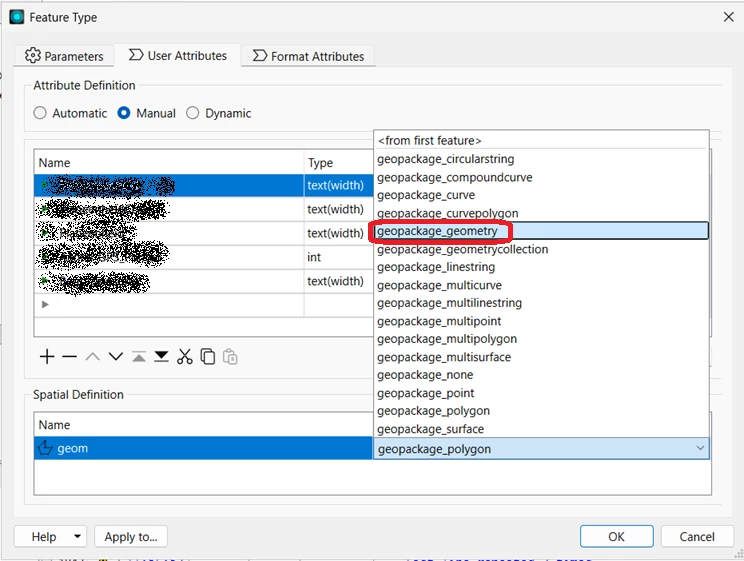
Instead of modifying my geometry, I‘ve had very good results setting the geometry type to geopackage_geometry. Essentially that allows all sorts of mixed geometry, but is really helpful when dealing with polygons and mult-polygons and aggregate polygons.
Instead of modifying my geometry, I‘ve had very good results setting the geometry type to geopackage_geometry.
Thanks s.jager. I hadn’t noticed the spatial definition option.
Luckily I can switch to manual attribute definitions, which is requirede to change the spatial definition.
But now it at least accepts any geometry type inserted - Yay!
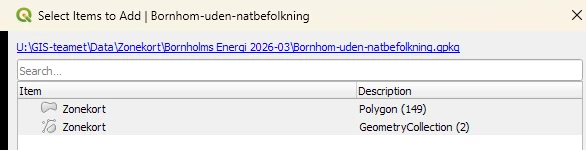
However, after I’ve created the geopackage, and dumps it into QGIS, QGIS claims that two features are acually geometrycollections. These are two of the unaltered original fme_aggregate geometries. And it again strips the geometry off the features, as if QGIS cannot handle geometrycollections.
In the fmeobjects dox for (FMEFeature) getGeometryType and setGeometryType there’s no GeometryCollection, only FME_GEOM_AGGREGATE.
Is the GeoPackage writer doing some dark magic to these geometries, and if so, what triggers it ? And how can one tell this in advance to do something about it ?
I suspect it’s the two larger polygons with multiple holes that are designated as geometrycollections.
Oh. Ouch. Geometry Collections are a nightmare. They might happen because of an arc in a polygon definition for example, or other such things, but there’s no surefire way of intercepting them in FME unfortunately.
Ah, the old buffer-out/buffer-in approach. Good call @s.jager
I went and took a hard look at the original zone data, which the municipalities provide here, so they’re of (very) varying quality. I try to aggregate+dissolve these in advance, and the smaller of the previously collectionized polygons had 63 holes from the outset, primarily due to sloppy registration work from the muncipality (adjacent polygons with unmatching common borders).
I now added the buffering solution, and reduced that to 3, although I had to go up to 1 meter to get there.
I’m running the calculations again, and will try to convert the output to a geopackage, and see whether that’ll eliminate the problem.
These are judicial zone boundaries I’m working with, but for this current purpose, I hope it’ll be ok.
Alas, buffering only solved some of the problems. The low quality zone handling was solved, but the larger aggregate remains, and its geometry is still being stripped away in QGIS.
This geometry is an fme_aggregate with 110 parts. As far as I can see, it’s a mix of FMEPolygon and FMEMultiArea. Nothing seems problematic.
I wonder whether there’s a limitation of parts ? E.g. 100 ?
Thanks for flagging this and also submitting a support ticket with us! Since we were able to reproduce the geometry dropping issue with IFMEAggregate, this has been filed under FMEENGINE-97628.
In the meantime, in addition to s.jager's advice to set the OGC GeoPackage writer's spatial definition to geopackage_geometry, you may also have more luck if your fme_aggregate geometry is stored as MultiArea parts (IFMEMultiArea - maps to geopackage_multipolygon) rather than Aggregate parts (IFMEAggregate- maps to geopackage_geometrycollection). You can use an AggregateFilter and GeometryFilter (detailed mode) to determine whether your aggregate features are IFMEMultiArea or IFMEAggregate.
If your aggregate feature contains a mix of polygons and MultiAreas parts (both fme_type = area), a GeometryFilter (simple mode, area port) can be used to flatten the MultiAreas into individual polygon parts, which also converts the feature from an IFMEAggregateto an IFMEMultiArea.
If you’re aggregate are homogenous (eg. all polygon parts), a GeometryRefiner or GeometryCoercer can also be used to convert homogenous aggregates into MultiAreas.
Hope this helps! We will provide an update once this has been addressed in a future release.