Solved

DateTimeCalculator claims invalid input for date fields

  • January 7, 2026
  • 6 replies
  • 72 views

aaron
Contributor
Forum|alt.badge.img+12

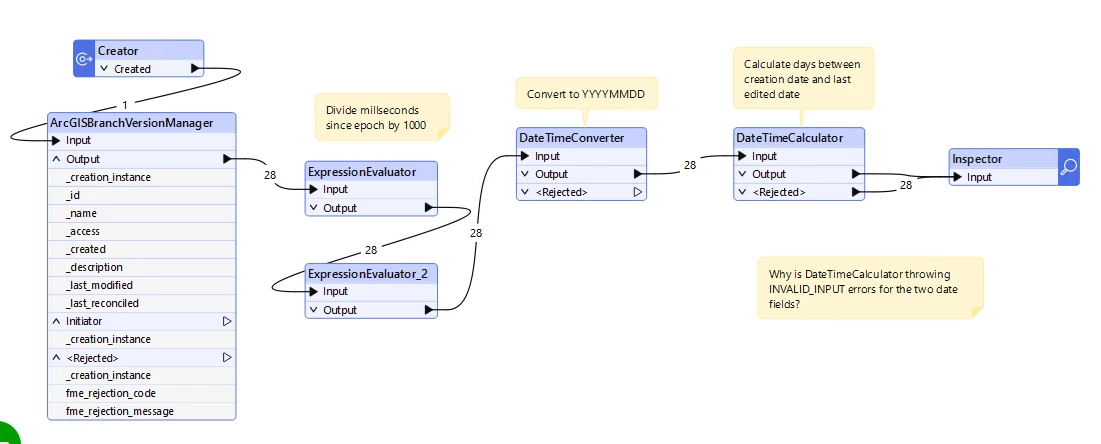
I have a workspace where the DateTimeCalculator is failing for all records. The rejection code is always INVALID_INPUT. And yet, when I view the data in Inspector the two input fields I’m using both list as Date under Data Type. The dates look fine fine (e.g. - 20251216). It fails for any mode - Add or Subtract, Calculate Interval, etc. Any ideas why it’s failing and what I need to do to fix it? (FME Form 2025.1.0.0)

Best answer by aaron

I upgraded FME Form to 2025.2.1 (from 2025.1) and rebuilt my workspace. It works!

This post is closed to further activity.
It may be an old question, an answered question, an implemented idea, or a notification-only post.
Please check post dates before relying on any information in a question or answer.
For follow-up or related questions, please post a new question or idea.
If there is a genuine update to be made, please contact us and request that the post is reopened.


6 replies

redgeographics
Celebrity
Forum|alt.badge.img+62

Can you share a screenshot of how you have it set up? I just tried it with that date and it seems to work just fine for me


s.jager
Influencer
Forum|alt.badge.img+23
  • Influencer
  • January 8, 2026

redgeographics
Celebrity
Forum|alt.badge.img+62

No, that’s limited to the DateTimeConverter, the DateTimeCalculator doesn’t have that issue.


s.jager
Influencer
Forum|alt.badge.img+23
  • Influencer
  • January 8, 2026

No, that’s limited to the DateTimeConverter, the DateTimeCalculator doesn’t have that issue.

Unless there’s a DateTimeConvertor in front of the DateTimeCalculator that does this, and it’s not noticed earlier. But you’re right, that particular problem does not affect the DateTimeCalculator itself, I missed that bit.


aaron
Contributor
Forum|alt.badge.img+12
  • Author
  • Contributor
  • January 8, 2026

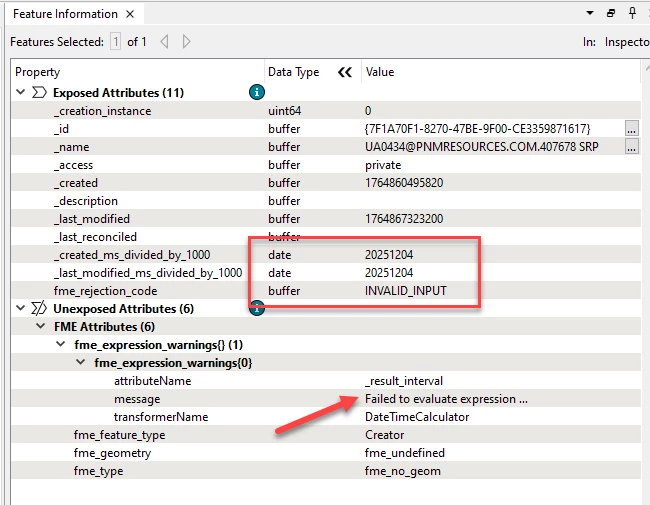
@redgeographics, two screenshots below. One of the workspace and another of a record from the output to the Inspector after the data passes through the DateTimeCalculator.

But I just peeked into the message under fme_expression_warnings and may have found the issue. It looks like the second value in the DateTimeCalculator is not populating. The warning reads, “Failed to evaluate expression '@DateTimeDiff(20251204,,DAYS)'. Result is set to null.” I tried testing again using the same attribute to Calculate Interval between datetimes, which should produce a value of zero (0) and FME throws the same error. That tells me it’s not the data. Bug?


aaron
Contributor
Forum|alt.badge.img+12
  • Author
  • Contributor
  • Best Answer
  • January 8, 2026

I upgraded FME Form to 2025.2.1 (from 2025.1) and rebuilt my workspace. It works!