


Question

How to dynamically remove attributes that have no values?

  • July 16, 2026
  • 4 replies
  • 45 views

ed-progres
Contributor
Forum|alt.badge.img+2


Hello,

I would like to remove attributes (or columns?) from my data stream that have no value (missing or null)
In below example that means “eindegrarantieperiode” and “integraalproject” need to be removed.
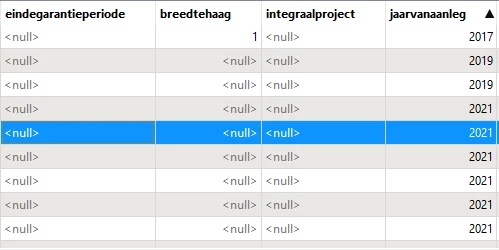


Note: can we do this dynamically? I don't want to manually go through 50+ attributes to check if they contain a value or not.
(FME 2025.0)

 

4 replies

geomancer
Evangelist
Forum|alt.badge.img+64
  • Evangelist
  • July 16, 2026

You can find an example here.

Take a look at workspace remove-columns-with-only-empty-data.fmwt in that question (near the end).

In the dynamic export the attribute COUSUBNS is removed, as it has only empty values.


redgeographics
VIP
Forum|alt.badge.img+63

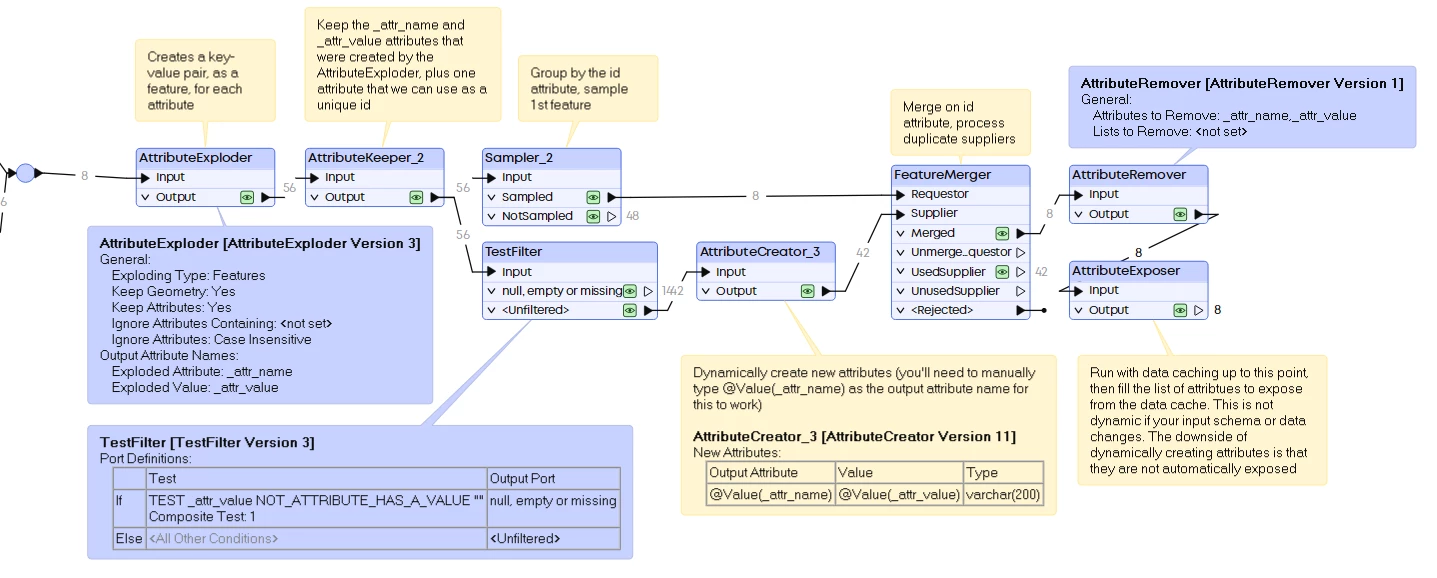
Similar approach. Basically what I do is use an AttributeExploder to create features with 2 attributes holding an original attribute name and value. Then filter those where the value is empty, null or missing, recreate the attribute and then merge it all back.

The downside of this approach is that the dynamically created attributes are not automatically exposed. 


ed-progres
Contributor
Forum|alt.badge.img+2
  • Author
  • Contributor
  • July 16, 2026

Thanks everyone, I'll have a look.
Leave it up to FME to turn a simple task into something complex!😂


redgeographics
VIP
Forum|alt.badge.img+63

Thanks everyone, I'll have a look.
Leave it up to FME to turn a simple task into something complex!😂

Yeah… I thought ‘how hard can it be’… 😅

This may be a case where a Python script could be more efficient, but I don’t know enough Python to be able to help you with that.