Question

How do I parse this kind of data?

  • June 6, 2023
  • 4 replies
  • 20 views

smclaugh1
Contributor
Forum|alt.badge.img+6

I have a logfile I need to extract some info from but I'm not sure what to use. Here's an example of what I have.

<Msg time="2023-06-05T19:55:23,511" type="INFO" code="9029" source="Rest" process="35236" thread="1" methodName="" 

4 replies

nielsgerrits
VIP
Forum|alt.badge.img+64

Are all lines like this or is it part of an XML?


smclaugh1
Contributor
Forum|alt.badge.img+6
  • Author
  • Contributor
  • June 9, 2023

Here is a complete line, they're all like this.

Line 45395: <Msg time="2023-06-05T19:07:29,797" type="INFO" code="6690" source="Admin" process="35236" thread="1" methodName="" machine="randomsite.com" user="" elapsed="" requestID="9c1dc9ba-9c69-437c-b66b-dddf2f6adef0">Service input directory 'F:\\arcgisserver\\directories\\arcgissystem\\arcgisinput\\Hosted\\MY_FS.FeatureServer.delete' is successfully deleted.</Msg>



nielsgerrits
VIP
Forum|alt.badge.img+64

You can use a XMLFlattener to parse this.

  • Feed the logfile to the XMLFlattener.
  • Set Elements to match = "Msg"
  • Under Flatten Options, choose Enable Flattening
  • In Attributes to Expose enter what you need (Msg.code, Msg.elapsed, Msg.machine, Msg.methodName, Msg.process, Msg.requestID, Msg.source, Msg.thread, Msg.time, Msg.type, Msg.user)

ebygomm
Influencer
Forum|alt.badge.img+46
  • Influencer
  • June 12, 2023

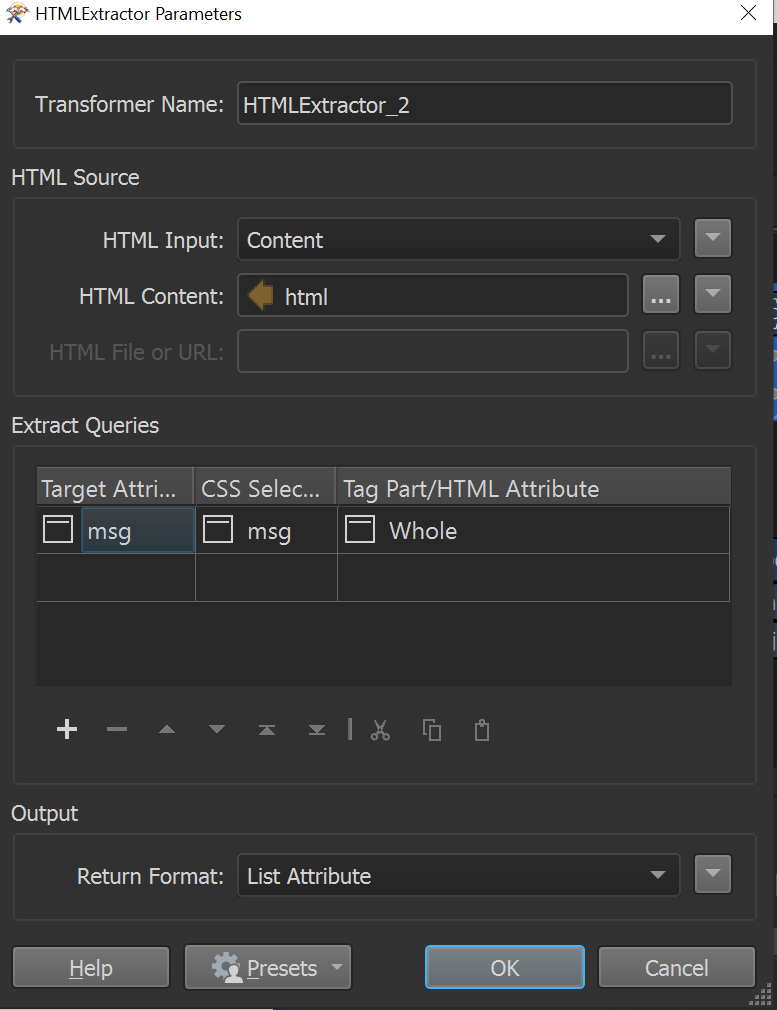
If these xml fragments are part of a larger log file you'll first need to get the individual fragments. Hard to say without seeing the whole log file but a html extractor might work hereimageSet the return format to list attribute, explode the list and then you can use that value within the XMLFlattener