Solved

How do I expose the KML placemark attributes?

  • May 15, 2018
  • 2 replies
  • 70 views

How do I expose the KML placemark attributes using fme?

Here is the file I want to use:

Best answer by danilo_fme

Hi @rdcrawford


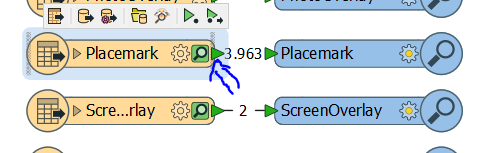
You can expose these attributes on feature type Placemarks:
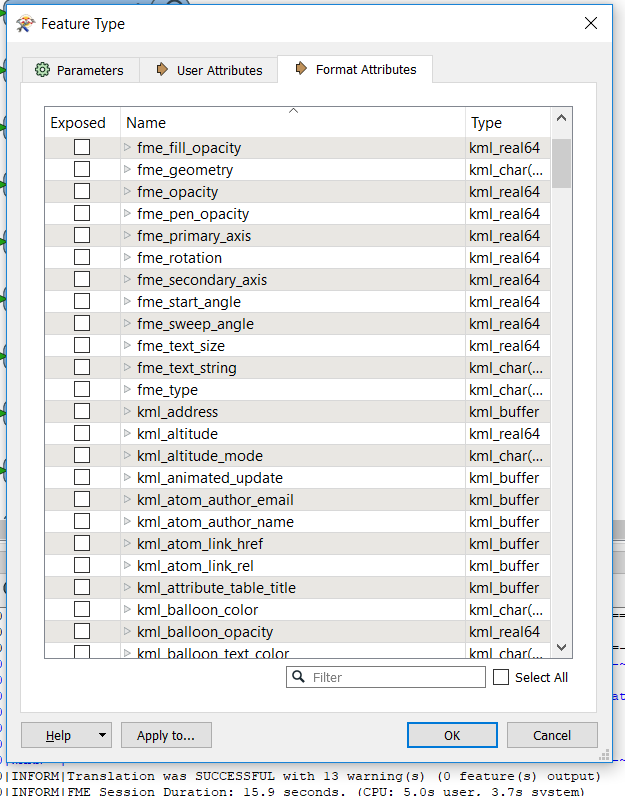
After select the Attributes in Format Attributes:
Thanks,

Danilo

This post is closed to further activity.
It may be an old question, an answered question, an implemented idea, or a notification-only post.
Please check post dates before relying on any information in a question or answer.
For follow-up or related questions, please post a new question or idea.
If there is a genuine update to be made, please contact us and request that the post is reopened.

2 replies

danilo_fme
Celebrity
Forum|alt.badge.img+52
  • Celebrity
  • Best Answer
  • May 15, 2018

Hi @rdcrawford


You can expose these attributes on feature type Placemarks:

After select the Attributes in Format Attributes:

Thanks,

Danilo


redgeographics
Celebrity
Forum|alt.badge.img+62

Hi @rdcrawford


You can expose these attributes on feature type Placemarks:

After select the Attributes in Format Attributes:

Thanks,

Danilo

In addition to that you can use an AttributeExposer transformer. I personally prefer that way in the interest of long-term maintainability of the workspace. If I open it after a few months I'll see that I've exposed attributes. If I don't use the AttributeExposer I might forget that. Same thing goes for when others have to edit the workspace.







