an easy one for you, but I'm still learning and i haven't found an article yet.
One writer in my workbench should be inserted in an existing dwg file.
How or with which params i can do that? (i dont find one)
Greetz and cheers
Franco

This post is closed to further activity.
It may be an old question, an answered question, an implemented idea, or a notification-only post.
Please check post dates before relying on any information in a question or answer.
For follow-up or related questions, please post a new question or idea.
If there is a genuine update to be made, please contact us and request that the post is reopened.
Hi Franco, I don't think it's possible to insert a layer into an existing dwg file, since the dwg format doesn't support Feature Operations unfortunately.
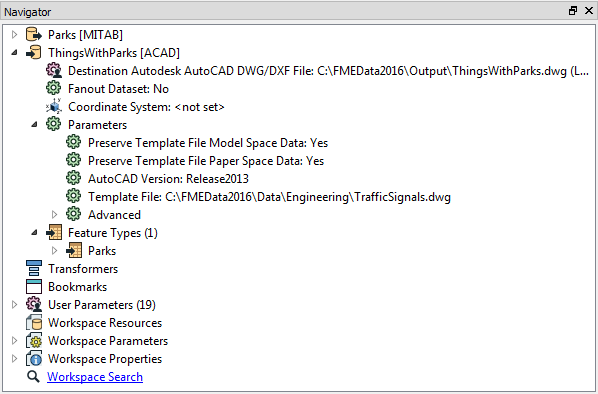
You can't exactly add data to an existing file. But... in the parameters set that file as a template and Preserve Template File Model Space Data = Yes, and then you will get a new file but it will have the existing and new data merged.
Here, for example, I add a layer of parks to a dataset of traffic signals already in DWG:
i want put a circle (new symbol, new layer) around existing data (numbers) according to outcome of workbench...to write a new dwg with this symbols i have already the workbench for this, but my question was if i could write this result (circles) in the same dwg (either i have defined the layer or not), because to have only the circles in a xref would be not so well.
Greetz
Franco
You could also set up a translation from DWG->DWG -- then read the data and write it all out to a new DWG. So long as there are no complex blocks etc, it should work. Use the original DWG as the template file of the output DWG as well, but this time, not with preserving the original models. Then you can easily test and introduce new entities in the FME Workspace, such as you needed above.
You can't exactly add data to an existing file. But... in the parameters set that file as a template and Preserve Template File Model Space Data = Yes, and then you will get a new file but it will have the existing and new data merged.
Here, for example, I add a layer of parks to a dataset of traffic signals already in DWG:
Hi Mark, I don't think this works. I was trying to do the exact same thing to work around the current limitation of not being able to dynamically define layer properties/attributes aside from the layer names (needing to merge various dwg files together to use as a layer template). However with the above example any features read from "Parks" are added to new layers within the new dwg, but with default color and linetype as specified in the writer. So these attributes cannot be made to match the ones as defined in "Parks". Is there a way around this? We really need the ability to preserve all layer settings and not just transfer the name and set everything else to a default value. PS: I have a case currently open about this exact thing, filed last evening 08/25/2016 (C119206). Thanks.