


Question

User Parameters are not saved in SQLCreator

  • August 4, 2026
  • 6 replies
  • 128 views

pratap
Contributor
Forum|alt.badge.img+12

Hi,

I’m using FME 2026.1.1 Build 26121.

I have observed strange behavior of SQLCreator today.

  1. User attributes which are created using “Create User Parameter” option are not getting saved (Step3.jpg).
  2. If we create then though “Manage User Parameters” and add user parameter with text option. User parameter is saved in user parameters in navigator but SQLCreator is saving the user name or password. Two screenshots are attached for reference with names step1 and Step2.
  1. This issue I have seen just today and everything is fine till yesterday. 
  1. Even I entered the username and password as constant values directly, values which are entered are not saved. When I open the SQLCreator constant values are not saved. 

Waiting for response...
Thank you!

 

6 replies

jglick
Contributor
Forum|alt.badge.img+6
  • Contributor
  • August 5, 2026

Same issue here in 2026.2 build 26333.  


pratap
Contributor
Forum|alt.badge.img+12
  • Author
  • Contributor
  • August 7, 2026

Thank you ​@johnglick82 for posting an update.

This is major concern as there will be multiple SQLCreator’s will be used in some workbenches and we have to update the credentials every time.

Can someone from Safe suggest on how to address this issue…

Thank you!


crystalwang
Safer
Forum|alt.badge.img+30
  • Safer
  • August 11, 2026

​Hi ​@pratap,

Thank you for posting your question on the FME Community and I’m sorry to hear you’re running into this issue.

I can confirm that the issue you’re running into is not intended behaviour. Fortunately, our development team is aware of this issue and it is being tracked internally as FMEENGINE-98647. 

​Again, apologies for the inconvenience. Once our development team has addressed this issue, we will be sure to update this thread.


desiree_at_safe
Safer
Forum|alt.badge.img+24

Hi folks! While FMEENGINE-98647 is being worked on, here's a suggestion that should help, especially if you have multiple SQL transformers or Readers/Writers in a workspace.

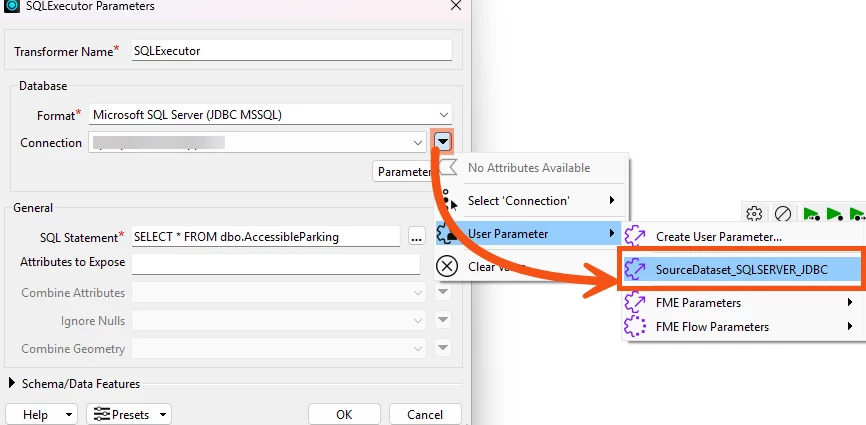
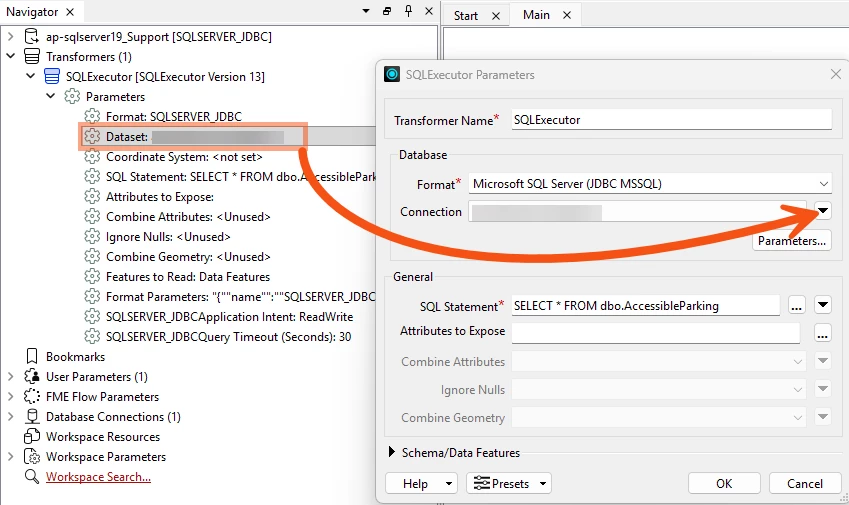
I'd recommend using a Standard Database Connection with User Parameters (instead of Embedded ones). So , instead of embedding connection parameters directly inside each SQLCreator (or other Transformers/Readers/Writers), switch to a Standard Database Connection and link it to a User Parameter. You can set that in the Parameter Editor or from the Navigator pane. That way, if credentials need to change, you only update a single User Parameter rather than reconfiguring each transformer individually.

Configuring Database connection to use a User Parameter
Accessing the Parameter Editor from the Navigator Pane

This won't resolve the underlying Embedded Parameter persistence issue, but it should cut down how often you have to reconfigure per transformer in the meantime. Hope it helps! 🙂


pratap
Contributor
Forum|alt.badge.img+12
  • Author
  • Contributor
  • August 19, 2026

@desiree_at_safe 

Thank you for your response.

Best work around approach which I suggest is to use the other option “Add Database Connection” instead of “Embed Connection Parameters”


We are using this version of FME from around May 2026 and everything went fine without any issue. Even, we have not updated FME 2026 to another or latest version in our work stations.

I am already aware of alternative workarounds, so I am not looking for a workaround solution. Instead, I would like to understand why the behavior of the SQLCreator transformer changed without any upgrade or modification to our FME version. To be precise, why the credentials are not getting saved in workspace...


desiree_at_safe
Safer
Forum|alt.badge.img+24

Thanks for clarifying that!

While I don't have a definitive answer yet for why this surfaced when it did for you, one common trigger is opening or editing the parameter dialog in a workspace originally authored in an older FME version. So it's usually less that something changed in your environment or in FME, and more that opening that dialog exposed a bug that was already there.

I'm not certain that's exactly what happened in your case. If you'd like us to dig deeper into your specific workspace, feel free to share more here or submit a Support Case. Either way, I’m sorry you’ve run into this! We'll keep this thread updated as we learn more. 🙂