


Question

Use gdalinfo in SystemCaller

  • March 17, 2026
  • 4 replies
  • 51 views

esietinga
Contributor
Forum|alt.badge.img+6

I would like to use gdalinfo to read the metadata/header for a folder of rasterfiles to get the extent and of each file. Ggalinfo can read this without loading the raster itself. This greatly speeds up the process.

Can we use the gdal implementation of FME to do this and if so how? The goal is to also have this working on FME Flow.

Example of gdalinfo output:

gdalinfo "C:\path\to\file\1.img"
Driver: HFA/Erdas Imagine Images (.img)
Files: C:\path\to\file\1.img

Size is 200, 130
Origin = (209000.000000000000000,529000.000000000000000)
Pixel Size = (100.000000000000000,-100.000000000000000)
Metadata:
  DataType=Generic
Corner Coordinates:
Upper Left  (  209000.000,  529000.000)
Lower Left  (  209000.000,  516000.000)
Upper Right (  229000.000,  529000.000)
Lower Right (  229000.000,  516000.000)
Center      (  219000.000,  522500.000)
Band 1 Block=64x64 Type=Float32, ColorInterp=Undefined
  Description = Layer_1
  Min=-54.770 Max=-21.170
  Minimum=-54.770, Maximum=-21.170, Mean=-40.290, StdDev=6.935
  NoData Value=-3.402823e+38
  Metadata:
    LAYER_TYPE=athematic
    RepresentationType=ATHEMATIC
    STATISTICS_COUNT=23044.000000
    STATISTICS_COVARIANCES=48.09764641535641
    STATISTICS_EXCLUDEDVALUES=
    STATISTICS_MAXIMUM=-21.170000076294
    STATISTICS_MEAN=-40.290237806175
    STATISTICS_MEDIAN=-41.33
    STATISTICS_MINIMUM=-54.770000457764
    STATISTICS_MODE=0
    STATISTICS_SKIPFACTORX=1
    STATISTICS_SKIPFACTORY=1
    STATISTICS_STDDEV=6.9352466729999
  Image Structure Metadata:
    COMPRESSION=RLE

4 replies

DanAtSafe
Safer
Forum|alt.badge.img+23
  • Safer
  • March 17, 2026

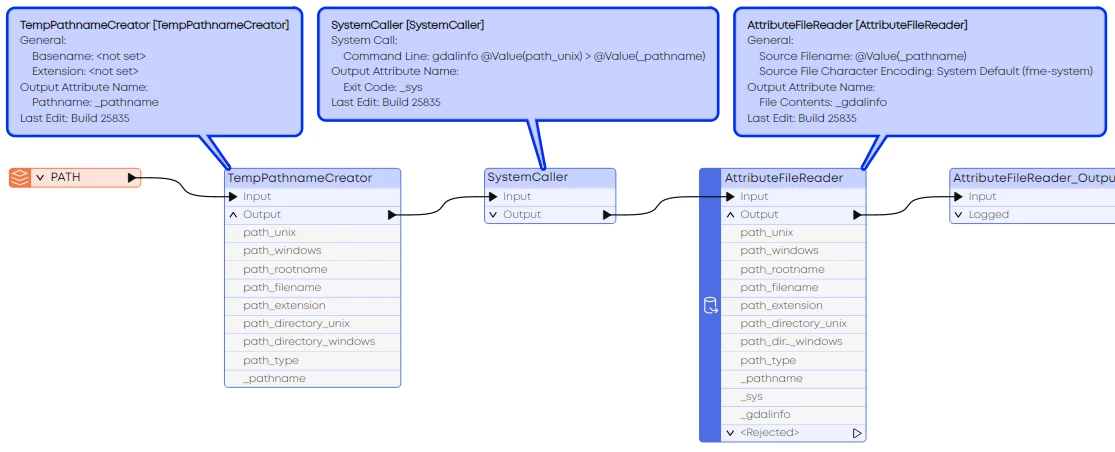
Hi ​@esietinga You can redirect the output of gdalinfo in the SystemCaller to a temporary text file, then read that back in with an AttributeFileReader or FeatureReader:


esietinga
Contributor
Forum|alt.badge.img+6
  • Author
  • Contributor
  • March 24, 2026

If I replicatie this on my machine I only get this response in the logfile:
'gdalinfo' is not recognized as an internal or external command,
operable program or batch file and the systemcaller only outputs a code 1 indicating an error.


Clearly something extra is needed to use gdalinfo. So the question may be be: does an fme installation include gdalinfo and if so are there extra steps required to make use of this, or do we need to use a separate install of gdal to use in this process?


DanAtSafe
Safer
Forum|alt.badge.img+23
  • Safer
  • March 24, 2026

You need to install GDAL - the SystemCaller is the way to run programs that are not installed with FME.  See https://github.com/domlysz/BlenderGIS/wiki/How-to-install-GDAL


esietinga
Contributor
Forum|alt.badge.img+6
  • Author
  • Contributor
  • March 24, 2026

So FME does use gdal drivers to read and write certain fomats but does not have the full functionality available. Good to know. We'll have to see if i can convince it to make the full gdal available to us.