




Solved

StringPairReplacer v2 failed to upgrade to StringReplacer v6 

  • May 23, 2026
  • 6 replies
  • 147 views

datablue
Supporter
Forum|alt.badge.img+10

When I attempted to upgrade to StringPairReplacer, Show Changes displays:

StringPairReplacer Version 2 replaced by StringReplacer Version 6

StringReplacer Change Log, version 6

  • Added multi-attribute string replace support.

My Replacement Pairs in StringPairReplacer v2 has multiple lines and quotes. This has worked great for years, and now I can’t upgrade. My first impression is that StringPairReplacer was changed so dramatically that it might have been better to leave it alone (and not replace it with StringReplacer). 

Here’s what my old StringPairReplacer looked like.
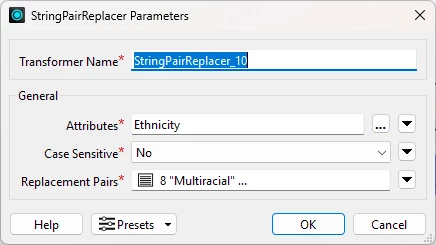
 

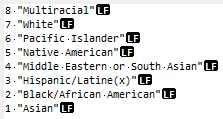
And here are my Replacement Pairs (using the Open Text Editor). I use multiple lines and quotes, and it works great.
Apparently, the upgrader is not expecting multiple lines or quotes. It’s a mess.
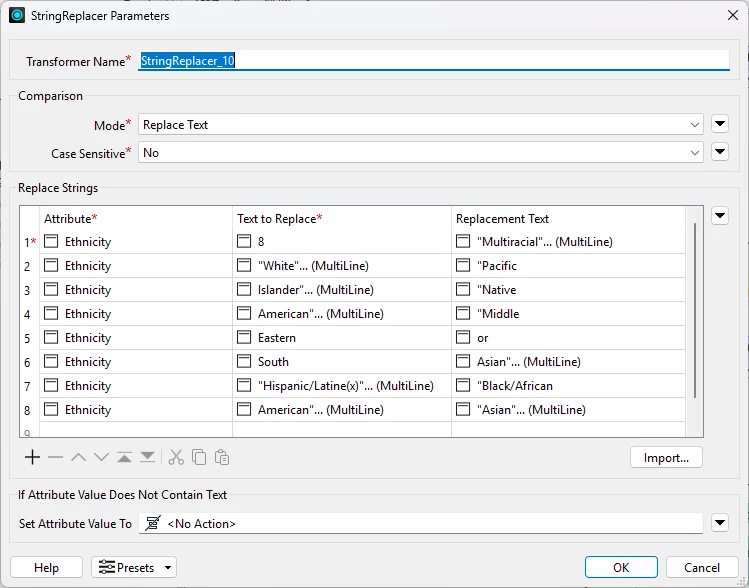
I tried creating a csv file but, I couldn’t figure out the proper format.

Finally, I removed the quotes (replacing spaces with underscores) and put it on a single line.

 

Now, the upgrade works.
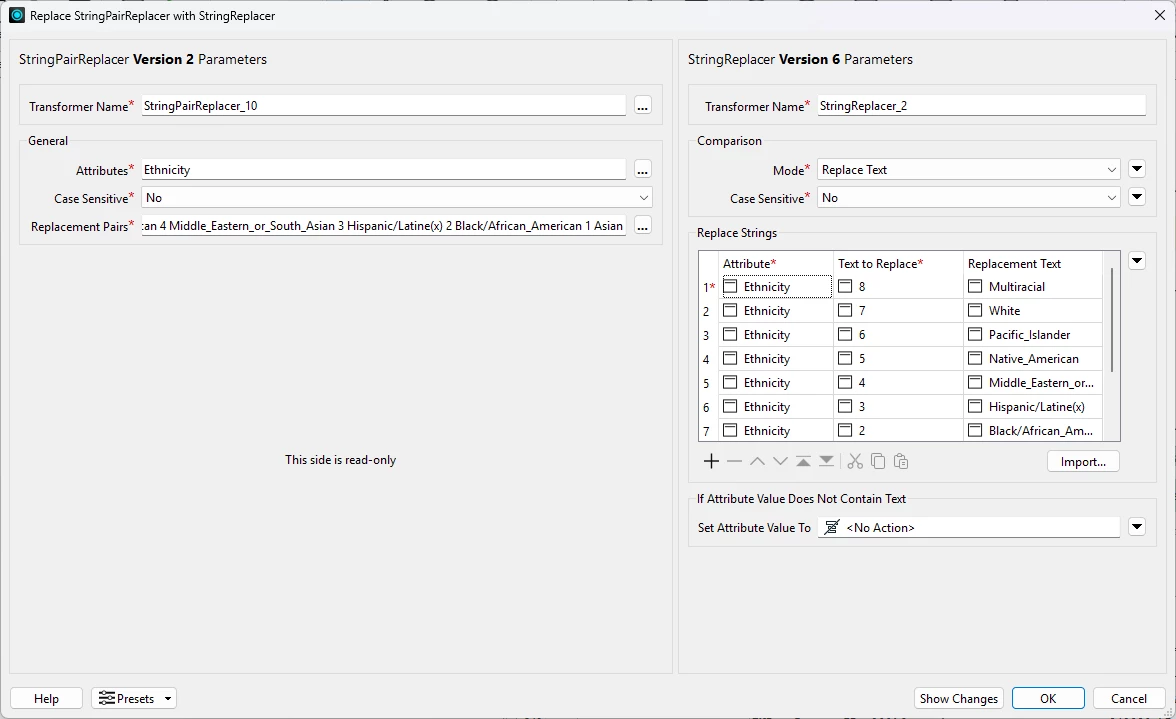
 

I wouldn’t call this success. It will be time consuming to fix all my StringPairReplacer transformers in all my workspaces. This is kind of a nightmare. The first time I upgraded StringPairReplacer I didn’t notice the upgrade had failed until I noticed that the output was wrong. I have public facing data and this is challenging.

Does anyone have any thoughts or suggestions? Should the upgrader have broken my StringPairReplacer transformers? Is this a bug?

Best answer by datablue

Thanks for the suggestions. I just read the documentation on StringPairReplacer. It says in Replacement Pairs, that if the strings contain a space, they must be escaped with a \. Instead of using a backslash, I enclosed my string with spaces in quotes. I also separated my pairs with new line characters (which isn’t mentioned in the documentation). My original Replacement Pairs has worked fine for years. For some reason, it only works correctly if the integer values are in descending order.

8 "Multiracial"
7 "White"
6 "Pacific Islander"
5 "Native American"
4 "Middle Eastern or South Asian"
3 "Hispanic/Latine(x)"
2 "Black/African American"
1 "Asian"

The StringPairReplacer upgrader (to StringReplacer) fails on the quotes and new lines. I discovered that if I change Replacement Pairs to the following (adding backslashes, and removing quotes and new lines) then the StringPairReplacer upgrader works fine.

8 Multiracial 7 White 6 Pacific\ Islander 5 Native\ American 4 Middle\ Eastern\ or\ South\ Asian 3 Hispanic/Latine(x) 2 Black/African\ American 1 Asian

I think that adjusting my Replacement Pairs for each StringPairReplacer before doing the upgrade to StringReplacer might be the best approach. This would minimize changes to my workspaces. And I wouldn’t have to create a bunch of Excel files.

Is there a reason for me to consider switching to AttributeValueMapper? If I were to write these workspaces again for the first time, I would likely use AttributeValueMapper. 

At first, I thought that AttributeValueMapper would be perfect, but I discovered that it maps the new value into a new attribute. StringReplacer replaces the new value in place (not a new attribute). My current logic is to replace the value in the same attribute. AttributeValueMapper could work, but I’d have to add and remove many attributes. Keep in mind, I have about 20 attributes similar to Ethnicity spanning about half dozen workspaces.

DatabaseJoiner seems like a good approach. I like the idea of storing everything in one Excel file, and presumably many sheets. But again, this would require adding and removing many attributes. And I don’t expect my values to change.

Side note: My source Ethnicity attribute actually is a comma separated list of integers (since a person can have multiple ethnicities), but I created a new attribute called EthnicityKey which is a single numeric value. If Ethnicity is a single value, I assign it to EthnicityKey, otherwise I assign the value ‘8’ to EthnicityKey meaning Multiracial. Then I assign EthnicityKey to Ethnicity to produce a single numeric value and remove the EthnicityKey attribute. If I was using AttributeValueMapper, I could avoid this and simply check for single numeric values and have Default Output Value of Multiracial.

6 replies

DanAtSafe
Safer
Forum|alt.badge.img+23
  • Safer
  • May 25, 2026

Hi ​@datablue You’ll likely want to upvote 


ebygomm
Evangelist
Forum|alt.badge.img+49
  • Evangelist
  • May 26, 2026

If you’re importing from a csv and the csv contains quotes, when you import you will need to go into the csv parameters and choose not to Trim Field Qualifier Characters then choose Import Mode Import From Attribute Values.

You’ll still have to set the attribute names, unless you doctor the csv to include them too but it’s quite quick to copy paste those down


datablue
Supporter
Forum|alt.badge.img+10
  • Author
  • Supporter
  • May 27, 2026

Thanks for your help. My Replacement Pairs (using the Open Text Editor) contained quotes so that the space would not act as a separator, like this: 

6 "Pacific Islander"
5 "Native American"
 

I created new csv files without quotes like this:

Ethnicity,6,Pacific Islander
Ethnicity,5,Native American
 

For some unknown reason, csv files would not import for me. I tried many variations. When I imported an Excel file (.xlxs) that worked fine.

I think that I will create entirely new import files using Excel and use StringReplacer. I will need to create about 20 different import files for StringReplacer (in order to stop using StringPairReplacer) spanning about a half a dozen workspaces. 

I discovered that about a month ago, I broke several workspaces (with public facing data) when I incorrectly upgraded StringPairReplacer to StringReplacer. Fortunately, I was about to revert to backup files before doing the upgrade.

I tend to think that what I described above is a bug. Or at least an improvement could be introduced to prevent the StringPairReplacer upgrade from failing.


redgeographics
VIP
Forum|alt.badge.img+62

Wild idea, instead of importing that Excel file into every StringReplacer, why not use a DatabaseJoiner instead. That way if that list of replacement pairs ever changes all you need to do is change that one Excel file, instead of every StringReplacer where it’s been imported.


ebygomm
Evangelist
Forum|alt.badge.img+49
  • Evangelist
  • May 27, 2026

Do you actually have multiple codes in a single attribute that need replacing? If the attribute only contains a single numeric value then something like an AttributeValueMapper or a Databasejoiner as mentioned above would be my choice.


datablue
Supporter
Forum|alt.badge.img+10
  • Author
  • Supporter
  • Best Answer
  • May 28, 2026

Thanks for the suggestions. I just read the documentation on StringPairReplacer. It says in Replacement Pairs, that if the strings contain a space, they must be escaped with a \. Instead of using a backslash, I enclosed my string with spaces in quotes. I also separated my pairs with new line characters (which isn’t mentioned in the documentation). My original Replacement Pairs has worked fine for years. For some reason, it only works correctly if the integer values are in descending order.

8 "Multiracial"
7 "White"
6 "Pacific Islander"
5 "Native American"
4 "Middle Eastern or South Asian"
3 "Hispanic/Latine(x)"
2 "Black/African American"
1 "Asian"

The StringPairReplacer upgrader (to StringReplacer) fails on the quotes and new lines. I discovered that if I change Replacement Pairs to the following (adding backslashes, and removing quotes and new lines) then the StringPairReplacer upgrader works fine.

8 Multiracial 7 White 6 Pacific\ Islander 5 Native\ American 4 Middle\ Eastern\ or\ South\ Asian 3 Hispanic/Latine(x) 2 Black/African\ American 1 Asian

I think that adjusting my Replacement Pairs for each StringPairReplacer before doing the upgrade to StringReplacer might be the best approach. This would minimize changes to my workspaces. And I wouldn’t have to create a bunch of Excel files.

Is there a reason for me to consider switching to AttributeValueMapper? If I were to write these workspaces again for the first time, I would likely use AttributeValueMapper. 

At first, I thought that AttributeValueMapper would be perfect, but I discovered that it maps the new value into a new attribute. StringReplacer replaces the new value in place (not a new attribute). My current logic is to replace the value in the same attribute. AttributeValueMapper could work, but I’d have to add and remove many attributes. Keep in mind, I have about 20 attributes similar to Ethnicity spanning about half dozen workspaces.

DatabaseJoiner seems like a good approach. I like the idea of storing everything in one Excel file, and presumably many sheets. But again, this would require adding and removing many attributes. And I don’t expect my values to change.

Side note: My source Ethnicity attribute actually is a comma separated list of integers (since a person can have multiple ethnicities), but I created a new attribute called EthnicityKey which is a single numeric value. If Ethnicity is a single value, I assign it to EthnicityKey, otherwise I assign the value ‘8’ to EthnicityKey meaning Multiracial. Then I assign EthnicityKey to Ethnicity to produce a single numeric value and remove the EthnicityKey attribute. If I was using AttributeValueMapper, I could avoid this and simply check for single numeric values and have Default Output Value of Multiracial.









