


Question

String attribute as component on pointcloud

  • May 21, 2026
  • 4 replies
  • 60 views

esietinga
Contributor
Forum|alt.badge.img+7

I have 400 rasters i would like to convert to a single combined pointcloud for more efficient processing. Each raster has a specific piece of information about the hydrology of the subsoil (horizontal resistance, top of geologic layer, bottom of geologic layer, top of aquifer, bottom of aquifer, etc). To preserve the meaning of the individual values i would like to keep the name and type of the source raster as component values. This is where my problem/challenge lies. I can rename the original rater bands to a meaningful name, but because each raster only has a single band, the band value is by default used as the z-value. If I set the attributes to keep as component to an attribute containing the layer name, these are not kept on the pointcloud. I think this is because they contain string values and components in a pointcloud usually only contain numeric values , but then why can i configure it as being a string datatype?


The rasters are 2800 x 3250 Pixels with each pixel 100 x 100 m.

Running FME Form 2025.2

4 replies

j.botterill
Influencer
Forum|alt.badge.img+58
  • Influencer
  • May 25, 2026

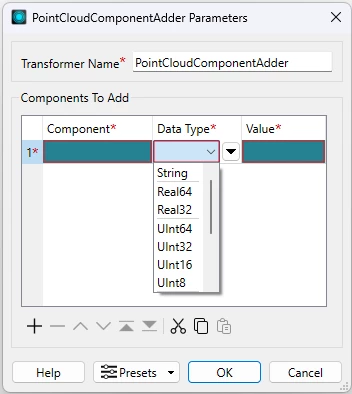
Firstly use 2 featurereaders. The first Path and File Directory reader points to your raster folder. Then connect the PATH outport port into another featurereader where the dataset is set to the Attribute path_windows. 

The PointCloudComponentAdder allows you to define the DataType, along with AttributeManagers

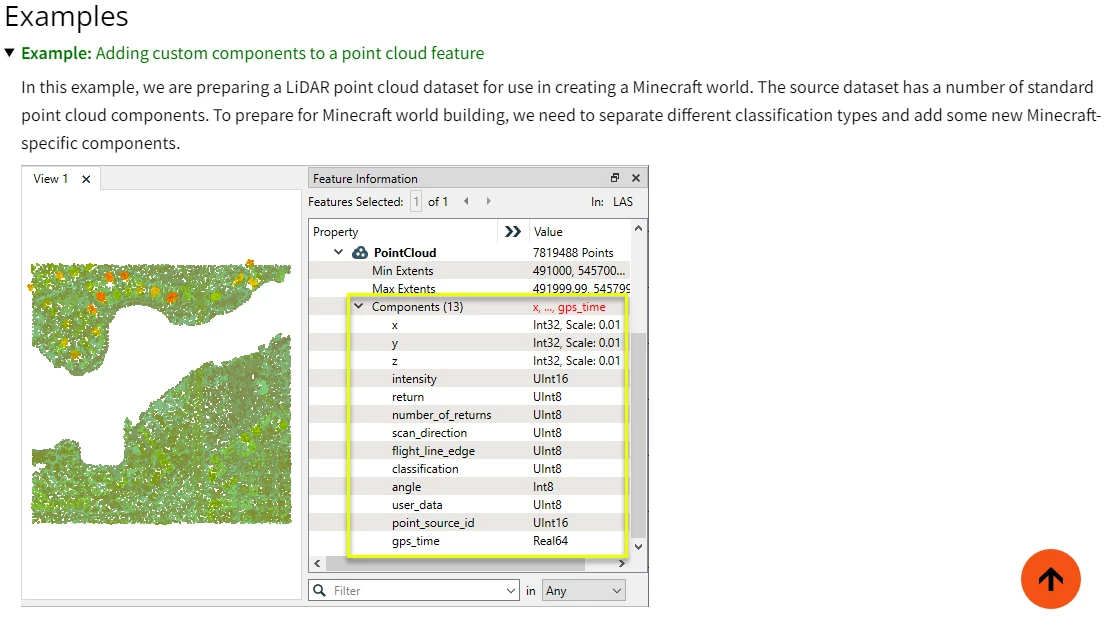
example - make sure you use the Feature/Record Information tab when inspecting the Components 


esietinga
Contributor
Forum|alt.badge.img+7
  • Author
  • Contributor
  • May 26, 2026

Firstly use 2 featurereaders. The first Path and File Directory reader points to your raster folder. Then connect the PATH outport port into another featurereader where the dataset is set to the Attribute path_windows. 

The PointCloudComponentAdder allows you to define the DataType, along with AttributeManagers

example - make sure you use the Feature/Record Information tab when inspecting the Components 


OK, using the PointCloudComponentAdder did work to add the attributes as components. It also alerted me to the fact that one of my attributes/components, which was defined to be of an Int8 type, can’t be a NULL value. The error message was formatted strangely though: @AddPointCloudComponents: Parameter '<value>' has value '' which is invalid for component type 'Int8'.  Please ensure the specified value and type are compatible. No error or warning messages from the PointCloudCombiner.

Thanks ​@j.botterill 


This does not however explain why I can’t do the same action in the PointCloudCombiner with the Attributes to Preserve as Componenets option. According to the docs this should do exactly the same as the PointCloudComponentAdder. Any thoughts on this ​@DanAtSafe ?


kailinatsafe
Safer
Forum|alt.badge.img+24

Hi ​@esietinga, thanks for posting! Happy to chime in here. I don’t think point clouds support true NULL values in their components, so we might need to use a substitute value to represent "no data.”

Mapping NULL to 0 using NullAttributeMapper is a natural first instinct, but it comes with a tradeoff as you'd lose the ability to store a real 0 value in that component.
A better approach is to choose a different value that can't be mistaken for a real measurement. Depending on your component type, good options are:

Int16 → use -1
Real32 → use NaN (Not a Number)

Both of these are unlikely to conflict with real data, and NaN in particular behaves like a true NULL since it represents an undefined numeric state rather than an actual value. 

I think there is an issue regarding the PointCloudCombiner, I will set aside some time to test and reach out with an update. Let me know if there are any further questions. Happy to help, Kailin.


kailinatsafe
Safer
Forum|alt.badge.img+24

Hello ​@esietinga, the PointCloudCombiner does not appear to preserve components when the source dataset is raster or point cloud geometry type. Moving forward, we can refer to this as FMEENGINE-98600. Let me know if you have any further questions, Kailin.