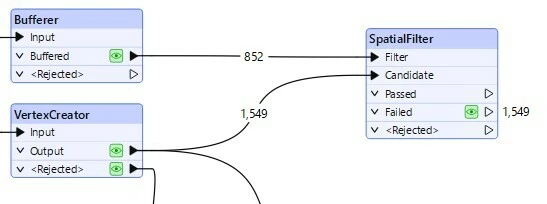
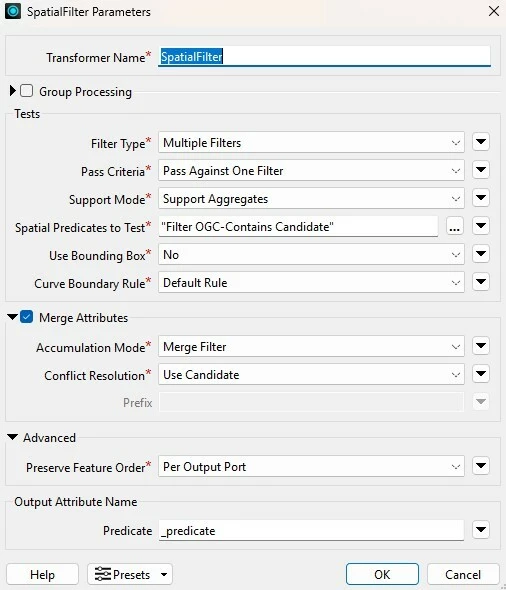
I have a simple job reads points from a spreadsheet and buffers my pipeline. I would like to set up the SpatialFilter to see which points on the spreadsheet are outside my buffer. For some reason, all points go to the Failed port. I have exported the buffer that is created and verified they correct and most of the points fall within the buffers. Any tips are appreciated!
Best answer by hriordan
I just got off of the phone with a resident expert...Even though my “testing” by exporting the reviewing the files in Pro showed they should be falling within my buffers, they actually were not. It had to do with the projection we use that is not very common. We were able to use the ProjReprojector before I created the buffer to get them lined up correctly.
This post is closed to further activity.
It may be an old question, an answered question, an implemented idea, or a notification-only post.
Please check post dates before relying on any information in a question or answer.
For follow-up or related questions, please post a new question or idea.
If there is a genuine update to be made, please contact us and request that the post is reopened.
I just got off of the phone with a resident expert...Even though my “testing” by exporting the reviewing the files in Pro showed they should be falling within my buffers, they actually were not. It had to do with the projection we use that is not very common. We were able to use the ProjReprojector before I created the buffer to get them lined up correctly.