


Question

Set Z value in LAS file

  • August 13, 2026
  • 3 replies
  • 119 views

pabloolivaresm
Supporter
Forum|alt.badge.img+6

Hi,


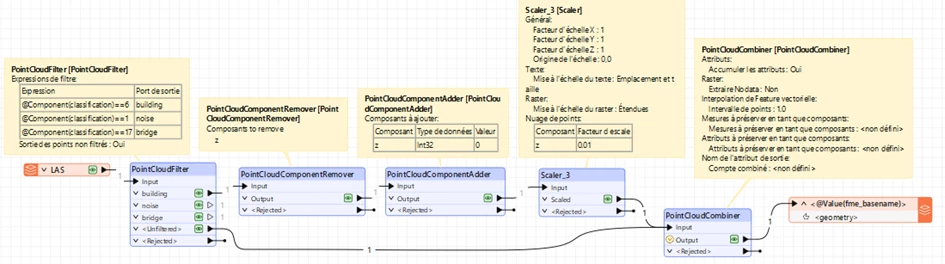
I have a LAS file already normalized, ground z value = 0, and other class z = height above ground. I need to set the z value to “0” to building class. I try this workflow and it’s seem to work but when I check the LAS writer, build and ground have the 8.847607091e-10 z value.
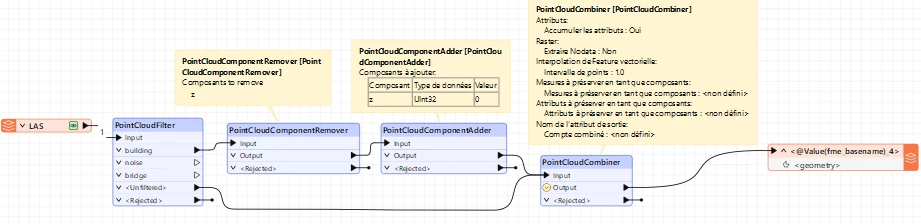
I dont know why this, but when I check property in FME, I realize that z value it’s different.

In my normalized LAS the z value
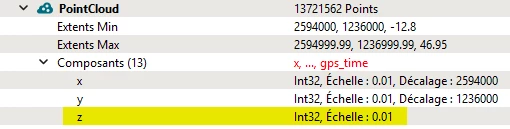
But in the output LAS I get this in z value

I tryied with PointCluidExpressionEvaluator instead remove and adder component but I get the same in Z value

Any idea why this happens?

3 replies

daveatsafe
Safer
Forum|alt.badge.img+24
  • Safer
  • August 14, 2026

Hi ​@pabloolivaresm,

There are a few things happening in your process to change the output LAS scaling and offset on the z component:

  • The PointCloudComponentAdder is setting the new z component to Uint32 on the Buildings, but the other untouched point cloud has z set to a scaled and offset Int32. When the PointCloudCombiner receives different types for the same component coming in, it saves it as Real64 to ensure no information is lost. The LAS writer than calculates a new scale and offset for the z component to fit it into the mandatory LAS Int32 data type
  • The PointCloudExpressionEvaluator used in your alternate scenario is not able to Preserve the data type of scaled/offset Int32, and so sets the output to Real64. This also triggers the LAS writer to recalculate the scale/offset Int32 for the z component.

I believe the PointCloudExpressionEvaluator should be able to Preserve the scaled/offset Int32 data types, and have created a problem report for our development team (FMEENGINE-99329). I will notify you when this issue is resolved.


pabloolivaresm
Supporter
Forum|alt.badge.img+6

​Hi @daveatsafe

thanks for answer.

I tryed now with a Scaler before PointCloudCombiner. I set as z=0.01. I changed also to Int32 in ComponentAdder  

It seems to work!


pabloolivaresm
Supporter
Forum|alt.badge.img+6

Update: to good to be true.

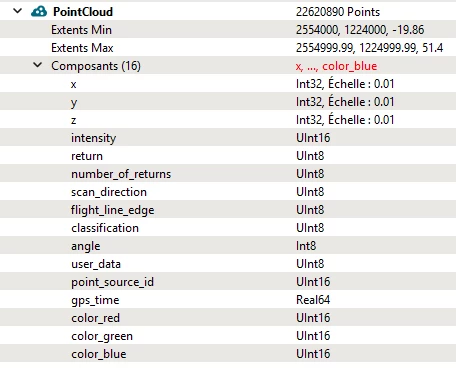
My workbench didn’t work with others color LAS tiles. 

My reader properties:

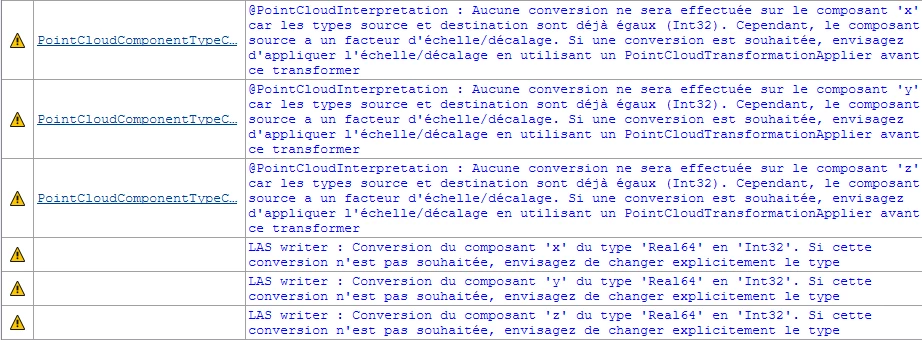
I get this warnings

LAS writer: Conversion of the “y” component from type “Real64” to “Int32”. If this conversion is not desired, consider explicitly changing the type

Its really strange because I dont modify y and x components. 

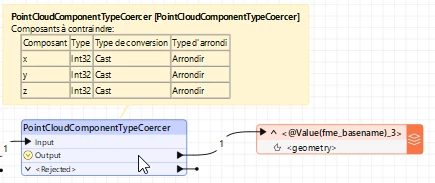
If I add a PointCloudComponentTypeCoercer before Writer

I get this warnings

@PointCloudInterpretation: No conversion will be performed on the “x” component as the source and destination types are already the same (Int32). However, the source component has a scale/offset factor. If a conversion is required, consider applying the scale/offset using a PointCloudTransformationApplier before this transformation.


EDIT: Just a projection problem, I removed spatial projection and It works