Question

raster resampler and align

  • April 1, 2026
  • 6 replies
  • 108 views

pabloolivaresm
Supporter
Forum|alt.badge.img+5

I have a raster with 0.25 m pixel size, I need to resampler to 0.5m and get align with another raster who it’s already in 0.5m pixel size.


I tried many transformer but without succes, and fme helps transformer didn’t help me


Any idea? thanks u!

align

6 replies

koulsoum
Contributor
Forum|alt.badge.img+14
  • Contributor
  • April 2, 2026

Hello ​@pabloolivaresm 

RasterResampler is the transformer that aloud you to resample a raster. If you want to align with the another raster you should have the same tiles (dimensions and perimeter).


daveatsafe
Safer
Forum|alt.badge.img+23
  • Safer
  • April 2, 2026

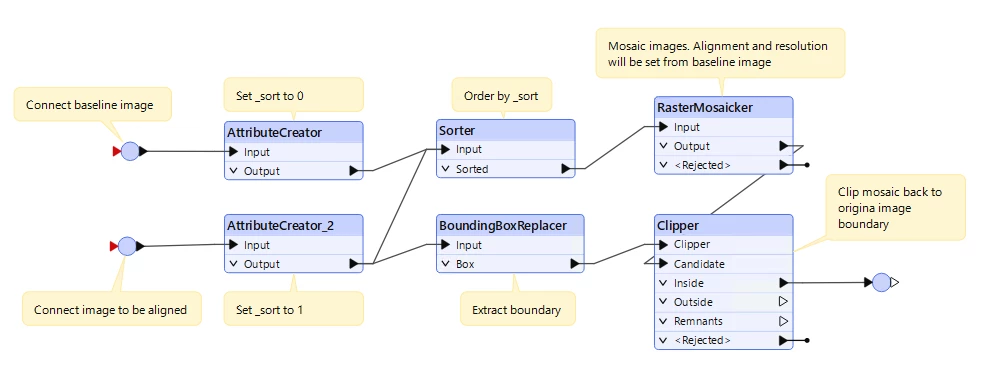
Hi ​@pabloolivaresm, you can use the RasterMosaicker to match an image’s resolution and alignment to a baseline image using the following process:

The RasterMosaicker sets the resolution and alignment by the first image it receives, so the Sorter ensures that the baseline is received first. The image to be adjusted is then added to this mosaic, then it’s boundary is used to clip the resulting image back to the original size. 


pabloolivaresm
Supporter
Forum|alt.badge.img+5

Hi ​@pabloolivaresm, you can use the RasterMosaicker to match an image’s resolution and alignment to a baseline image using the following process:

The RasterMosaicker sets the resolution and alignment by the first image it receives, so the Sorter ensures that the baseline is received first. The image to be adjusted is then added to this mosaic, then it’s boundary is used to clip the resulting image back to the original size. 

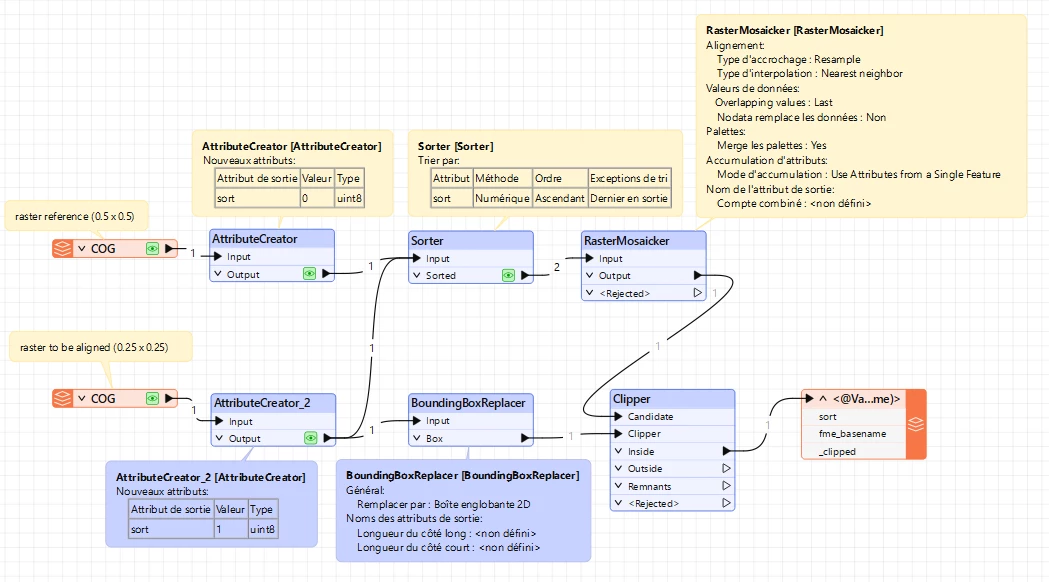
Hi ​@daveatsafe I tried with this process but I get the pixel values from the reference raster. Maybe it’s the transformer settings that’s not correctly set


daveatsafe
Safer
Forum|alt.badge.img+23
  • Safer
  • April 7, 2026

Please try setting ‘Nodata Overwrites Data’ in the RasterMosaicker to ‘Yes’


pabloolivaresm
Supporter
Forum|alt.badge.img+5

Please try setting ‘Nodata Overwrites Data’ in the RasterMosaicker to ‘Yes’

I tryed with this setting but I still get the values from reference raster. With ArcGIS and QGIS I was able to do it. Thanks anyway! ​@daveatsafe  


daveatsafe
Safer
Forum|alt.badge.img+23
  • Safer
  • April 9, 2026

Try using an Offsetter to move the reference image 1000 meters away before the mosaicking. This should ensure that the clipping step keeps only the adjusted image.