


Question

Problems with OneDriveConnector - Overwrite or delete folder

  • April 2, 2026
  • 1 reply
  • 32 views

adam_wood
Contributor
Forum|alt.badge.img+5

Initially, I tried using Onedrive connector>Folder to overwrite a folder (with two parquet files) however onedrive doesn’t allow this if the folder already exists.
I then tried to delete the folder first. I wasn’t able to do that. The connector seems to use the id and this changes each time I recreate the folder. I get an id doesn’t exist type error.

I’ve also tried passing a string as the path. Still no luck.
Has anyone been able to overwrite files or folders successfully?


1 reply

desiree_at_safe
Safer
Forum|alt.badge.img+20

Hi ​@adam_wood! I think you’re on the right track, breaking the actions down a bit. The ID issue you’ve hit is common with hard-coded references.

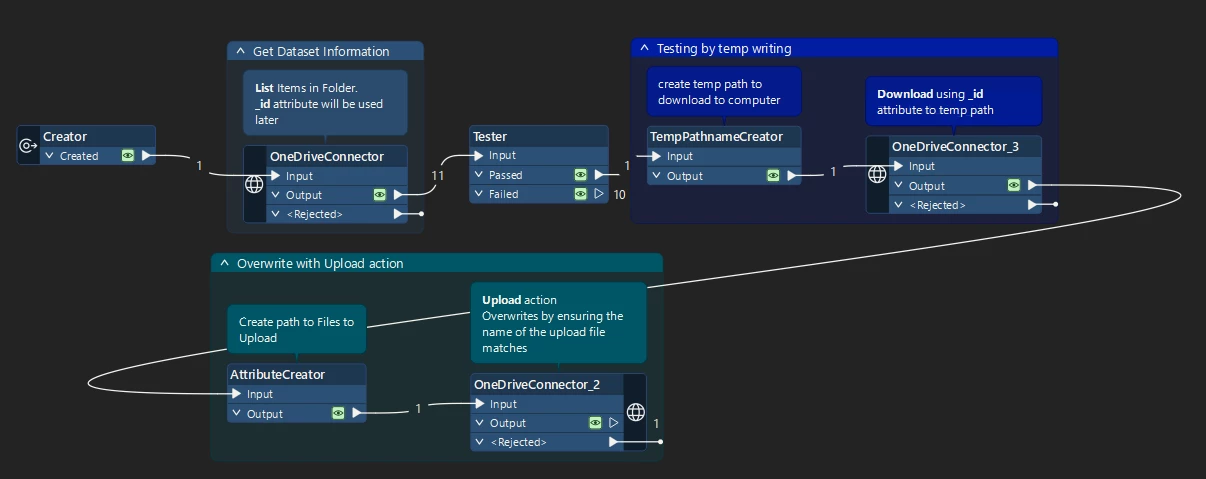
You might have an easier time overwriting files using two (or more, depending on what you want to do) OneDriveConnectors. One with the List action and one with the Upload action.

The List action gives helpful attributes like name and id! This should hopefully solve your ID problem. You're essentially pulling the current folder metadata each time the workspace runs. 

When it comes to the Upload action and actually overwriting files, this line from the documentation might shed some light: “uploads of the same name, in a specific folder, as overwrites, so if you upload files that already exist in that folder, they will be overwritten by the upload


I’ve tested this with both files and folders, and it seems to work with overwriting both! The Upload action handles the overwrite automatically when you target the same folder path/name

If this doesn’t help get you to that end goal, if you’re willing to share a workspace (and what version you’re using) or a screenshots that would be great!