



Solved

Multiple choice user parameter - showing all choices at the "promt"

  • March 27, 2019
  • 11 replies
  • 48 views

jonathanklarup
Contributor
Forum|alt.badge.img+6

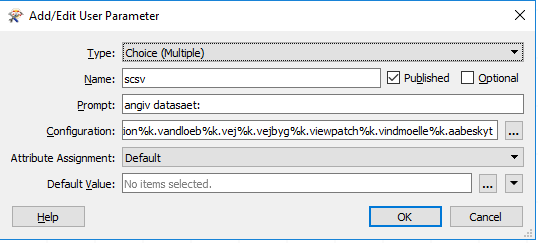
As many times before I've populated a multiple choice user parameter from an Excel spreadsheet.


This time though, and also in all of my older workbenches now, when the user parameter Promt is shown it displays all the choice options there as well. ?


Is this a known bug, and/or is there a workaround?

 

Here are my parameter settings :
 

Best


Jonathan
Best answer by nielsgerrits

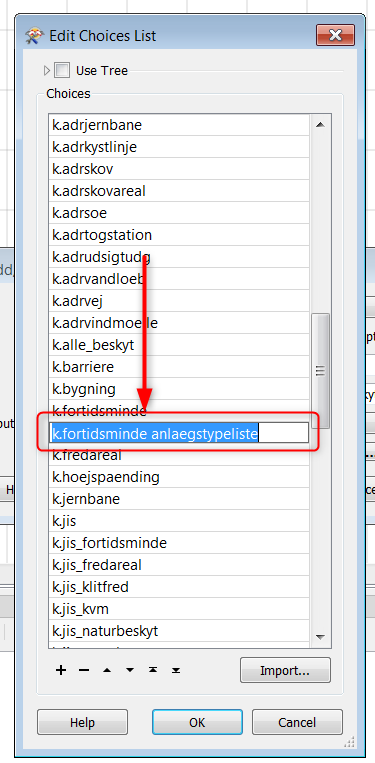
One of the items has a newline:

k.fortidsminde
anlaegstypeliste

If i remove that it works.

0684Q00000ArLniQAF.png

This post is closed to further activity.
It may be an old question, an answered question, an implemented idea, or a notification-only post.
Please check post dates before relying on any information in a question or answer.
For follow-up or related questions, please post a new question or idea.
If there is a genuine update to be made, please contact us and request that the post is reopened.

11 replies

jonathanklarup
Contributor
Forum|alt.badge.img+6
  • Author
  • Contributor
  • March 27, 2019
Another thing I've just realized is that some of my "choice" options are also not showing in the choice list. But they are in the configuration list.

nielsgerrits
VIP
Forum|alt.badge.img+64

What version? I am not able to reproduce this in 2018.1.1.2 or 2019.0


jonathanklarup
Contributor
Forum|alt.badge.img+6
  • Author
  • Contributor
  • March 27, 2019

What version? I am not able to reproduce this in 2018.1.1.2 or 2019.0

If i fill in 3 options the parameter looks fine, so it might be something with the number of choices ?


I'm in version 2018.1.0.3.

jonathanklarup
Contributor
Forum|alt.badge.img+6
  • Author
  • Contributor
  • March 27, 2019

If i fill in 3 options the parameter looks fine, so it might be something with the number of choices ?


I'm in version 2018.1.0.3.
Gonna try the latest build

nielsgerrits
VIP
Forum|alt.badge.img+64
Gonna try the latest build

Can you share your choicelist source xls or the workspace with only the parameter?


jonathanklarup
Contributor
Forum|alt.badge.img+6
  • Author
  • Contributor
  • March 27, 2019

Can you share your choicelist source xls or the workspace with only the parameter?

sure :)


parameter_m_choice.fmw


nielsgerrits
VIP
Forum|alt.badge.img+64

sure :)


parameter_m_choice.fmw


Now I am able to reproduce in 2018.1.1.2


nielsgerrits
VIP
Forum|alt.badge.img+64
  • Best Answer
  • March 27, 2019

One of the items has a newline:

k.fortidsminde
anlaegstypeliste

If i remove that it works.

0684Q00000ArLniQAF.png


nielsgerrits
VIP
Forum|alt.badge.img+64

Now I am able to reproduce in 2018.1.1.2

One of the items has a newline:

k.fortidsminde
anlaegstypeliste

If i remove that it works.


jonathanklarup
Contributor
Forum|alt.badge.img+6
  • Author
  • Contributor
  • March 27, 2019

One of the items has a newline:

k.fortidsminde
anlaegstypeliste

If i remove that it works.

0684Q00000ArLniQAF.png

Ah yes of course, i hadn't seen that.


thanks a lot !

nielsgerrits
VIP
Forum|alt.badge.img+64

Ah yes of course, i hadn't seen that.


thanks a lot !

Cheers, this was a nice riddle :)



