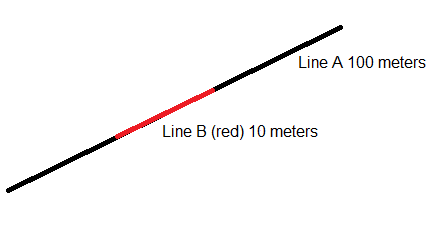
Question

How to retract line?

  • December 21, 2015
  • 6 replies
  • 78 views
This post is closed to further activity.
It may be an old question, an answered question, an implemented idea, or a notification-only post.
Please check post dates before relying on any information in a question or answer.
For follow-up or related questions, please post a new question or idea.
If there is a genuine update to be made, please contact us and request that the post is reopened.


6 replies

erik_jan
Contributor
Forum|alt.badge.img+26
  • Contributor
  • December 21, 2015

This can be done using the transformer OffsetCurveGenerator or with the Offsetter.


Forum|alt.badge.img
  • Author
  • December 21, 2015

Hello,

I need to shrink a line.

Line A 100 meters reduced to 10 meters (line B).

Start_coordinate - (45metros) and end_coordinate (-45 meters).

Thank you.


jdh
Contributor
Forum|alt.badge.img+40
  • Contributor
  • December 21, 2015

You want the Snipper with Distance(Value Mode) Starting location 45m, Ending location -45.


Assuming your feature is in a coordinate system with Meters.

Forum|alt.badge.img
  • Author
  • December 21, 2015

You want the Snipper with Distance(Value Mode) Starting location 45m, Ending location -45.


Assuming your feature is in a coordinate system with Meters.

Thank you!!!


erik_jan
Contributor
Forum|alt.badge.img+26
  • Contributor
  • December 21, 2015

This can be done using the transformer OffsetCurveGenerator or with the Offsetter.

From the first picture I thought you needed an offset. The second picture made it clearer.


Forum|alt.badge.img
  • Author
  • December 21, 2015

This can be done using the transformer OffsetCurveGenerator or with the Offsetter.

Thank you.