


Question

How to iteratively merging rings

  • May 4, 2018
  • 3 replies
  • 19 views

chau
Contributor
Forum|alt.badge.img+3

I have a set of polygons resembling the Towers of Hanoi (I have many towers with varying rings but only included one tower here):
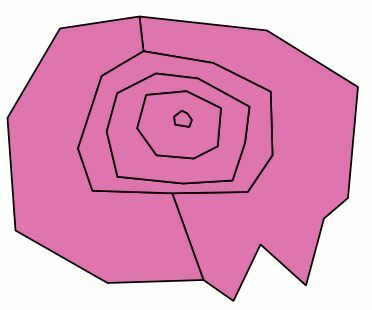
I would like to start with the polygons which doesn't have any holes and which are holes in other polygons (in this case I only have the small one in the center) and dissolve it with the polygon in which it is a hole. I would like to repeat this until the dissolved area is larger than some threshold (here 30).

Can I do this in FME 2016?

I have attached a shape file with the data set above.

This post is closed to further activity.
It may be an old question, an answered question, an implemented idea, or a notification-only post.
Please check post dates before relying on any information in a question or answer.
For follow-up or related questions, please post a new question or idea.
If there is a genuine update to be made, please contact us and request that the post is reopened.

3 replies

takashi
Celebrity
  • May 4, 2018
The Dissolver can dissolve those rings at once and form a single large polygon. Why do you need iteration?


chau
Contributor
Forum|alt.badge.img+3
  • Author
  • Contributor
  • May 4, 2018
The Dissolver can dissolve those rings at once and form a single large polygon. Why do you need iteration?


I need it because of the combined dissolved area threshold, at least I think I need it.

takashi
Celebrity
  • May 4, 2018

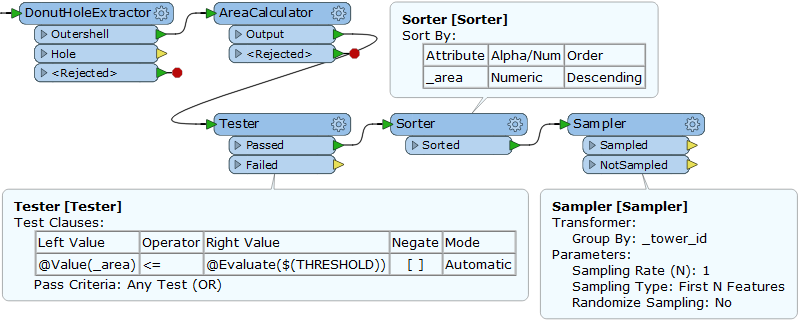
Hi @chau, if all the rings are donuts, remove hole from them, calculate area for each, then select one which has the maximum area within the threshold. I think it would be your desired result. This is an implementation example.