




Question

How to hide Transformer Input Ports in FME Workbench?

  • March 12, 2026
  • 2 replies
  • 35 views

927474939
Contributor
Forum|alt.badge.img+2

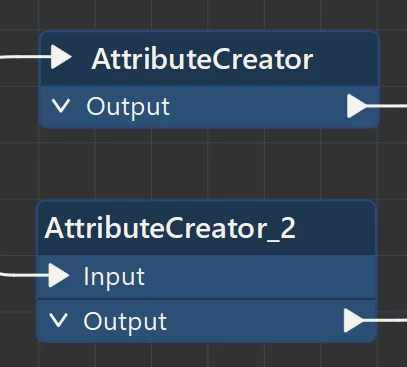
I have opened an old workspace and all of the transformers in that workspace look like the first AttributeCreate in my screenshot. The Input port is hidden.

  • When I copy the AttributeCreator, it looks different. The Input port becomes visible. It looks like the second AttributeCreator in my screenshot.
  • When I add new transformers, they all have a visible Input port.
  • When I open a completely new workspace and add transformers, they also have a visible Input port.

How can I hide the Input port like on the first AttributeCreator in my screenshot?

It seems like this cannot be achieved for any newly created transformers and workspaces. It only looks like this in this one old workspace of mine.

  • There is an option under View that makes the Input ports visible on all of my Transformers. But it’s impossible to reverse that action. The option to make the Input ports visible disappears, once they are visible on all transformers. There is no option to reverse that. It can be reversed only by clicking the Undo button. But the option to show the Input ports on transformers is not available in new workspaces, because the Input ports are already visible on all newly added transformers. So the Undo button doesn’t work because the option that I want to reverse - the option to show the Input ports - is missing in the first place. Also the Undo button does not affect new transformers that I add to the workspace because they already have a visible Input port when I add them.
It’s ridiculous that there is an option that you can only turn on but never turn off again.

2 replies

hkingsbury
Celebrity
Forum|alt.badge.img+69
  • Celebrity
  • March 12, 2026

I believe that is due to new style guidelines in newer versions of FME.

My understanding is that Safe introduced mandatory Input ports to standardise transformers across the board and make it clearer that they expect an input.

As far as i’m aware, there is no setting to turn this on/off. When you opened the old workspace, the transformers didn’t have the input port defined like such. By adding a new one, or even copying it, forced workbench to add the Input port


jovitaatsafe
Safer
Forum|alt.badge.img+11

Hi ​@927474939,

@hkingsbury is right that it’s an intentional change to show the input ports on transformers. It looks like we implemented the new user interface in FME 2024.0, so opening a workspace created in FME 2023.2 and older will have this difference that you’ve shown in your screenshot if you’re adding new transformers. 

The option to View > Show Transformer Input Ports (FME 2024.0 and newer) is meant to help users migrate to the new transformer UI if desired. Whether or not you decide to show the input ports, the functionality of the workspace should remain the same, so I think it’s up to preference. If you decide to continue authoring on the workspace, I’d probably suggest enabling it for the visual consistency, especially since all new workspaces will have transformers with the input ports. 

So to answer the original question, you can’t re-hide input ports going forwards from FME 2024.0. 

Hope that helps provide some context!





