


Question

Having issues with null values on the output feature when the initial tables that are being used do not have null values.

  • September 23, 2026
  • 1 reply
  • 55 views

ehernandez2
Participant
Forum|alt.badge.img+2

Hello, the initial base tables have non null values and my writer to AGOL is finishing with majority of the fields as null. The way it is set up is: Base Table > Attribute Manager/Keeper > Feature Joiner > Attribute Creator>Feature Joiner>Attribute Manager>Output Data Layer. 

In total, there are four non-spatial tables and one spatial geometry layer being used to create this layer. What is the best way to approach this? Thank you! 


I am using FME Workbench 2024.0.2.1

1 reply

gareth-at-safe
Safer
Forum|alt.badge.img+13

Hi ​@ehernandez2 

Thanks for laying out your workflow. I’d suggest you start by finding where the values go missing: enable Feature Caching, run your workspace and inspect the output of your last AttributeManager. If the fields are already null there, the joins are the cause. If they have values there, compare the writer's field names and types against the layer.

For the joins, I'd suggest:

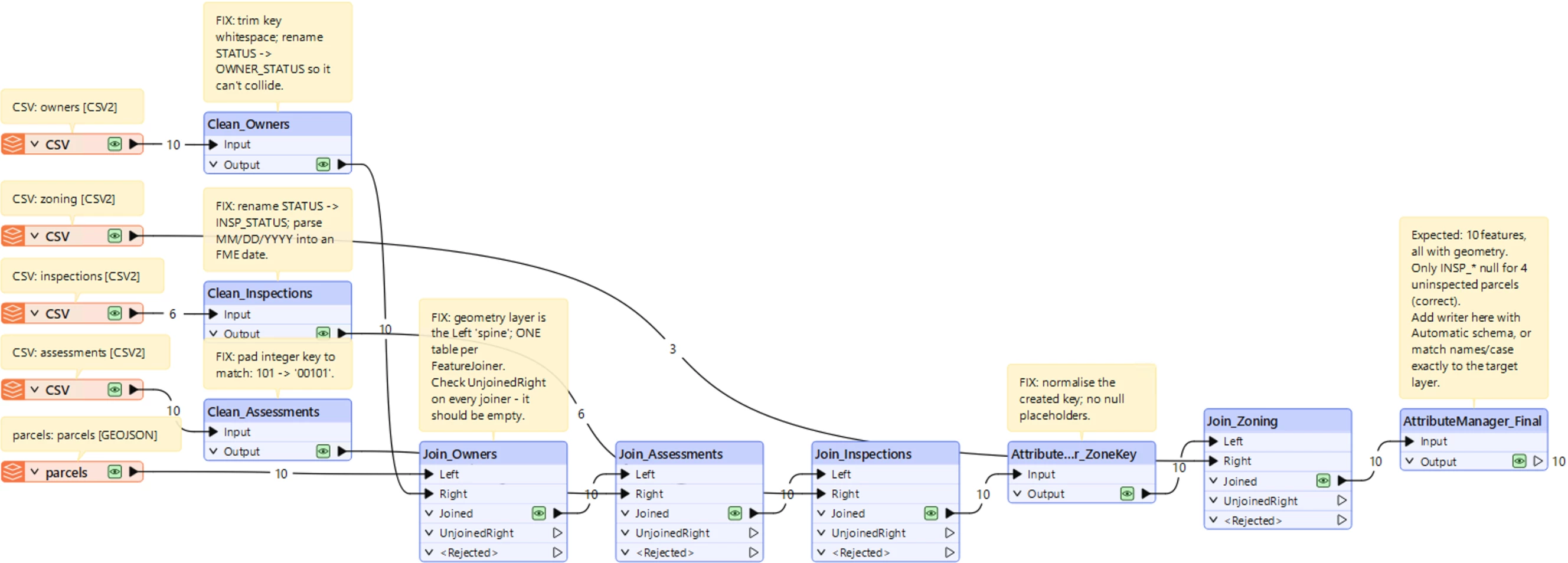
  • Use the geometry layer as the Left input, and join one table per FeatureJoiner.
  • Clean the keys first so both sides match, e.g. with an AttributeTrimmer for spaces or a StringPadder for leading zeros (101 vs 00101).
  • If neither of those suggestions help, you’ll want to find the specific features that aren't matching. With Join Mode set to Left, unmatched features still leave through the Joined output port with nulls, so failed joins look like missing data. Temporarily switch to Inner and inspect the UnjoinedLeft and UnjoinedRight output ports to see which keys don't match (see Unmatched Features in the FeatureJoiner documentation).

The FeatureJoiner Transformer article covers join modes and output ports in more detail.

I mocked up a workspace to work through this on my side, it’s attached. edit: doh, just realized I did it in the latest 2026.3 - so it won’t open in your older FME 2024. See Screenshot below. Note that there are a few steps to emphasize cleaning the keys and doing one join at a time.

I made a few assumptions based on my reading of what you mentioned, so please let me know if there’s anything I missed and we can address it.

Also I should note that the fix depends on your data, so if you’re open to it, please share your workspace as a template (with a data cache included ideally). Alternatively, we could work through a support case, where we can look at your workspace and tables.