




Question

get the centroid coordinates of the boundingbox of all my geometry and move all the geometry using these coordinates

  • March 11, 2016
  • 6 replies
  • 113 views

lavairye
Contributor
Forum|alt.badge.img

Hello,

I have a dataset of geometries (from CityGml files) and I want to translate these geometries near the origin of my workspace. So I use BoundingBoxAccumulator and CenterPoint Extractor to get the centroid coordinates (it's ok) and want to use it to move all the geometries.

Maybe because it's Friday and I'm quite tired, but I can't see how to copy these coordinates into attributes on the features.
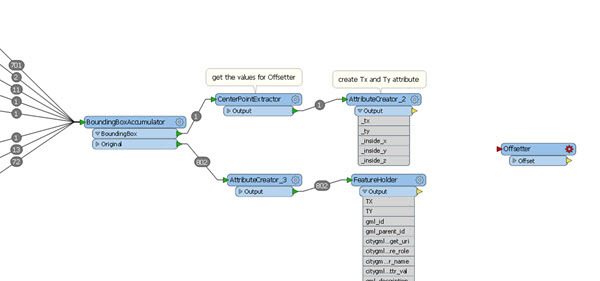
Help will be appreciate.


This post is closed to further activity.
It may be an old question, an answered question, an implemented idea, or a notification-only post.
Please check post dates before relying on any information in a question or answer.
For follow-up or related questions, please post a new question or idea.
If there is a genuine update to be made, please contact us and request that the post is reopened.

6 replies

david_r
Celebrity
  • March 11, 2016

Hi

How about using the BoundsExtractor?

David


ebygomm
Evangelist
Forum|alt.badge.img+53
  • Evangelist
  • March 11, 2016

It's not particularly elegant, but create an attribute called JOIN with a value of 1 on each line in the above, then use a featuremerger, merging with the JOIN attribute with the attributes going into the requestor and your feature containing the coordinates into the supplier port


takashi
Celebrity
  • March 11, 2016

Hi @lavairye, you can use the FeatureMerger to merge the attributes which store the coordinates to every feature unconditionally. Send the original features to the Requestor port, send the feature from the CenterPointExtractor to the Supplier port. Then, set an identical constant value (e.g. 1) to the "Join On" parameter for both Requestor and Supplier.


takashi
Celebrity
  • March 11, 2016

Hi @lavairye, you can use the FeatureMerger to merge the attributes which store the coordinates to every feature unconditionally. Send the original features to the Requestor port, send the feature from the CenterPointExtractor to the Supplier port. Then, set an identical constant value (e.g. 1) to the "Join On" parameter for both Requestor and Supplier.

my answer is completely the same as egomm's :)

Another approach.

  1. Once aggregate all the original features by the Aggregator. Set "No" to the "Keep Input Attributes" parameter, and specify a list name with the "List Name" parameter.
  2. Extract the center coordinates of the aggregate feature with the CenterPointExtractor.
  3. Restore the original features by the Deaggregator. Set the list name to the "List Attribute to Explode".

lavairye
Contributor
Forum|alt.badge.img
  • Author
  • Contributor
  • March 11, 2016

Thanks for all. Using featuremerger with a constant value for "join" work well, and thanks to takashi for his second approach which is quite elegant !


gio
Contributor
Forum|alt.badge.img+15
  • Contributor
  • March 11, 2016

Create a line from an arbitrary point within your dataset. (2 vertexcreators, one replace the other add).

Extract lenght and angle of this line.

Unconditionaly merge this to all objects in the set. (or aggregate the set and link data tot the aggregate wich is 2 transformers more...)

Then use an affiner

1,0,Lenght*@cos(Angle/180)*$(Pi))

0,1,Length*@sin(Angle/180)*$(Pi))






