



Apologies if this has already been asked - seems like it should already have been reported.
FME Form 2025.0.1
FeatureWriter Version 0
Writing to Esri Geodatabase on MSSQL Server 2019
When using either Create if Needed, or Drop and Create table handling, the geodatabase_sde writer appears to ignore the table qualifier set on the feature type.
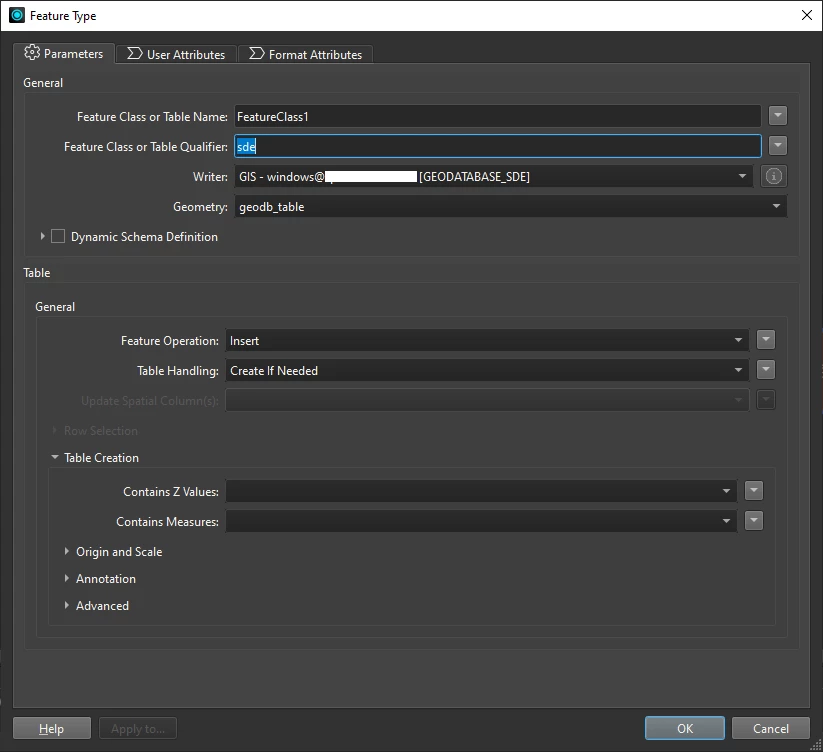
The table gets successfully created, visible in SSMS - but under the default user database schema eg: domain\john.smith.FeatureClass1
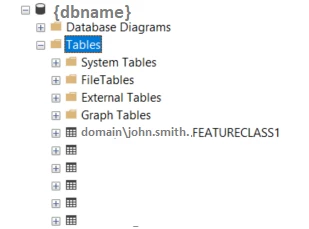
However the flow then fails because at some stage it does take into account the table qualifier and is looking for a table called sde.FeatureClass1
An error occurred while attempting to create the table 'sde.FeatureClass1'. The error number from ArcObjects is: '-2147220655'. The error message from ArcObjects is: {DBMS table not found [{dbname}.sde.FeatureClass1]}
The user has appropriate permissions on the sde schema
(Note: It is an Esri requirement that the users default database schema name matches the username, so the default can’t just be changed in SSMS)