Best Answer

folder existance checker

  • March 23, 2020
  • 11 replies
  • 82 views

Forum|alt.badge.img

Hello,

I am trying to use Python caller to check if a folder exist. Here is the code:

But it doesnt geve back outcome to attribute "van". Where is my mistake?

import fme
import fmeobjects
import os

def processFeature(feature):
    van = os.path.isdir(feature.getAttribute('_LAS_eleresiutvonal'))
    print van
    feature.setAttribute('_van', van)
class FeatureProcessor(object):
    def __init__(self):
        pass
    def input(self,feature):   
        self.pyoutput(feature)
    def close(self):
        pass

Best answer by ebygomm

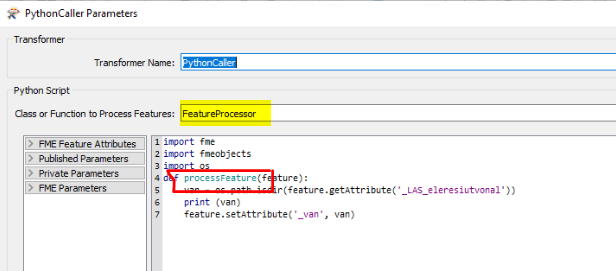
The bit in yellow needs to be set to match the bit in red so processFeature

You are calling a class that doesn't exist

This post is closed to further activity.
It may be an old question, an answered question, an implemented idea, or a notification-only post.
Please check post dates before relying on any information in a question or answer.
For follow-up or related questions, please post a new question or idea.
If there is a genuine update to be made, please contact us and request that the post is reopened.

11 replies

ebygomm
Influencer
Forum|alt.badge.img+46
  • Influencer
  • March 23, 2020

What version of python are you using? That code won't work for python 3

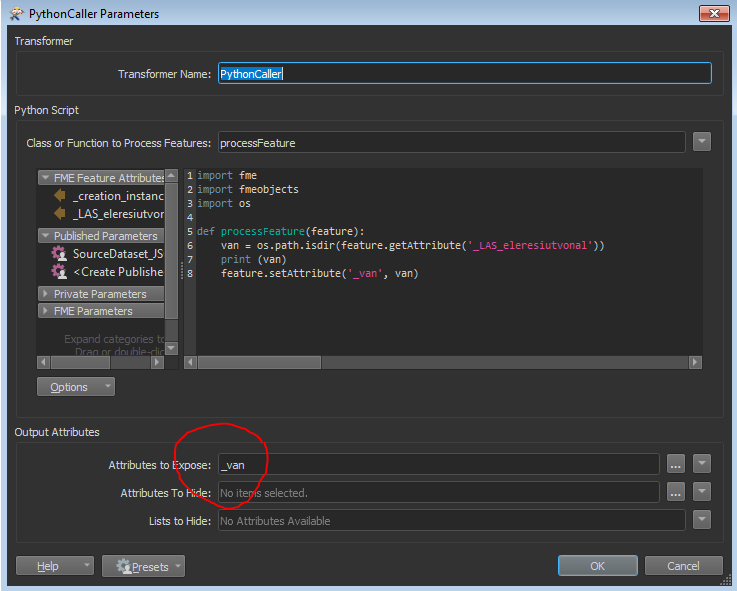
Have you enterd _van in the Attributes to Expose parameter


Forum|alt.badge.img
  • Author
  • March 23, 2020

What version of python are you using? That code won't work for python 3

Have you enterd _van in the Attributes to Expose parameter

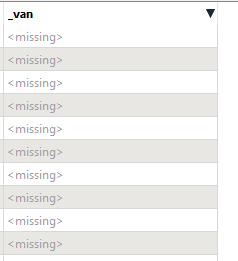
I tried it but it gives back missing values :


jdh
Contributor
Forum|alt.badge.img+40
  • Contributor
  • March 23, 2020

Is your class or function to process features set to processFeature (good) or FeatureProcessor (bad in this case)?


ebygomm
Influencer
Forum|alt.badge.img+46
  • Influencer
  • March 23, 2020

I tried it but it gives back missing values :

Is everything else set up exactly as the screenshot?


Forum|alt.badge.img
  • Author
  • March 23, 2020

Is everything else set up exactly as the screenshot?

everything is okay, only python output is missing


david_r
Celebrity
  • March 23, 2020

In the above code, the lines 9-15 are not (should not be) used. Try deleting these lines and see if you get a different error message.


Forum|alt.badge.img
  • Author
  • March 23, 2020

In the above code, the lines 9-15 are not (should not be) used. Try deleting these lines and see if you get a different error message.

I deleted, now it says:


PythonFactory failed to load python symbol `FeatureProcessor'
Factory proxy not initialized
PythonCaller(PythonFactory): PythonFactory failed to process feature

ebygomm
Influencer
Forum|alt.badge.img+46
  • Influencer
  • March 23, 2020

everything is okay, only python output is missing

If you look at the screenshot, you will see that class or Function to process feature is set to processFeature, and the additional unwanted code is deleted. If you set up your pythoncaller exactly as posted it will work

ebygomm
Influencer
Forum|alt.badge.img+46
  • Influencer
  • Best Answer
  • March 23, 2020

The bit in yellow needs to be set to match the bit in red so processFeature

You are calling a class that doesn't exist


Forum|alt.badge.img
  • Author
  • March 23, 2020
If you look at the screenshot, you will see that class or Function to process feature is set to processFeature, and the additional unwanted code is deleted. If you set up your pythoncaller exactly as posted it will work

I got it, it works well ;)


david_r
Celebrity
  • March 23, 2020

I deleted, now it says:


PythonFactory failed to load python symbol `FeatureProcessor'
Factory proxy not initialized
PythonCaller(PythonFactory): PythonFactory failed to process feature

Thanks, now we see the real error. Do as suggested by @ebygomm and it should work.