


Solved

Extracting EXIF GIS coordinates from a .TIF file

  • April 27, 2021
  • 2 replies
  • 274 views

brian_
Contributor
Forum|alt.badge.img+4

Hi

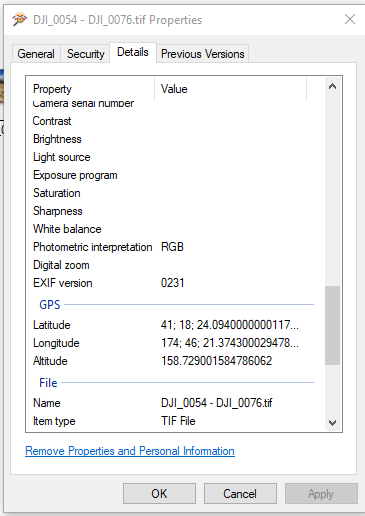
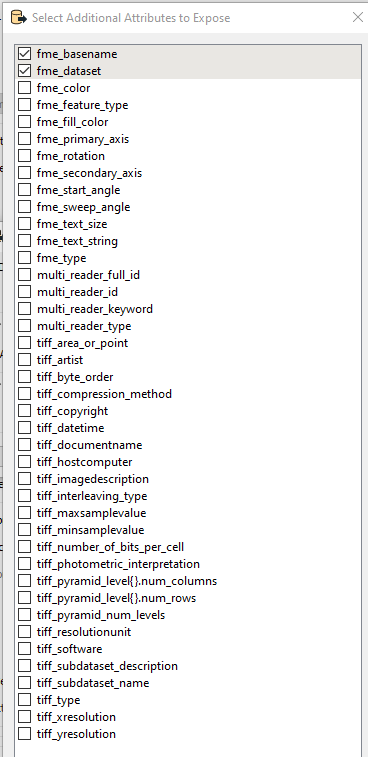
I am trying to extract the EXIF GPS coordinates from a .TIF file. I have managed to extract EXIF from a JPEG, but it seems .TIF readers doesn't expose the right additional attributes:
Screenshot 2021-04-28 102626The .TIF file I am trying to extract:

Screenshot 2021-04-28 101833Anyone know of an alternative way to do this?

Best answer by gazza

There is a custom transformer on FMEHub which does this https://hub.safe.com/publishers/jamess/transformers/exifreader

This post is closed to further activity.
It may be an old question, an answered question, an implemented idea, or a notification-only post.
Please check post dates before relying on any information in a question or answer.
For follow-up or related questions, please post a new question or idea.
If there is a genuine update to be made, please contact us and request that the post is reopened.

2 replies

gazza
Contributor
Forum|alt.badge.img+6
  • Contributor
  • April 28, 2021

One way is to use the SystemCaller to run ExifTools on the image and create a text file of the output which a FeatureReader can then read in and extract the required data.


gazza
Contributor
Forum|alt.badge.img+6
  • Contributor
  • Best Answer
  • April 28, 2021

There is a custom transformer on FMEHub which does this https://hub.safe.com/publishers/jamess/transformers/exifreader