Question

Esri ArcGIS Feature Service Writer - Difficulties writing datetime

  • April 29, 2026
  • 2 replies
  • 94 views

tb09114
Enthusiast
Forum|alt.badge.img+28

I am using the Esri ArcGIS Feature Service Writer to write to ArcGIS Enterprise (11.*). The writer is set to truncate the existing data and writing the data as such goes without any problem.
However, when looking at the attribute table of the Feature Service Layer I can see that some of the timestamps are wrong.

To write timestamps to the existing Feature Service Layer I am converting the timestamps to Unix epoch time and multiply by 1000 to get my milliseconds.

Quick example: 2025110163722 → 1762011442000

When writting data to the Feature Service Layer the attribute for the Unix epoch time is set to type ‘Date’. For the majority of the data the resulting timestamps in the Feature Service Layer is correct, but e.g. in case of the example above the epoch time is interpreted as:

1762011442000 → 1/14/1762, 8:53 PM.

I checked if there are leading or trailing white spaces… nothing the Unix timestamps in question are just like all the others where the interpretation goes well.

I have to admit that I am not certain if this behaviour is connected to the Esri ArcGIS Feature Service Writer in package Esri ArcGIS Connector v 3.22.0 or if this originates from the ArcGIS Enterprise.

2 replies

davechoi
Safer
Forum|alt.badge.img+12
  • Safer
  • May 6, 2026

Hi ​@tb09114 

Apologies for the slow response and thank you for your patience.

The behavior you are seeing is expected, though the reason is not immediately obvious. The Esri ArcGIS Feature Service Writer handles Date (datetime) fields using a specific parsing order:

  1. It first attempts to parse the incoming value as an FME datetime string (the YYYYMMDDHHmmss format, or ISO datetime format).
  2. If that parse does not produce a valid datetime, it then assumes the value is in epoch milliseconds.
  3. Otherwise, it attempts to write the value as-is.

In your example, the value 1762011442000 gets caught by step 1 because it happens to partially satisfy the FME datetime pattern. The writer reads the leading digits as year 1762, month 01, day 14, and so on, which is why you see the result 1/14/1762, 8:53 PM. It never falls through to the epoch milliseconds interpretation because the leading digits are structurally valid enough as a datetime string.

Similarly, if you write to the Feature Service using your original value (2025110163722), the writer assumes this is UNIX epoch milliseconds and the date value you will see corresponds to 2034/03/04.


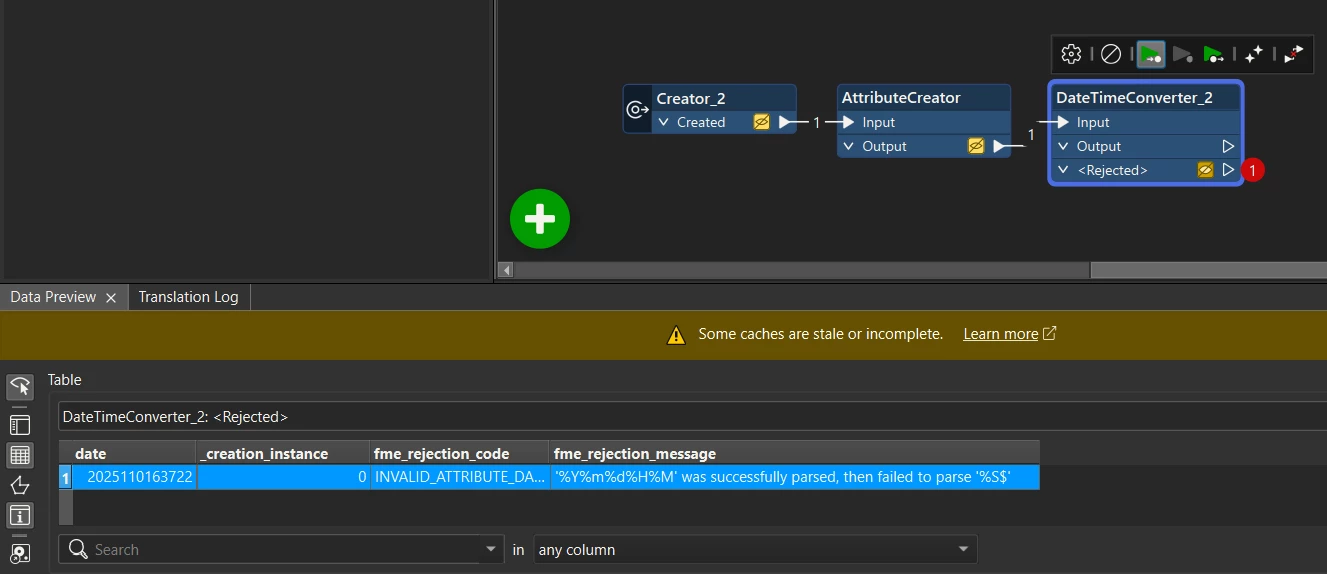
I am curious as to how you are able to convert your FME datetime (2025110163722) to UNIX epoch time. Your value corresponds to 2025/11/01 6:37:22, but the hour component 6 is not zero-padded to 06. This makes your FME datetime string technically invalid (since 63722 does not resolve to a valid HHmmss). Here is a screenshot showing that your value cannot be parsed by DateTimeConverter:


When modifying the value to 20251101063722 (with the zero-padded hour), then using DateTimeConverter to UNIX epoch seconds and using AttributeManager to convert this value to UNIX milliseconds (1761979042000); the date value I see on the feature service is 10/31/2025 11:37:22 PM (Esri applies the timezone offset; I am located in Safe headquarters in Surrey, BC which is UTC-7) which corresponds to 2025/11/01 6:37:22.


Given that the Esri ArcGIS Feature Service Writer now accepts both FME datetime and ISO datetime directly for Date fields (as of Esri ArcGIS Connector v3.20.2), I would recommend formatting your timestamps in one of those formats instead of converting to Unix epoch millisecond time. For example, applying the zero-padded hour for your value (to 20251101063722) or 2025-11-01T06:37:22 would let the writer parse the value correctly on the first pass and avoid this type of issue entirely.


tb09114
Enthusiast
Forum|alt.badge.img+28
  • Author
  • Enthusiast
  • May 6, 2026

Hi Dave,

thanks for your elaborated answer! I just checked the online help for the Esri ArcGIS Feature Service Writer, and yes, I did not read the updated article about Working with Esri ArcGIS Feature Services in FME until now.

Because it never worked for me to use the DateTimeConverter to create Epoch Time (%s$) or Unzoned Epoch Time (%Es$) I used a little Python script

import fme
import fmeobjects

def processFeature(feature):
import datetime
ts = feature.getAttribute('timestamp')
# FME datetime is like: '20251123193000'
dt = datetime.datetime.strptime(ts, '%Y%m%d%H%M%S')
epoch_ms = int(dt.timestamp() * 1000)
feature.setAttribute('timestamp_epoch', epoch_ms)

Maybe I had a typo when writing the post and missed a zero in there… From the script you can see the hour should be zero-padded.

But this is all good news 😊 - the writer accepts the datetime as is, and I got an explenation why the strange dates showed up in my data.

Thanks a lot!