
Solved

Civil 3D Read extended data/property set

  • August 6, 2019
  • 3 replies
  • 209 views

sprongandre
Forum|alt.badge.img

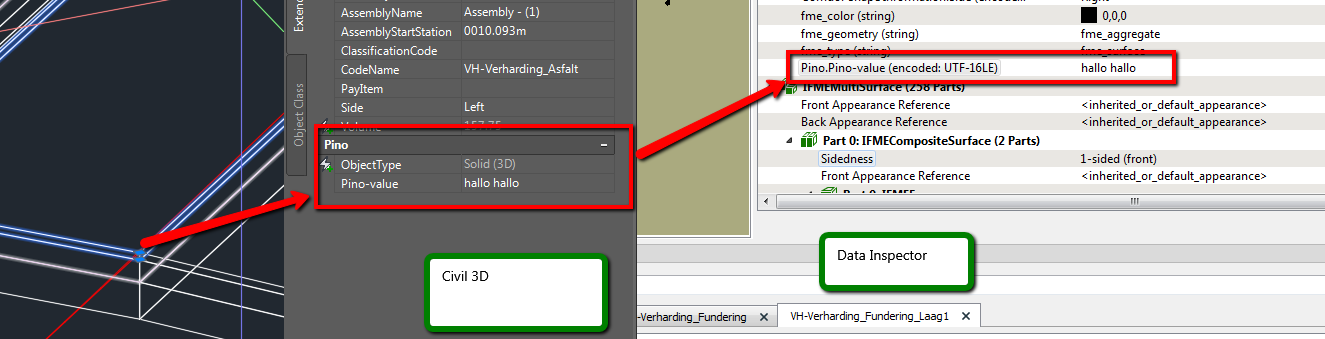
In Civil 3D I can add properties to objects by add Property sets. After that i can see this information in the Extended data tab. In the data inspector I can read those properties.

I tried something with autocad_extended_data_list{}, but I can't read those properties from the dwg.

Who can help me? :-)

(How can I read the Pino.Pino-value "hallo hallo"?)
 

Best answer by jovitaatsafe

Hi @sprongandre,

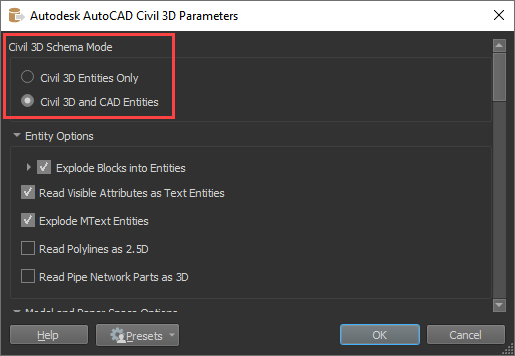
It looks like when you fist add your Civil 3D writer, you need to specify the Civil 3D Schema Mode to be Civil 3D and CAD Entities. By default it is set to Civil 3D Entities Only.

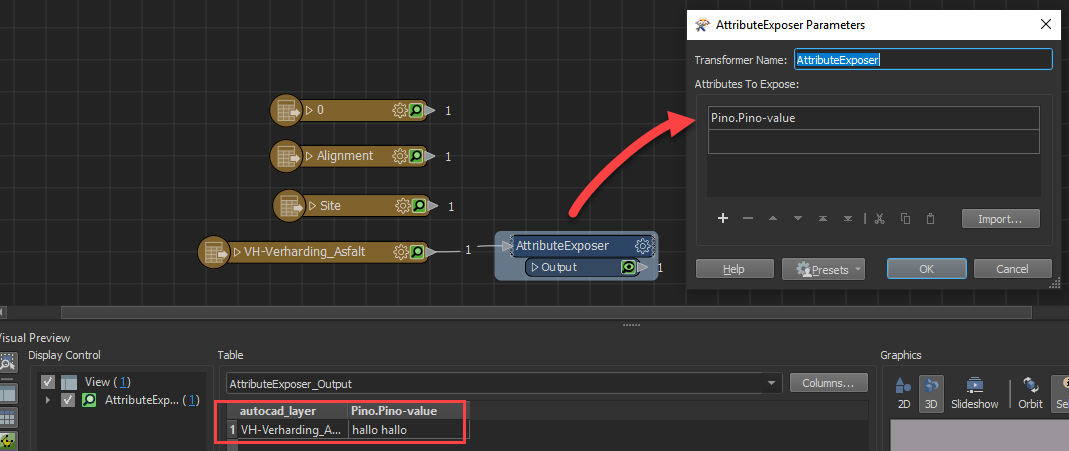
Setting it this way exposes the feature type, VH-Verharding_Asfalt, where the Pino.Pino-value attribute is located. You can then add an AttributeExposer to expose VH-Verharding_Asfalt and you should be able to grab the value.

Hope that works for you as well!

-Jovita

This post is closed to further activity.
It may be an old question, an answered question, an implemented idea, or a notification-only post.
Please check post dates before relying on any information in a question or answer.
For follow-up or related questions, please post a new question or idea.
If there is a genuine update to be made, please contact us and request that the post is reopened.

3 replies

jovitaatsafe
Safer
Forum|alt.badge.img+11
  • Safer
  • Best Answer
  • August 7, 2019

Hi @sprongandre,

It looks like when you fist add your Civil 3D writer, you need to specify the Civil 3D Schema Mode to be Civil 3D and CAD Entities. By default it is set to Civil 3D Entities Only.

Setting it this way exposes the feature type, VH-Verharding_Asfalt, where the Pino.Pino-value attribute is located. You can then add an AttributeExposer to expose VH-Verharding_Asfalt and you should be able to grab the value.

Hope that works for you as well!

-Jovita


sprongandre
Forum|alt.badge.img
  • Author
  • August 8, 2019

Hi @sprongandre,

It looks like when you fist add your Civil 3D writer, you need to specify the Civil 3D Schema Mode to be Civil 3D and CAD Entities. By default it is set to Civil 3D Entities Only.

Setting it this way exposes the feature type, VH-Verharding_Asfalt, where the Pino.Pino-value attribute is located. You can then add an AttributeExposer to expose VH-Verharding_Asfalt and you should be able to grab the value.

Hope that works for you as well!

-Jovita

Yessss that did the trick, thanks! :-)


jovitaatsafe
Safer
Forum|alt.badge.img+11

Yessss that did the trick, thanks! :-)

Awesome! No problem!