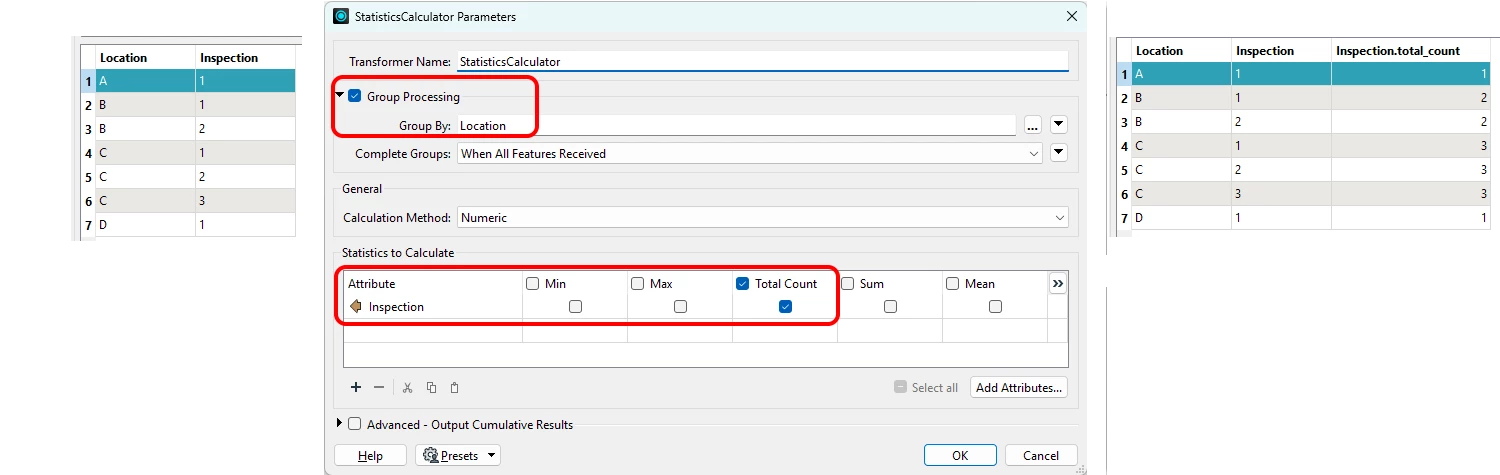



I’m trying to figure out how to add new attribute and calculate a specific value.
I have a Survey123 survey that submits records to ArcGIS Online. Each survey contains one location, and one or more inspections (this is an example). In ArcGIS, this is stored in two tables with a one-to-many relationship. Each location has a field with a unique ID and each inspection has a field with the inspection number literally 1, 2, 3, and so on. Records in the two tables look like this.
Locations table
| Location A. |
| Location B. |
| Location C. |
| Location D. |
Inspections table
| A. Inspection 1. |
| B. Inspection 1. |
| B. Inspection 2. |
| C. Inspection 1. |
| C. Inspection 2. |
| C. Inspection 3. |
| D. Inspection 1. |
In FME Form, I join the tables so the records look like this.
| Location A. Inspection 1. |
| Location B. Inspection 1. |
| Location B. Inspection 2. |
| Location C. Inspection 1. |
| Location C. Inspection 2. |
| Location C. Inspection 3. |
| Location D. Inspection 1. |
I’m trying to figure out how to add a “number of inspections” field to each record like this.
| Location A. Inspection 1. | Number of inspections for Location A: 1 |
| Location B. Inspection 1. | Number of inspections for Location B: 2 |
| Location B. Inspection 2. | Number of inspections for Location B: 2 |
| Location C. Inspection 1. | Number of inspections for Location C: 3 |
| Location C. Inspection 2. | Number of inspections for Location C: 3 |
| Location C. Inspection 3. | Number of inspections for Location C: 3 |
| Location D. Inspection 1. | Number of inspections for Location D: 1 |
As far as I can tell, this is either not easy or impossible. It occurs to me that I may be able to modify my survey and add the Number of Inspections field there. This might be the easiest solution.
Does anyone have thoughts on this?
Thank you,
Chuck