


Question

AutodeskDocsConnector - Corrupted Revit files after download

  • March 24, 2026
  • 3 replies
  • 28 views

galigis
Enthusiast
Forum|alt.badge.img+22

Hi All,

Has anyone experienced issues with the AutodeskDocsConnector transformer when downloading Revit files from Autodesk Construction Cloud (ACC)?


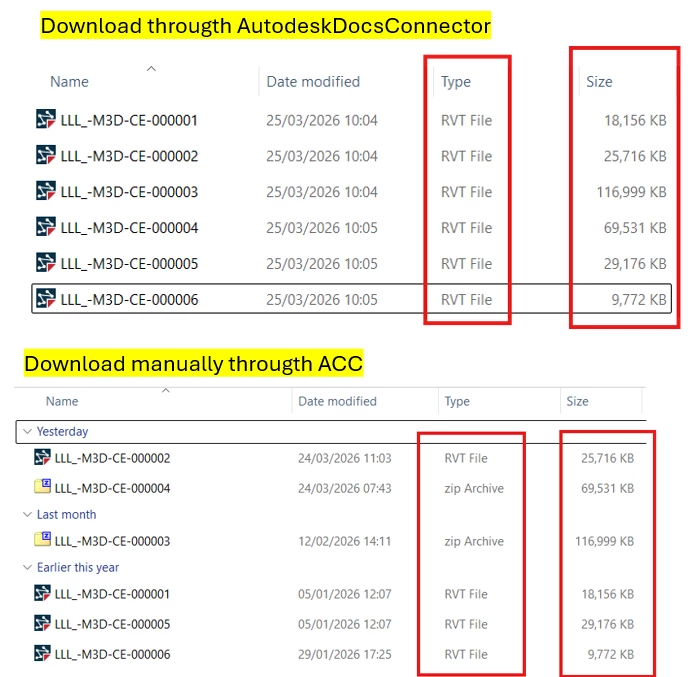
In my case, when the Revit files are downloaded via the transformer as part of an automation, the resulting files are noticeably larger in size and FME is unable to recognise them as valid Revit files, returning an error. However, when I download the same Revit files manually from ACC, the file size is smaller and the files are read correctly in FME without any issues.


I would appreciate any insights or similar experiences, as well as suggestions on what might be causing this discrepancy.

I’m using FME(R) 2024.2.4.0 (20250318 - Build 24831 - WIN64)

Thanks :)

3 replies

j.botterill
Influencer
Forum|alt.badge.img+57
  • Influencer
  • March 25, 2026

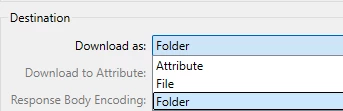
Hi galigis, I can only think you when performing a download action in this Connector, you are selecting Download As “File”… have you tried download to “Folder”

https://docs.safe.com/fme/html/FME-Form-Documentation/FME-Transformers/Transformers/pkg-autodeskdocsconnector/autodeskdocsconnector-pkg.htm


galigis
Enthusiast
Forum|alt.badge.img+22
  • Author
  • Enthusiast
  • March 25, 2026

Thanks ​@j.botterill the folder option didn’t work,

I believe I have identified the cause of this issue. FME downloads the Revit files (including the linked files) with a .rvt extension; however, these are in fact compressed Revit files packaged as ZIP archives. When I downloaded the same files manually from Autodesk Construction Cloud (ACC), they were downloaded correctly as ZIP files. Please see the screenshot below for further clarification.


pierrekoelich
Safer
Forum|alt.badge.img+5

Hello @galigis ,

Thank you for bringing this up, we are aware of this, though it is not well documented. This behaviour also occurs in the Autodesk Desktop Connector - it also displays what should be .zip files as .rvt. 

I’ve filed a problem report to investigate this issue further on our end, internal reference FMEENGINE-97609. 

The only workaround I’m aware of is renaming the .rvt file to a .zip and then extracting, it will contain the original file and all the linked files and they can be used in.