





Introduction
Hello again and Happy Friday, FME Community! Today’s TGIF, brought to you by Matt, is for our FME Flow users. If you've been working with FME Flow for a while, you've probably leaned on job logs more times than you can count. They're your first stop when something goes sideways, and your best friend when you're trying to understand what a job did. But if that job runs on Remote Engine Services, that workflow gets a little more complicated. Here's the rundown.
Engines Without Borders
Remote Engines Services are a powerful feature of FME Flow that lets you run jobs on engines hosted outside your core FME Flow environment. This means different networks, operating systems, geographic regions, and even inside Snowflake! Instead of being tethered to the same machine as your FME Flow Core, these engines can live wherever your data and processes need them to.
The benefits are real: you can process data closer to where it lives anywhere in the world without worrying about network problems, since jobs are simply sent to the Remote Engines Services and do not need to connect back to FME Flow Core. It's a flexible setup that opens up a lot of doors.
The Price of Freedom: Where’s my Logs?
Here's where things get tricky. When a job runs on a Remote Engine Service, the log for that job lives on the remote engine host — not on the FME Flow Core. The only thing the Core knows is that it submitted the job to the remote engine to run; it can't access that log directly. To actually read the log file, you'd normally have to log in to the Remote Engines Service separately as the administrator.
For occasional troubleshooting, that might be manageable. But if you're regularly reviewing job logs, bugging the administrator isn’t fun. And if you are the administrator, bouncing between Core and Remote Engines Services interfaces for job logs gets old.
No Job Log Left Behind
Thankfully, there's a way to pull those remote job logs back to where you're already working on the FME Flow Core. Using FME, of course.
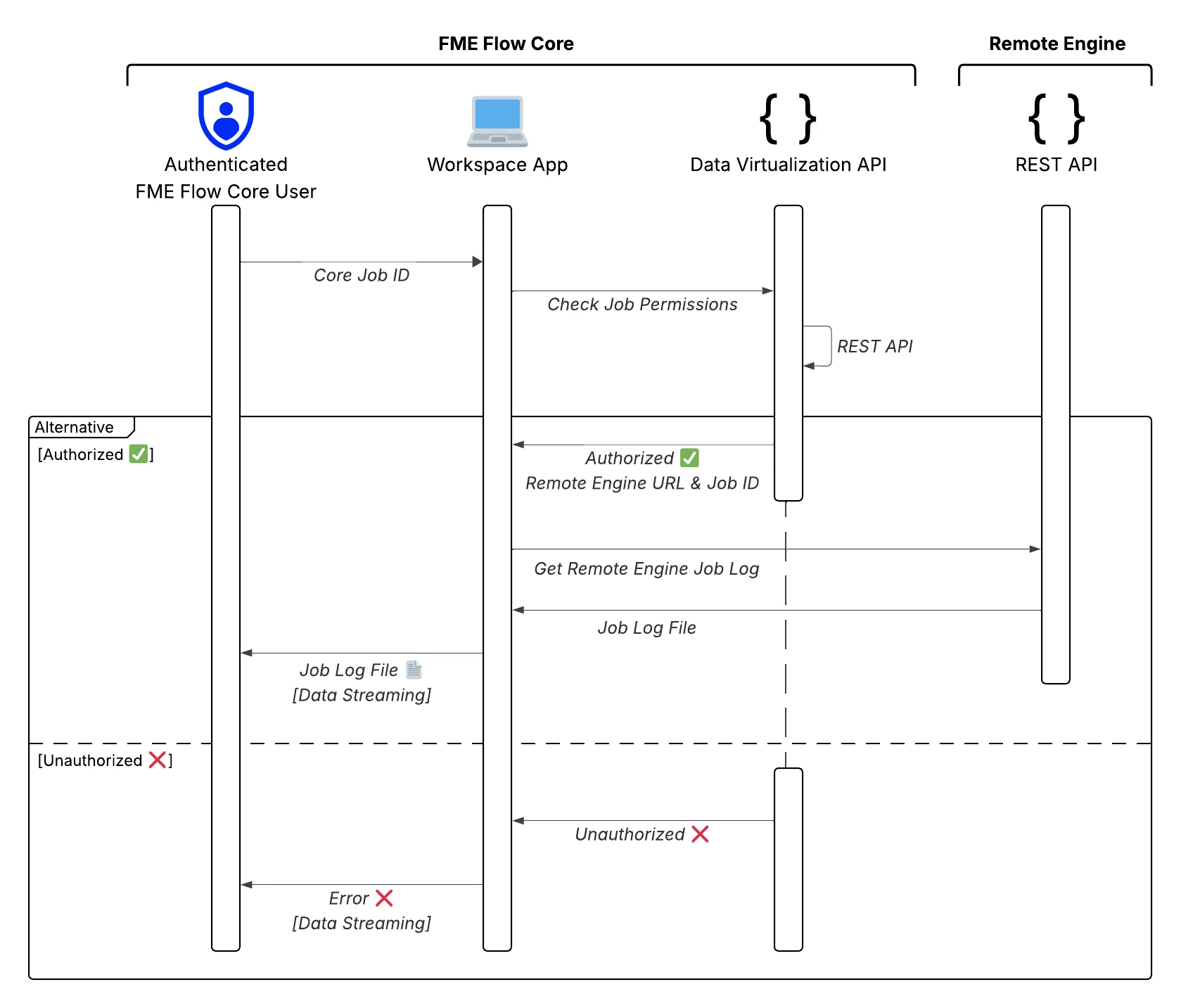
You can create an FME Flow Workspace App for a user to enter a core job ID, check their effective job permissions using a Data Virtualization API, and, if they have access, return the job log file using the Data Streaming Service.
What if the user doesn’t have access or something goes wrong? You can use the same Data Streaming Service to return an error to the user as HTML.
The diagram below illustrates the flow:
Want to learn more and download a project with the solution? Check out our article Getting a Remote Engines Service Job Log from the FME Flow Core
Conclusion
Remote Engines Services are a great way to scale FME Flow deployments and execute jobs on external servers, but come with some tradeoffs, a big one being more challenging job log access. Hopefully, the article Getting a Remote Engines Service Job Log from the FME Flow Core gives you an option to address this.
Join us next week for another edition of TGIF: Thank Goodness It’s FME! Have a great weekend everyone!