




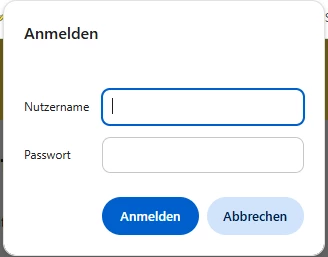
Since upgrading from FME Flow 2025.2 to 2026.2, we are seeing a recurring authentication problem with our Workspace Apps. When a user opens or reloads an app, a native browser Basic Authentication popup appears intermittently, roughly every second or third load. Because we use SAML, our users have no local username or password to enter and are forced to click Cancel every time. After cancelling, the app works normally, but the repeated prompt is disruptive for end users.
Our setup: FME Flow runs under HTTP behind an IIS reverse proxy (Application Request Routing) that enforces HTTPS. Authentication is handled through SAML with Azure AD as the identity provider using SP initiated login. On IIS, only Anonymous Authentication is enabled while Windows and Basic Authentication are disabled, and the SAML base URL is correctly configured.
Using the browser developer tools, I captured the exact request that returns the 401. It is a GET to the Data Upload Service that the app fires in the background to browse and list uploaded files (/fmedataupload//.fmw?opt_pathlevel=-1&opt_fullpath=true&opt_serverapp=). The response comes back with status 401 Unauthorized and the header Www-Authenticate: Basic realm="FME Server Authentication".
Interestingly, the issue only seems to occur in Workspace Apps that allow users to upload files. I can reproduce it within other apps that allow uploading some data. Workspace Apps without upload parameters do not trigger the authentication dialog.
This is the authentification windows that is appearing repeatedly:
Has anyone else experienced this behavior after upgrading to FME Flow 2026.2, or is there a known workaround?



