




FME 2026.1 kicks off the year with a release focused on enterprise readiness, modern cloud connectivity, and greater workflow control. A key addition is the new MCPCaller Transformer, a big step toward expanding FME’s reach into the growing MCP ecosystem. With the MCPCaller Transformer, users can invoke tools from any MCP server directly within their workflows. Combined with features like Data Caching in FME Form, a new Microsoft Fabric Warehouse reader and writer, and expanded platform and integration support, FME 2026.1 strengthens the foundation for building and operating modern, enterprise-scale data workflows.
Feature Highlights
Data Caching (FME Form): Users can now view caches during a running translation, allowing them to inspect data in real time without stopping the workflow. This makes authoring and debugging long-running and streaming workflows significantly easier. Additionally, incomplete caches are retained if a translation is stopped midway, and the “Pause” run action has been removed as caches can now be inspected during a running translation.
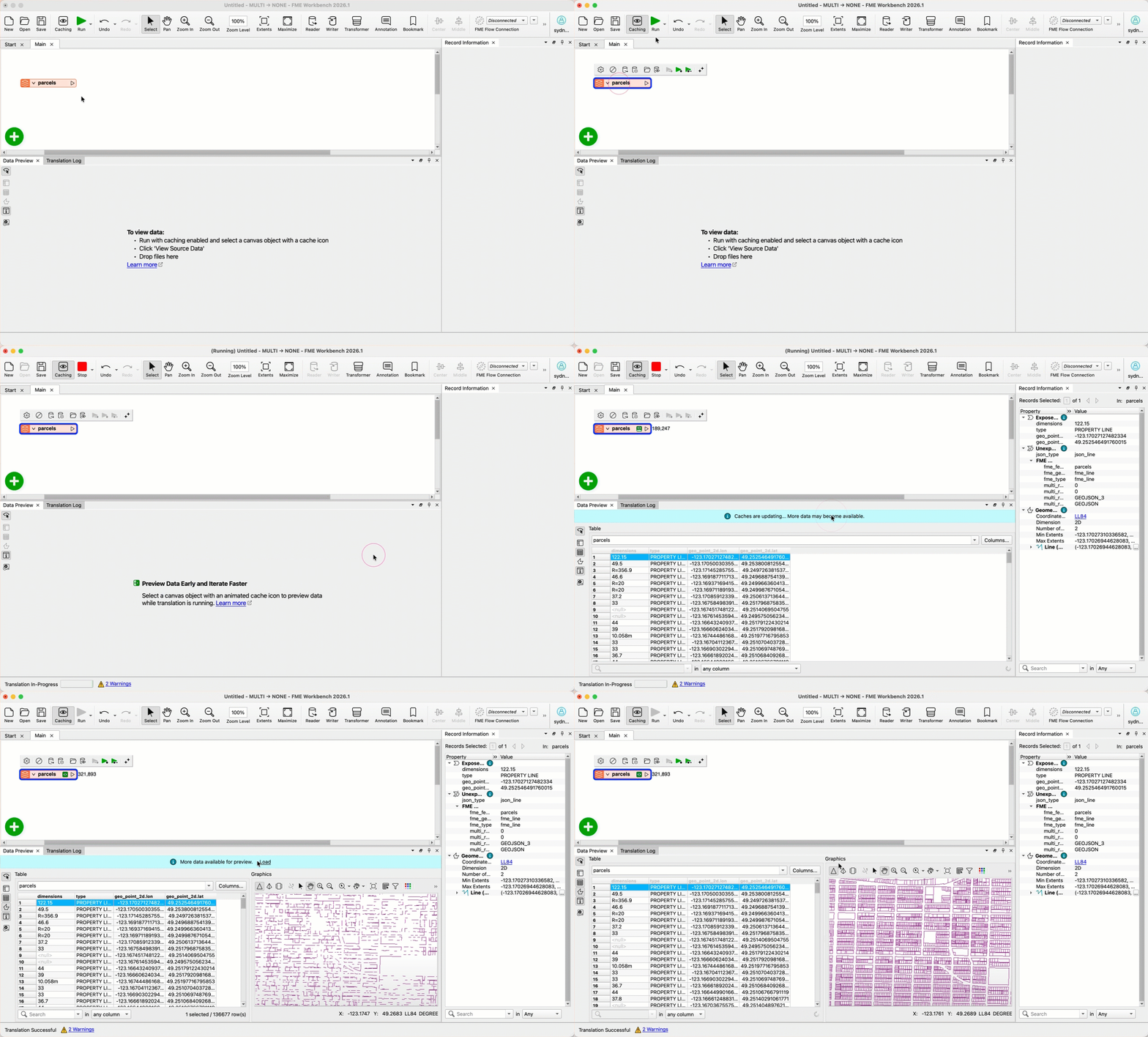
Want to learn more about this feature? Watch our short demo video here.
New Connector – MCPCaller Transformer: The new MCPCaller Transformer enables FME to invoke MCP tools via Model Context Protocol. Users can connect to a growing number of MCP servers, dynamically retrieve tools, call their exposed tools directly within a workspace, and execute tools. Results can be returned as structured JSON for downstream processing.
New Microsoft Fabric Warehouse Reader/Writer: The new Microsoft Fabric Warehouse reader and writer enables direct integration with OneLake, supporting datasets stored natively in Fabric, including data accessed through OneLake Shortcuts to external sources like Amazon S3. Built on ADLS Gen2 DFS APIs with Microsoft Entra ID authentication, it aligns with enterprise security and governance standards.
Additional Enhancements
FME Platform
Debian 13 and RHEL 10 Support: The FME Platform now officially supports Debian 13 (Trixie) and Red Hat Enterprise Linux (RHEL) 10. With new Linux releases available, organizations planning their infrastructure upgrades can deploy FME on these platforms with confidence.
FME Form
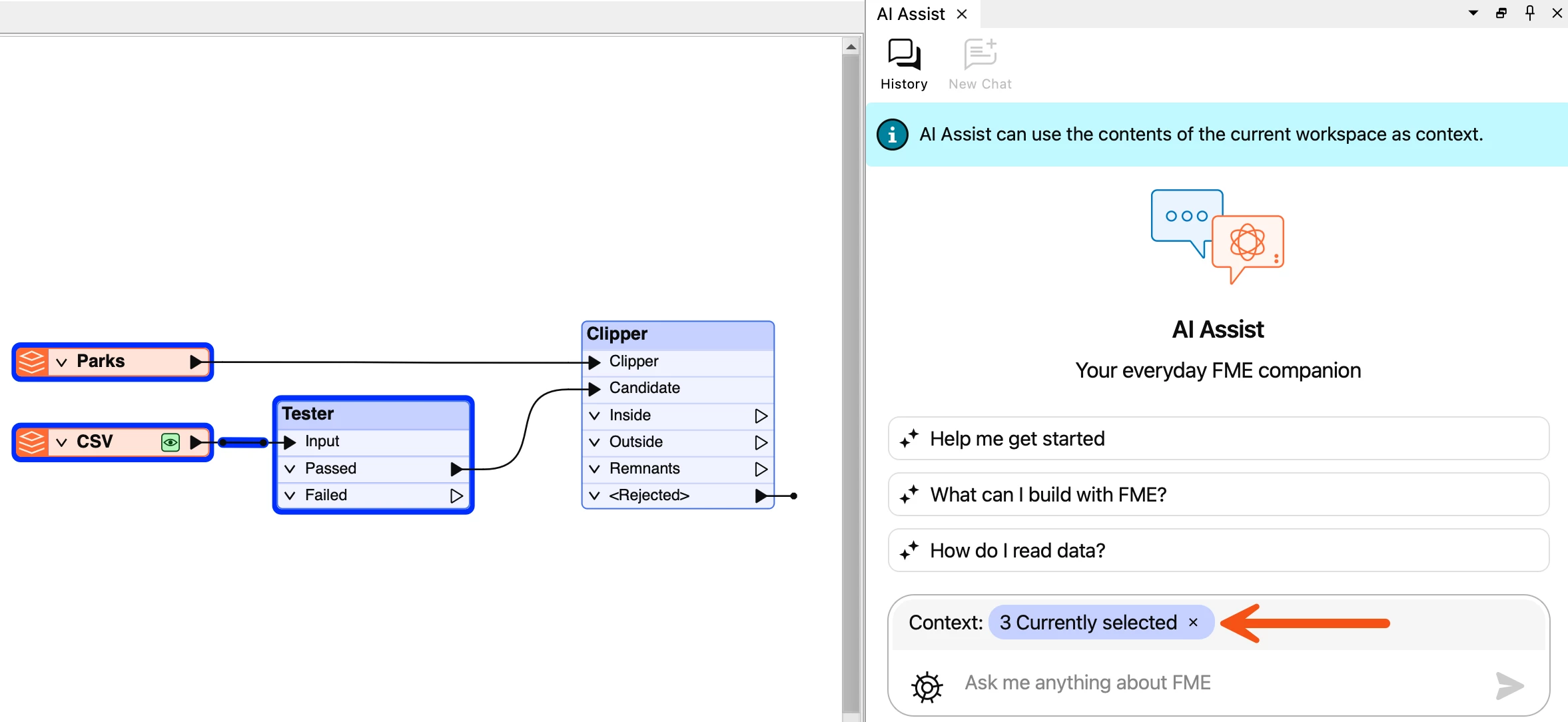
Context Visibility with AI Assist: Users can now clearly see which portion of their canvas is being shared with AI Assist and when, improving transparency and control.
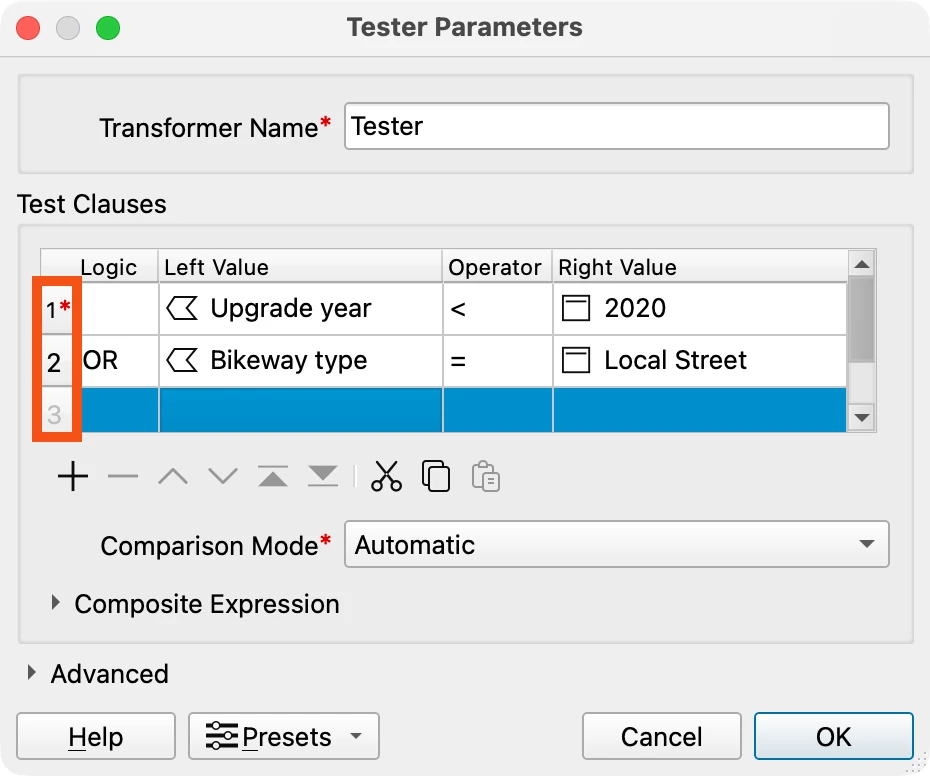
Row Numbers in Table Interfaces: Tables throughout FME Form now display a row number column, making it easier to reference, review, and troubleshoot entries in parameter dialogs.
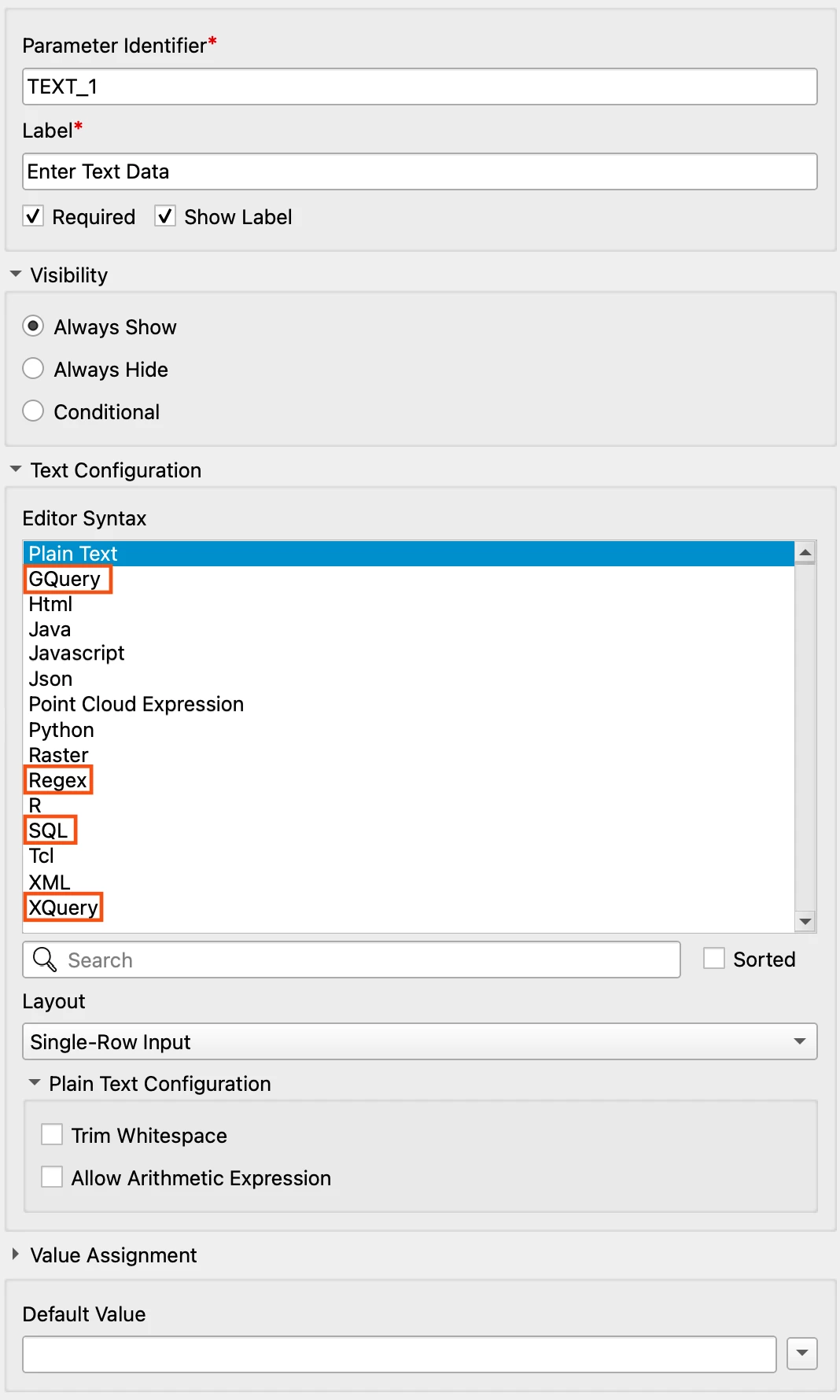
Additional Text Configuration Options in User Parameter Manager: The User Parameter Manager now supports Regex, SQL, XQuery, and GQuery, with Plain Text consolidated into a single option. Users get the full editing experience they're already familiar with—including Regex validation against a test string and database table previews in the SQL Text editor when supplied with a database connection.
Want to learn more about this feature? Watch our short demo video here.
Improved Multiple Geometry Support: FME continues to simplify how users work with features that contain multiple geometry columns.
- Microsoft SQL Server (ADO) Writer: The writer no longer requires a pre-existing database table to write multiple spatial columns. Authors can define multiple geometry columns in the Geometry Definition table, with geometry data matched by name.
- Transformer Updates: GeometryNameSetter, GeometryRemover, and GeometryExtractor now support targeted geometry column selection. A new GeometryCopier duplicates geometries under a new name, while FeatureMerger and FeatureJoiner can preserve separate geometry columns when combining streams.
Want to learn more about this feature? Watch our short demo video here.
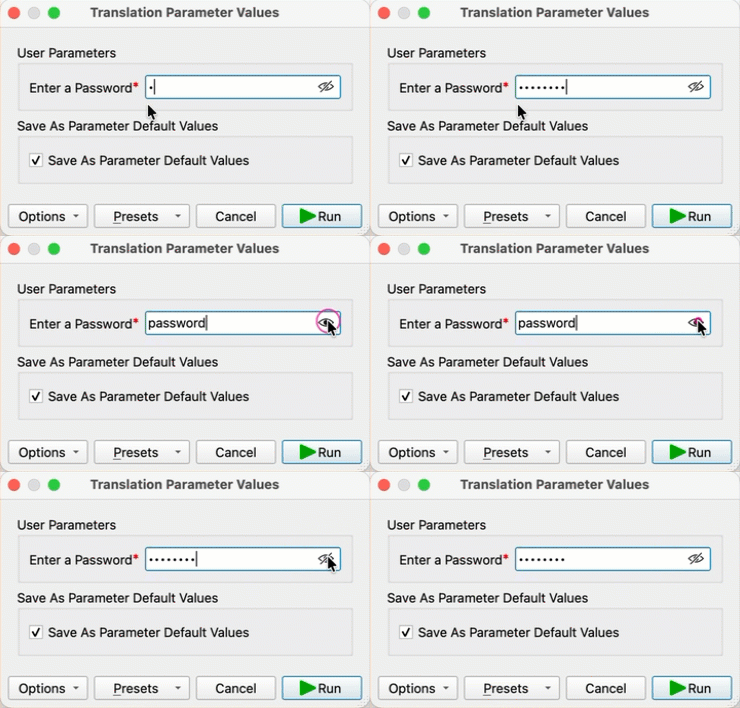
Show/Hide Password Toggle: Password fields now include a quick preview icon to reveal or hide text, reducing input errors. Click the icon to reveal your password in plain text; click again to hide it.
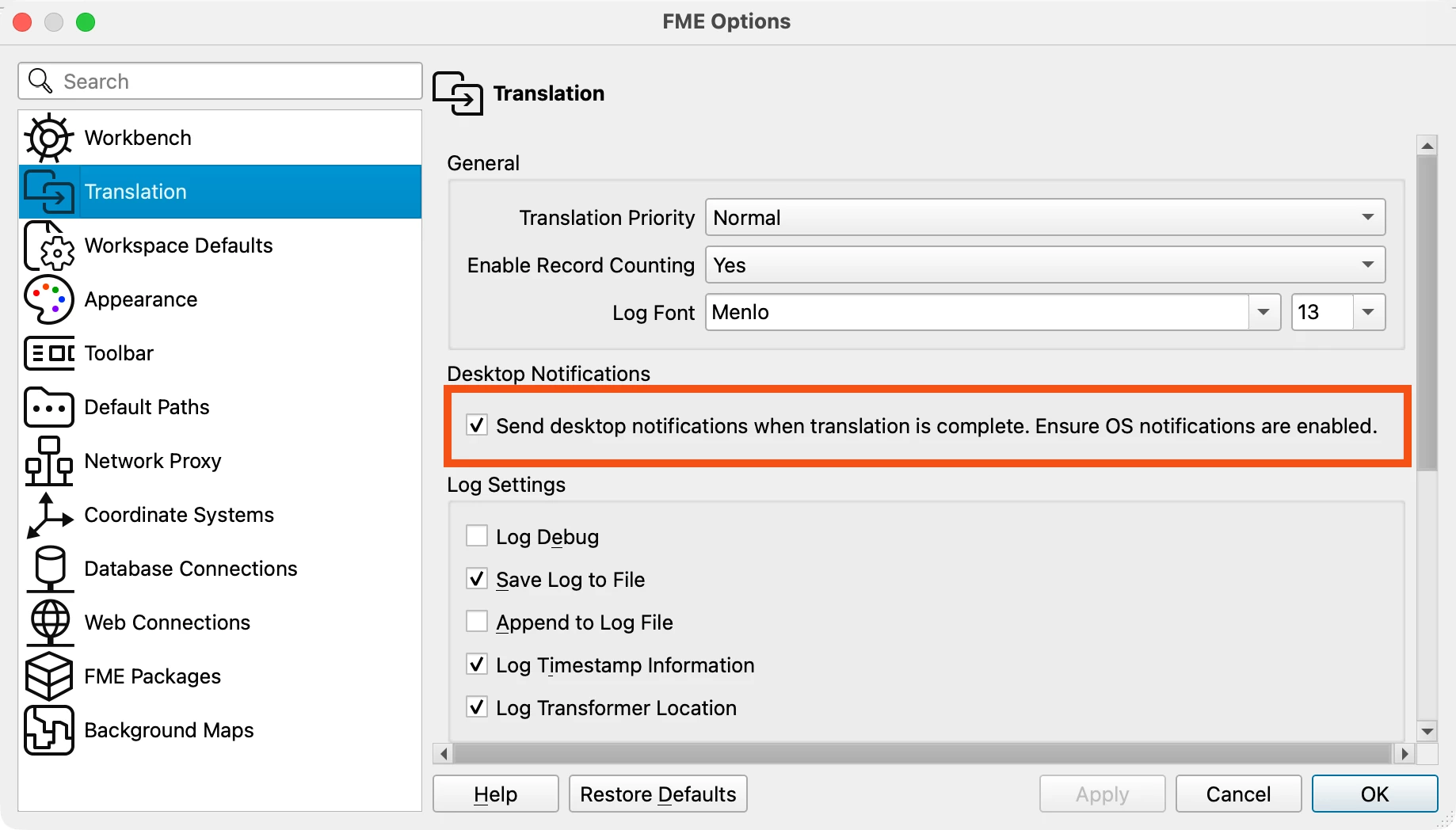
Desktop Alerts for Completed Translations: FME can now send desktop notifications when a translation finishes.
FME Flow
Improved Security for FME Flow Apps: Flow Apps now use a tokenless execution model based on a scoped Flow App Identifier, eliminating token exposure and reducing permission risk. Dynamic Parameter Configuration can load from a JSON file in FME Flow Resources, removing the need for external URLs or separate workspaces while preventing access to other resource contents.
Callback Target Support in Data Virtualization: FME’s Data Virtualization now supports Callback Targets to notify endpoints when asynchronous Data Virtualization requests complete, eliminating manual polling. Built-in retry handling for timeouts and execution failures improve reliability, and callbacks can be configured per endpoint with some API-level settings available.
Want to learn more about this feature? Watch our short demo video here.
FME Realize
Precision Model Alignment: A new Model Adjustment mode adds sliders and joystick controls for fine-tuning rotation, position, and elevation in AR. An optional mesh view improves elevation and surface awareness, helping technicians correct alignment issues directly from the main on-screen menu.
Transformers
ISO DateTime Support Across Transformers, Functions, and Writers: FME now preserves ISO 8601 date/time formatting throughout workflows. Updated transformers (DateTimeConverter, DateTimeCalculator, DateTimeStamper, and DateTimeRounder) and new date/time functions preserve the input format. Writers now also accept ISO-formatted datetimes directly, and existing workspaces continue to run unchanged with no migration required.
New and Updated Integrations
New Integrations
New Connector – TrimbleUnityConnector: The TrimbleUnityConnector replaces legacy CityWorks transformers with a unified connector that simplifies configuration, maintenance, and long-term support. It standardizes service requests, work orders, tasks, attachments, and cost updates under one interface, and supports Trimble ID and MFA requirements.
New Format – Protomaps PMTiles: FME now supports PMTiles, a single-file, cloud-optimized vector and raster tile archive designed for static hosting on platforms such as S3 without requiring a dedicated tile server. With this, users can generate and consume serverless map packages directly in FME.
New Reader and Writer for File Geodatabase: Built on GDAL’s OpenFileGDB driver, this new reader and writer improves cross-platform compatibility (including macOS (Apple Silicon)), adds support for newer data types (Date, Time, Larger Integer), enhances geometry handling, and improves performance while remaining compatible with existing File Geodatabase feature sets.
Want to learn more about this feature? Watch our short demo video here.
New Format – HDF5: FME now includes native HDF5 reading support. Built on GDAL’s HDF5 driver and aligned with our existing HDF4 capabilities, it handles subdatasets and multi-banded raster structures common in meteorological and earth observation workflows.
Bentley MicroStation Design (DGN - Tech Preview): Rebuilt on ODA libraries, the new DGN integration improves support for modern 3D elements and attributes, streamlines translations, and improves stability with complex design files. This release is available as a Tech Preview, with further enhancements planned.
Updated Integrations
Delta Lake Reader Now Production-Ready: The Delta Lake Reader is now production-ready, with DuckDB upgraded to v1.4.3 for improved compatibility and stability. STRUCT columns are supported for complex lakehouse schemas, and Google Cloud Storage support has been restored, re-enabling Delta workflows on GCP. With these updates, Tech Preview has been removed, and FME now reliably supports Delta Lake workloads across AWS, Azure, and GCP.
Databricks Reader Supports Native Spatial Types: The Databricks Reader now supports Data Native Spatial Types, enabling direct use of spatial joins, H3 indexing, and spatial aggregations inside Databricks without external processing or workarounds. Writing support for these spatial types is planned for FME 2026.2.
Microsoft Azure AI Services Upgrade: The AzureTextAnalyticsConnector and AzureAIVisionConnector now use Microsoft’s supported Azure Text Analytics SDK and updated Language Service APIs. This resolves issues caused by deprecated endpoints, restores Language Detection functionality, and ensures compatibility with Microsoft’s latest API versions.
Microsoft Office (Excel / Word) Improvements: The Excel Reader now supports password-protected files and ignoring empty rows, reducing downstream filtering. Both the Reader and Writer also support hidden rows and columns. In Word, MSWordStyler now supports hyperlink creation for automated report generation.
Updated LAS Integration: The LAS Reader now supports LAX spatial index files for faster reads and handles previously failing truncated points, while the LAS Writer adds LAZ compression options (compressor type and chunk size). LASD creation is optimized by eliminating a full dataset copy for large ArcGIS point clouds. Furthermore, FME now reads and writes user component descriptions in LAS files.
Want to learn more about this feature? Watch our short demo video here.
Python 3.14: The embedded Python runtime has been upgraded to Python 3.14, ensuring consistent security updates, performance improvements, and compatibility with modern Python libraries and platforms like ArcGIS without disrupting existing custom transformers and scripts.
JSON Writer – Full Format Support: The JSON writer now supports a richer set of typical json elements, including nested json objects and lists, similar to what the XML writer supports. Previously limited to flat json, the JSON writer can now handle more complex structures, providing users with another writer option rather than only JSONTemplater and Text File writer. A new ‘json’ attribute data type has also been added to accept json blobs.