Solved

Trimble Connect Authentication Error

  • October 14, 2020
  • 1 reply
  • 249 views

warrendev
Influencer
Forum|alt.badge.img+28

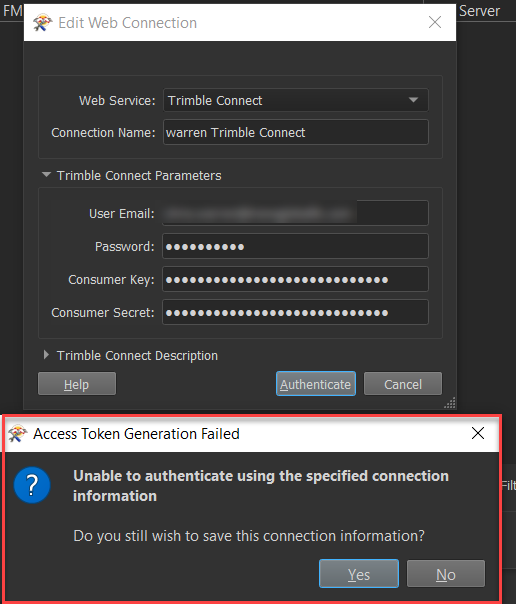
I'm attempting to use the Trimble Connect web connection, but I am receiving an authentication error. I have a Trimble Connect account and have received my consumer key and consumer secret for authentication, but I'm not able to get it to work.

2020-10-13_18-58-50


I've reviewed the Trimble Connect API documentation, but I am still relatively new to working with API's, and this API requires multiple steps, so I'm having trouble. Does anybody have examples of authenticating with Trimble Connect with FME? I could sure use some assistance.


I downloaded the provided collection and environment in PostMan and was able to connect, but no luck getting this to work in FME.


Trimble Connect API Documentation


Best answer by warrendev

I wanted to circle back and answer this question I posted awhile back with the solution I found.


Trimble Connect now only allows the Oauth 2.0 Authorization code grant for security concerns.

Trimble Documentation Link


Create a new Oauth2.0 web connection in FME.

Enter Client Id, Client Secret and Redirect Uri that was used during sign up of the Trimble Identity.


Authorization Parameters

URL: https://identity.trimble.com/authorize?scope=openid&response_type=code


Retrieve Token Parameters

URL: https://identity.trimble.com/token?tenantDomain=trimble.com


Refresh Token Parameters

URL: https://identity.trimble.com/token

Request Format: client_id=[CLIENT_ID]&client_secret=[CLIENT_SECRET]&refresh_token=[REFRESH_TOKEN]&response_type=refresh_token&grant_type=refresh_token&tenantDomain=trimble.com


Test the connection and login with your credentials.

View original
This post is closed to further activity.
It may be an old question, an answered question, an implemented idea, or a notification-only post.
Please check post dates before relying on any information in a question or answer.
For follow-up or related questions, please post a new question or idea.
If there is a genuine update to be made, please contact us and request that the post is reopened.


1 reply

warrendev
Influencer
Forum|alt.badge.img+28
  • Author
  • Influencer
  • Best Answer
  • February 1, 2021

I wanted to circle back and answer this question I posted awhile back with the solution I found.


Trimble Connect now only allows the Oauth 2.0 Authorization code grant for security concerns.

Trimble Documentation Link


Create a new Oauth2.0 web connection in FME.

Enter Client Id, Client Secret and Redirect Uri that was used during sign up of the Trimble Identity.


Authorization Parameters

URL: https://identity.trimble.com/authorize?scope=openid&response_type=code


Retrieve Token Parameters

URL: https://identity.trimble.com/token?tenantDomain=trimble.com


Refresh Token Parameters

URL: https://identity.trimble.com/token

Request Format: client_id=[CLIENT_ID]&client_secret=[CLIENT_SECRET]&refresh_token=[REFRESH_TOKEN]&response_type=refresh_token&grant_type=refresh_token&tenantDomain=trimble.com


Test the connection and login with your credentials.