Question

SharePointOnlineConnector versus SharePointOnline Reader

  • July 8, 2026
  • 5 replies
  • 86 views

s.jager
Influencer
Forum|alt.badge.img+26

I need to download one or more PDF documents from Sharepoint as part of an export process. These PDF’s have random titles and filenames, in the Sharepoint library an extra column was added containing a unique ID. It’s this ID I have to use in order to download the correct PDF.

Problem is that I can get this ID from Sharepoint using the Sharepoint Online List Reader, but that cannot give me the download URL. Conversely I can get the download url from the SharepontOnlineConnector transformer, but that one does not allow me to get the added custom ID.

So in order to get all the info I need,  have to use the reader AND the connector and join the results from both together, which is rather ugly.

Am I missing something? Is there a way either of these can be configured where I get all the necessary info in one go? Or is this as designed? If the last, I’ll file an Idea I suppose...


5 replies

desiree_at_safe
Safer
Forum|alt.badge.img+21

Hi ​@s.jager! I totally get the friction, and there is a genuine gap between the two.

Using the List Reader and Connector together is a common pattern, and there's an article that shows this cascading approach in action: Document Library Migration & Metadata Updates with Microsoft SharePoint

That said, I want to make sure I understand your specific setup before pointing you in a direction, since the custom column piece adds a wrinkle worth examining more closely.

Could you share a simplified workspace or a few screenshots of your current flow? I've been testing something similar on my end and want to see how your setup compares before suggesting next steps.


s.jager
Influencer
Forum|alt.badge.img+26
  • Author
  • Influencer
  • July 16, 2026

Hi Desiree,

My flow is very simple: Read everything from the Sharepoint Library twice, once with the Connector, once with the Reader. Then join those results, and test for the specific ID that was given by the user through a User Parameter. Then use a second Connector to download the pdf’s that have that specific ID in the custom column. That last Connector is not in the screenshot, but this is basically how it is set up at the moment.


desiree_at_safe
Safer
Forum|alt.badge.img+21

Thanks for sharing that; it's really helpful to see your actual flow laid out.

I'm curious about the file and folder structure in your SharePoint library, since that seems to be the piece that decides how simple this can get.

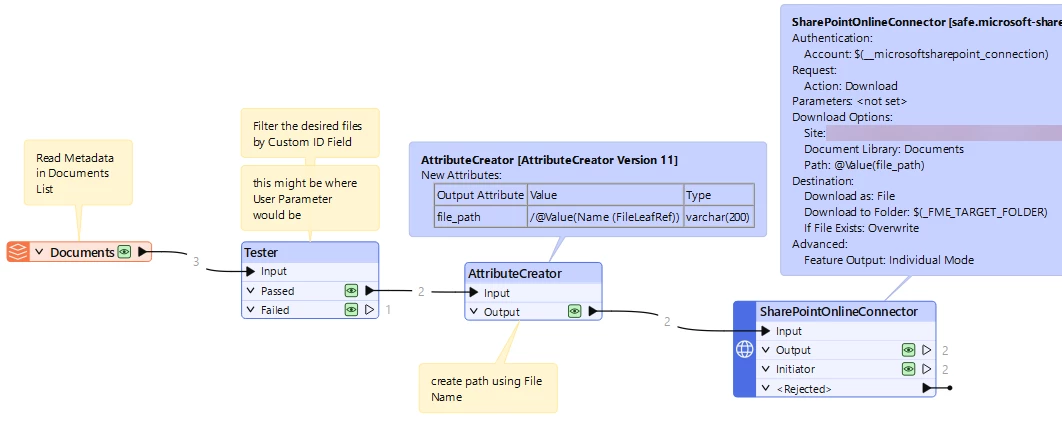
If your PDFs sit in that library directly with the custom ID and no subfolders, there's a simpler setup. You can read the metadata list once, filter on the custom ID field, then use an AttributeCreator to build the download path directly from the filename, something like /@Value(Name(FileLeafRef)). Then you can feed that straight into the SharePointOnlineConnector's Download action.

Cascading setup - building download path
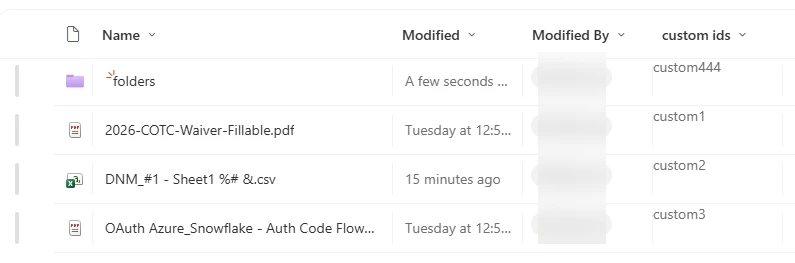
Test Document Library

What's your SharePoint setup like? That'll help confirm whether the setup above covers your case, or whether there’s a deeper enhancement gap or issue. Happy to keep digging into this


s.jager
Influencer
Forum|alt.badge.img+26
  • Author
  • Influencer
  • July 20, 2026

If your PDFs sit in that library directly with the custom ID and no subfolders, there's a simpler setup. You can read the metadata list once, filter on the custom ID field, then use an AttributeCreator to build the download path directly from the filename, something like /@Value(Name(FileLeafRef)). Then you can feed that straight into the SharePointOnlineConnector's Download action.

What's your SharePoint setup like? That'll help confirm whether the setup above covers your case, or whether there’s a deeper enhancement gap or issue. Happy to keep digging into this

Did a quick test, and indeed, that does work. The PDF’s currently indeed sit directly in the Library (so the pseudo-path is {tenant-name}.sharepoint.com/sites/{site-name}/{library-name}/{file-name}.pdf).

I do consider it a bit of a workaround though, since this can and probably will change (we are currently transitioning from mapped network drives to using sharepoint - so this workflow will be used a lot more in the future). We have multiple Libraries, which can have different setups, and this workflow should be as generic as possible - so that I can use it elsewhere without having to make sure I change things like that. It feels a bit too much like hard-coding a path, and that is what makes me feel this is a bit of a workaround.

I think a better solution would be to add the list-attributes (including the custom-defined ones) to the File Attributes to Add-selector in the SharePointOnlineConnector Transformer (which is actually where I expected to see them...). That way you can choose to have them, and just have a single Transformer to do the heavy lifting.


desiree_at_safe
Safer
Forum|alt.badge.img+21

I agree! The custom list attributes surfaced directly in the Connector would make this much cleaner, especially for a workflow meant to be reusable across libraries with different setups.

I filed an internal IDEA based on your suggestion, and it's being tracked as IDEA-3240. You're also welcome to submit your own community IDEA so other FME users can upvote and add their own context, which always helps. You can do that by following the link here.

Thanks again for taking the time to share this, ​@s.jager !