


I've got a few challenges concerning styling of an excelsheet. It's not just an ordinary sheet with columns and rows, but it's a reporting template. The report contains several attributes in different fields and several images. The issues/challenges I'm currently facing:
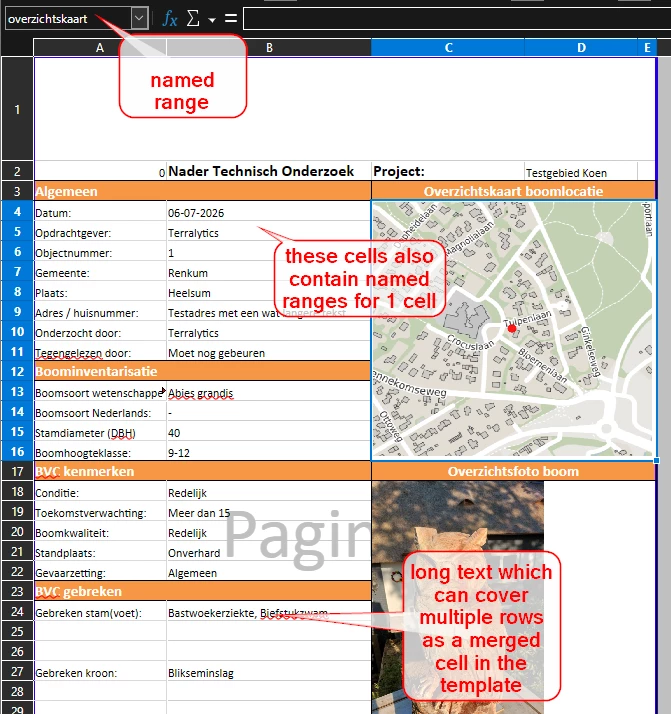
- I would like images to fit itself into a named range or predefined rows and columns. See screenshot below. I created a predefined named range ‘overzichtskaart’ which covers cells $C$4:$E$16. But as far as I can see there is no option to let FME/Excel know that the image should stay in those cells. I created a workaround now which tells the image that it should align in xlsx_row_id 4 and xlsx_col_id2 with a height and with of 255 pixels. But this goes wrong as soon as the alignment of the attributes changes (for example multirow text in column B). Does anyone have a smart work-around to fit the image exactly in the desired cells?
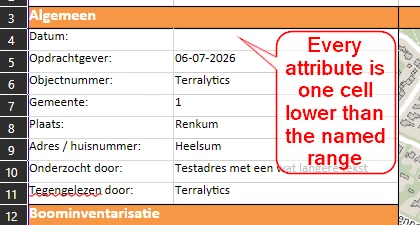
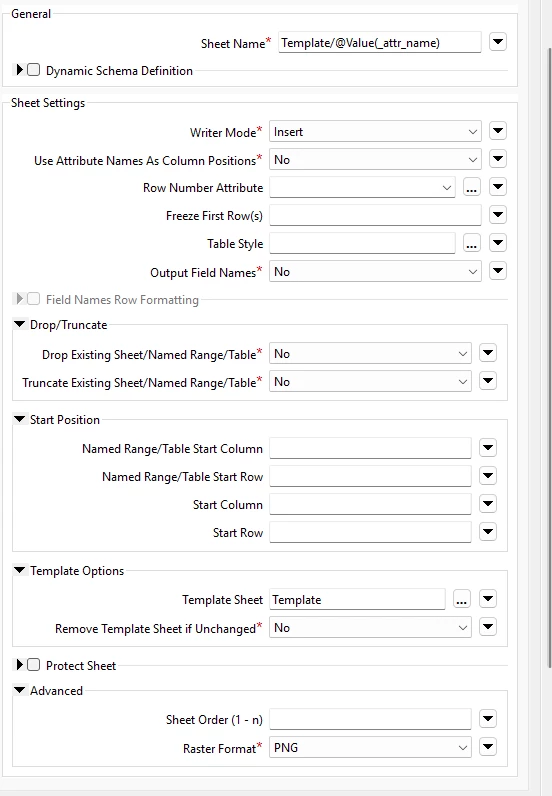
- Named ranges are useful to make sure that the attribute-data ends up in the right cell, but it seems to be impossible to use them and maintain styling at the same time. In the screenshot below there is a merged cell in my template covering cells B24:B26. But when writing the data to this template, the cell is not merged any more and all styling gets lost. How can I keep my merged cells and styling from the template? Also settings like word-wrap gets lost. I tried to use the excel-writer setting ‘truncate existing sheet/named range/table = No. But when I do this, some named ranges do not get the values I tried to add in these cells. They seem to stay blank (but not all of them). Or the value ends up in the cell below.
So in short I'd like to learn some tricks or settings to get a nice report, based on my template.