Question

Esri ArcGIS Connector Failing to Download Items

  • June 29, 2026
  • 15 replies
  • 190 views

mmccart
Enthusiast
Forum|alt.badge.img+30

After the June 2026 ArcGIS Online update last week, the Esri ArcGIS Connector stopped working when attempting to download .csv admin reports. Prior to last week’s update, the connector would download these .csv files without issue. 

As of last Friday (6/26), FME returns the following:

  • fme_rejection_message: 400 Client Error: Bad Request
  • fme_rejection_code: INVALID_FILE

when attempting to download .csv file. These errors persisted over the weekend and today. It fails both in FME Form and FME Flow. 

Versions I am using:

  • FME Form: 2025.1.2.0 (Build 25630)
  • FME Flow: 2025.1.2.0 (Build 25630)
  • Esri ArcGIS Connector: 3.25.1

Note: This exact error is returned for multiple types of .csv files generated within AGOL. I have dug into Chrome Developer’s tools to compare and confirm URLs and Payload being sent to the API and everything looks the same on both ends (Chrome and FME).

Something might have changed with AGOL API’ backend. Is anyone else seeing these same issue? If so, how did you resolve it? Or, can someone at Safe look into this issue with the Esri ArcGIS Connector please?

Thanks in advance!

15 replies

mmccart
Enthusiast
Forum|alt.badge.img+30
  • Author
  • Enthusiast
  • June 29, 2026

@bruceharold Bruce, are you seeing the same error being returned on your end?


bruceharold
Influencer
Forum|alt.badge.img+19
  • Influencer
  • June 29, 2026

Hi Mark

Using the Esri ArcGIS Online package 3.25.1 I just successfully downloaded a CSV.

I’m using Data Interoperability in Pro 3.7 which equates to Form 2026.1.0.0.


mmccart
Enthusiast
Forum|alt.badge.img+30
  • Author
  • Enthusiast
  • June 29, 2026

@bruceharold Can you confirm what role/privileges you have in ArcGIS Online? Are you full blown Admin, or do you have limited privileges when attempting to download the file?


bruceharold
Influencer
Forum|alt.badge.img+19
  • Influencer
  • June 29, 2026

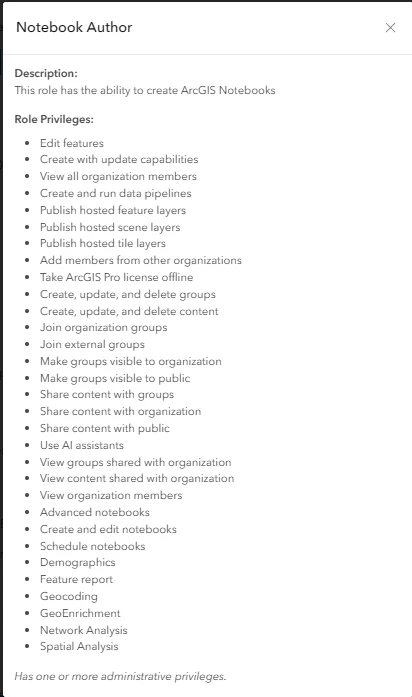
Hi Mark, I’m not an Admin but I do own the CSV item I downloaded and here are my role and privileges.   I don’t see anything specific to file-storage items.  Did any setting for you block export?


aabdulr
Participant
Forum|alt.badge.img
  • Participant
  • June 30, 2026

I can confirm we are experiencing the same issue, also started after last weeks AGOL update.  This may be on the ESRI side because I am an Admin.  To clarify, this only happens with CSV Administrative  Reports.  I was able to download other CSV files without any issues.


bruceharold
Influencer
Forum|alt.badge.img+19
  • Influencer
  • June 30, 2026

I suggest opening a support call and reference this post.  If you can share a CSV item via a group to the Safe analyst he or she might be able to repro.


carlm
Contributor
Forum|alt.badge.img+21
  • Contributor
  • June 30, 2026

Same thing on my side, I can download a normal CSV but not the Admin Report.

If i’m using a HTTPCaller instead I can use the itemID and download the Admin Report just fine:

https://arcgis.com/sharing/rest/content/items/@Value(_id)/data


bruceharold
Influencer
Forum|alt.badge.img+19
  • Influencer
  • June 30, 2026

I can reproduce the issue.  The Rejected port emits a feature with a 400 error - bad request.  You should include a workspace and log for Safe.


mmccart
Enthusiast
Forum|alt.badge.img+30
  • Author
  • Enthusiast
  • June 30, 2026

Thanks ​@bruceharold, ​@aabdulr and ​@carlm for confirming on your end. I have logged a ticket with Safe.


Also thanks ​@carlm your work-around via the REST API worked perfectly!


mmccart
Enthusiast
Forum|alt.badge.img+30
  • Author
  • Enthusiast
  • July 13, 2026

@carlm Your suggestion is no longer working. I am getting a 400 NO RESULT response. How large is your admin file? Mine is 4.6 MB. (Note: we have over 20K users in our AGOL subscription). 

@bruceharold I saw your note about the new version of the Esri Connector on HUB. I downloaded it (3.25.3 this morning and I still get a 400 Client Error: Bad Request

It starts to download the file, but the resulting file is 0KB in size and empty. If this helps, we’re using ArcPro 3.5.6 and the corresponding Python modules available at that version. 

Note: A .csv file attempts to be written. when I open it up, I see this:

<Error><Code>InvalidArgument</Code><Message>Only one auth mechanism allowed; only the X-Amz-Algorithm query parameter

 Signature query string parameter or the Authorization header should be specified</Message><ArgumentName>Authorization</ArgumentName><ArgumentValue>Bearer [OKEN REMOVED]</ArgumentValue><RequestId>FB4201NWSZ5A6EEQ</RequestId><HostId>unjkL8/95I/+/6DyZz0TIUerFFwn2SjcUpzgaoJ9NzjURR0DegXQzatqTU2xtGtAr7aCm3TZaQs9qMc0CWJ1lqCrshUQB9Rf</HostId></Error>


bruceharold
Influencer
Forum|alt.badge.img+19
  • Influencer
  • July 13, 2026

Hi, if your ticket is still open add the information to it.  Thanks.


carlm
Contributor
Forum|alt.badge.img+21
  • Contributor
  • July 14, 2026

@mmccart  Hey can you give it another look, yesterday it failed but today it’s working when I’m making the GET request, thanks ESRI for this headache


mmccart
Enthusiast
Forum|alt.badge.img+30
  • Author
  • Enthusiast
  • July 14, 2026

@carlm I just re-tested the connector again and it failed with a ‘400 Client Error: Bad Request’ response.

I also tested the HTTPCaller method and it too failed with a ‘HTTP/2 400’ response.

I still have my ticket opened with Safe and they acknowledged that they did not test the latest version of the Esri Connector package with ‘Administrative Reports’. Waiting to hear back from them.


anas.alkhrissat
Participant
Forum|alt.badge.img+2

you can install version 3.25.3 from the FME Hub


mmccart
Enthusiast
Forum|alt.badge.img+30
  • Author
  • Enthusiast
  • July 15, 2026

@anas.alkhrissat I already tested 3.25.3 from the Hub on Monday. It continued to throw the same errors. I have an open ticket with Safe and they’re looking into it.