Solved

Auth2.0 asking for web browser authentication (FME Form 2023, 2025, 2026)

  • June 23, 2026
  • 3 replies
  • 67 views

dustinedgecob
Contributor
Forum|alt.badge.img+2

Hi Brains Trust

I’m trying to setup a web connection to Oracle Integration Cloud and have been given the client ID, secret, token url and scope url.

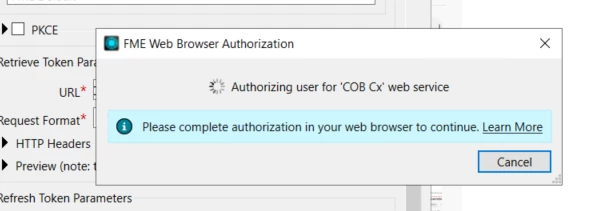
In testing the connection I keep getting this message but tje Integration Engineer is telling me there is no need to sign-in, and also no browser window is popping up for a sign-in.


Other posts had suggestions such as:

  • Change to System default instead of FME default
  • Change to proxy redirect instead of loopback.

I’ve tried those things and still nothing. Any tips on how can I troubleshoot this to get it to work?


Previously we used a basic username & password to connect but there’s a push from IT to move to OAuth.


Thanks

Best answer by desiree_at_safe

Hi ​@dustinedgecob! It looks like Oracle Integration Cloud is using the Client Credentials grant, which doesn't involve a browser login at all. That's probably why the browser prompt feels wrong. The OAuth 2.0 web service type in FME is designed for the Authorization Code flow (user-interactive), so switching to a Token web service would be closer. However, Oracle's token endpoint has an additional requirement: the client ID and secret need to be sent as a Base64-encoded value in the Authorization header, rather than as plain form body parameters.

The approach I'd recommend is building the token fetch directly in your workspace using an HTTPCaller. The pattern is similar to our article on connecting to Precisely's API:

Authenticating and Extracting Information from API calls with the HTTPCaller

Essentially:

  1. Use a BinaryEncoder to Base64-encode your clientId:clientSecret string
  2. Pass that into an HTTPCaller as Authorization: Basic <encoded value>, with grant_type=client_credentials&scope=<your scope> in the form body, posting to Oracle's token endpoint
  3. Use a JSONFlattener to extract the access_token
  4. Pass that as a Bearer token into a second HTTPCaller to call your actual Oracle Integration endpoint

I'm also looking into whether there's a case for product enhancements for future releases. Perhaps in how we connect to Oracle or our Token Web Services.

Hope this helps get you unblocked! Let me know if you have any questions 🙂

3 replies

j.botterill
Influencer
Forum|alt.badge.img+60
  • Influencer
  • June 23, 2026

I know in FME2026 that external browser launching is no longer supported (by default)

External Browser Authentication in FME Form – FME Support Center


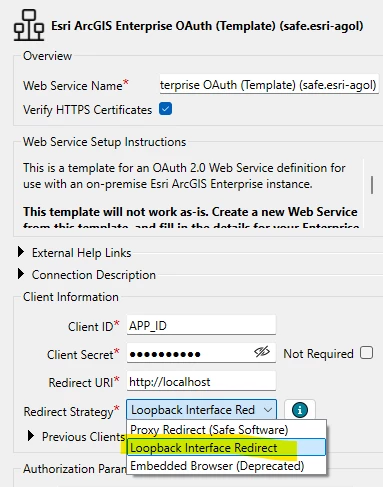
In Form > Web connections > Manage services… you need to alter the service to use 

Loopback interface redirect method is now the oauth 2.0 preference

Also be sure to add http://localhost to the registered app > redirect URI settings


desiree_at_safe
Safer
Forum|alt.badge.img+21

Hi ​@dustinedgecob! It looks like Oracle Integration Cloud is using the Client Credentials grant, which doesn't involve a browser login at all. That's probably why the browser prompt feels wrong. The OAuth 2.0 web service type in FME is designed for the Authorization Code flow (user-interactive), so switching to a Token web service would be closer. However, Oracle's token endpoint has an additional requirement: the client ID and secret need to be sent as a Base64-encoded value in the Authorization header, rather than as plain form body parameters.

The approach I'd recommend is building the token fetch directly in your workspace using an HTTPCaller. The pattern is similar to our article on connecting to Precisely's API:

Authenticating and Extracting Information from API calls with the HTTPCaller

Essentially:

  1. Use a BinaryEncoder to Base64-encode your clientId:clientSecret string
  2. Pass that into an HTTPCaller as Authorization: Basic <encoded value>, with grant_type=client_credentials&scope=<your scope> in the form body, posting to Oracle's token endpoint
  3. Use a JSONFlattener to extract the access_token
  4. Pass that as a Bearer token into a second HTTPCaller to call your actual Oracle Integration endpoint

I'm also looking into whether there's a case for product enhancements for future releases. Perhaps in how we connect to Oracle or our Token Web Services.

Hope this helps get you unblocked! Let me know if you have any questions 🙂


dustinedgecob
Contributor
Forum|alt.badge.img+2
  • Author
  • Contributor
  • June 26, 2026

@desiree_at_safe  thank you!! That was it.