


Question

AADSTS65001 consent_required even though permission is already granted (FME 2026.3, Azure AD web service)

  • September 30, 2026
  • 4 replies
  • 87 views

ecx
Supporter
Forum|alt.badge.img+8

Hi, I am migrating an FME Flow Azure AD web service from FME Form 2025.0.1 to 2026.3.0.0 (Build 26589). The upgrade to FME 2026 introduced the redirect strategy, due to removal of embedded browser, which was working previously, so I know the details I’ve used should work. 

Error:
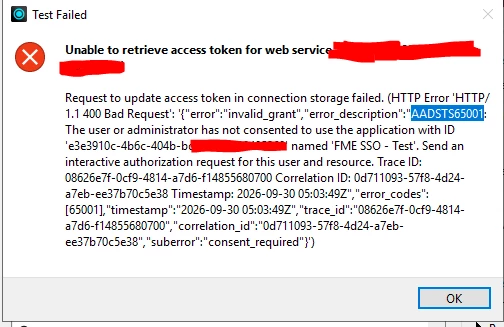

I’m using no secret. I’ve tested using both Loopback Interface Redirect and Proxy Redirect, same result on both. Everything has been set up following instructions outlined in: 
https://support.safe.com/hc/en-us/articles/39450156608781-External-Browser-Authentication-in-FME-Form 
 

I’ve set up everything as instructed in azure too. 

I’m stumped by this issue. Not sure how to even begin to debug it. FME form has no logs for me to assess. Azure has only basic logs which offer no answers.|

Can anyone give me some ideas on what I can try and check to resolve this? Is using tinker the only way forward?


Happy to share the full web service config if useful.

Thanks

4 replies

desiree_at_safe
Safer
Forum|alt.badge.img+24

Hi ​@ecx! I have a few thoughts on where the error: invalid_grant and "suberror": "consent_required" messages could be coming from.

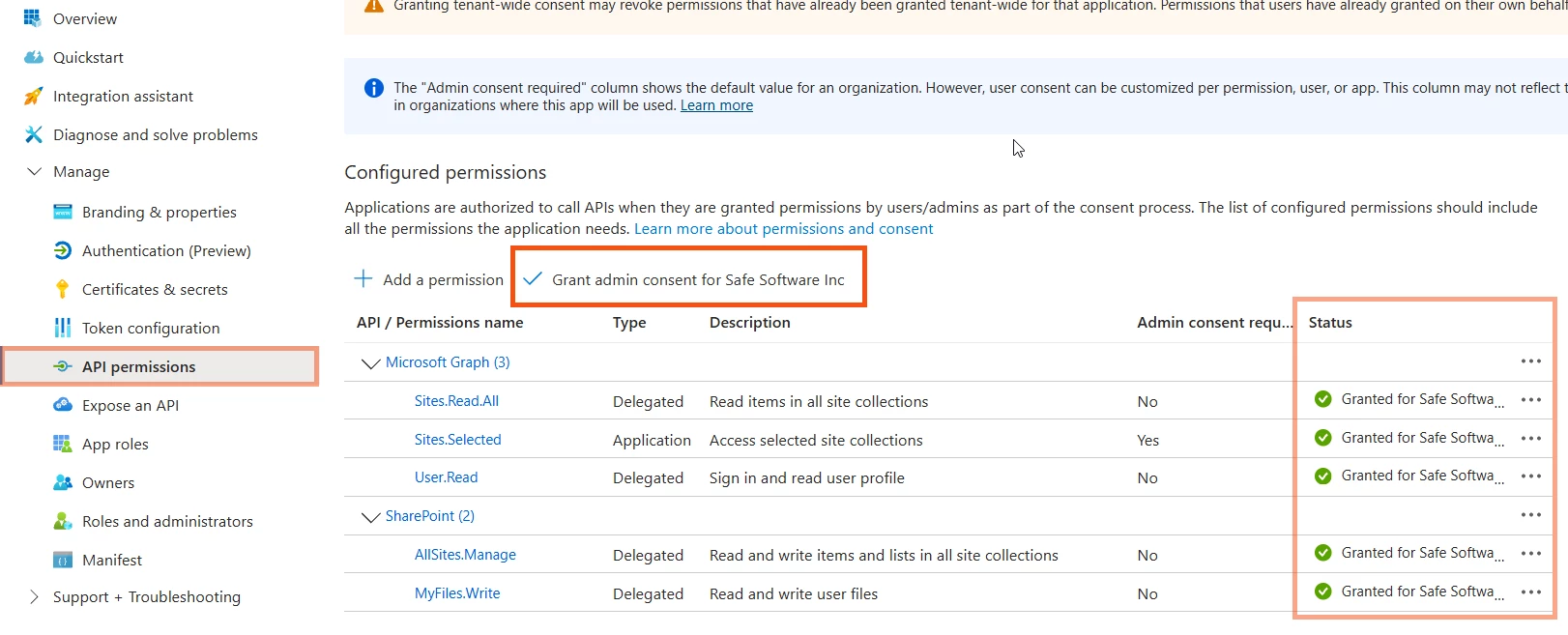
A new/altered app registration may require you or your Azure admin to grant consent again. You can find that option in the App registration under Manage > API Permissions, where you can confirm that Grant admin consent for [company] is selected and the API/Permissions Status all show checkmarks.

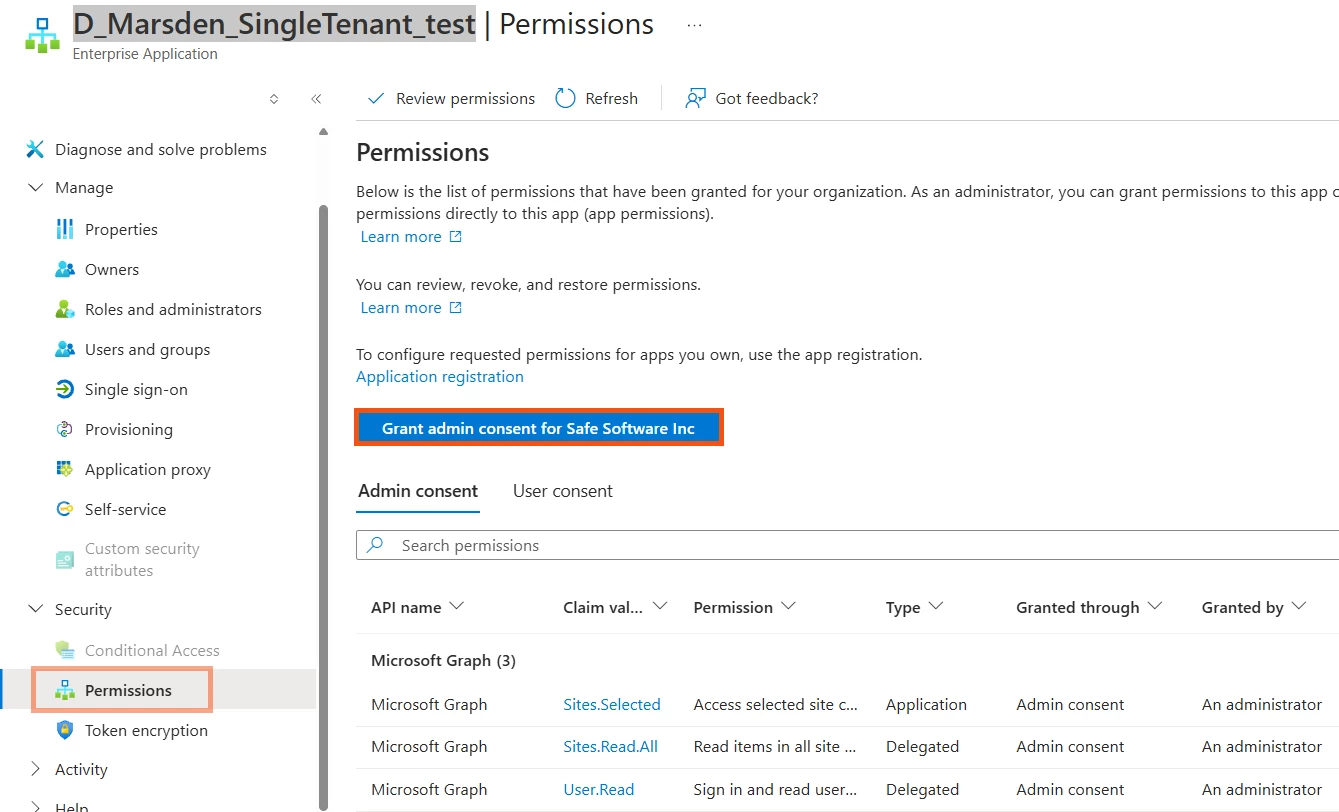
Another place to check is the Enterprise Application section, which controls tenant-level consent settings. That's under the Enterprise Application's Security > Permissions page.


The Client ID in the FME web service itself is still worth a quick check too. Old client details or stray characters can cause issues!


ecx
Supporter
Forum|alt.badge.img+8
  • Author
  • Supporter
  • October 4, 2026

Hi ​@ecx! I have a few thoughts on where the error: invalid_grant and "suberror": "consent_required" messages could be coming from.

A new/altered app registration may require you or your Azure admin to grant consent again. You can find that option in the App registration under Manage > API Permissions, where you can confirm that Grant admin consent for [company] is selected and the API/Permissions Status all show checkmarks.

Another place to check is the Enterprise Application section, which controls tenant-level consent settings. That's under the Enterprise Application's Security > Permissions page.


The Client ID in the FME web service itself is still worth a quick check too. Old client details or stray characters can cause issues!


Hello, thank you for the reply.

I believe that the sys admin has already granted me consent, as he says he has, but I will get him to check again, using your instructions. 

Would you have any other suggestions if consent was already granted?


ecx
Supporter
Forum|alt.badge.img+8
  • Author
  • Supporter
  • October 5, 2026

Hi again, I have checked with the sys admin and those have been granted using his global admin account.

Do you have any suggestions of what to try next?


Thanks,


desiree_at_safe
Safer
Forum|alt.badge.img+24

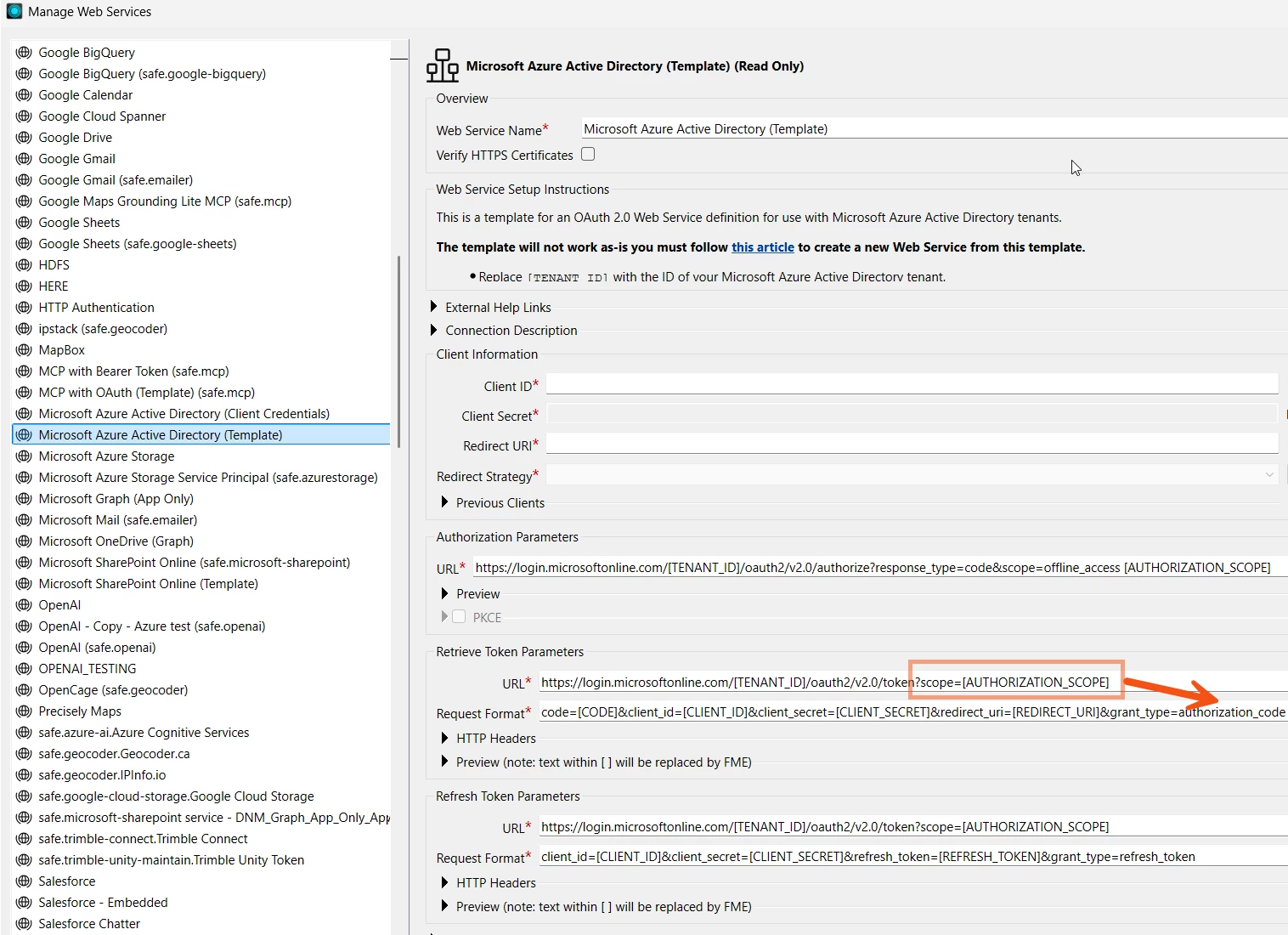
Hi ​@ecx! I believe you may have run into a recent change to the underlying web service. In FME 2026.3, Microsoft Azure Active Directory (Template), the service behind the FME Flow Azure AD web connection has now moved the scopes for the Token request from the URL to the Request Format. This change ensures those scopes persist when you refresh your access token for Flow and other services, but it differs from previous configurations, which I believe is what's happening. 

For now, you’ll have to move scope=<your-scopes> out of the URL and into the Request Format, or remove the placeholder completely if no scope was set.

So the Retrieve Token Parameters> Request Format  should look something like:
code=[CODE]&client_id=[CLIENT_ID]&redirect_uri=[REDIRECT_URI]&grant_type=authorization_code&scope=

If this doesn’t help, please open a ticket with us using this link: Support Case.

We can give you more targeted guidance by seeing the web service you’ve configured in FME and the scopes your sys admin has placed on the App registration 🙂

[FMEENGINE-88618]