

Released

Workspace Search cursor should auto-focus inside of Find entry text box

Related products:FME Form
  • March 2, 2017
  • 2 replies
  • 50 views

Forum|alt.badge.img+4

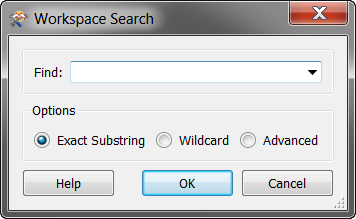
In FME Desktop, when I press Ctrl-F to bring up Workspace Search, the cursor should automatically be inside of the search box. (Currently, I have to click inside of the search box.)

Additionally, when the most recent search term appears, it should highlight the entire string so that I can either press Enter to redo the last search, or just start typing to enter a new search term.

This post is closed to further activity.
It may be an old question, an answered question, an implemented idea, or a notification-only post.
Please check post dates before relying on any information in a question or answer.
For follow-up or related questions, please post a new question or idea.
If there is a genuine update to be made, please contact us and request that the post is reopened.

2 replies

rbovard
Contributor
Forum|alt.badge.img
  • Contributor
  • July 6, 2017

Agreed, in 99.9% case we want to enter a new value so the old value should be selected.

Typical workflow:

  • Copy to clipboard value to search
  • CTRL+F
  • CTRL+V
  • Enter

And if we want to search the old value:

  • CTRL+F
  • Enter

Currently, I always search the old value with the new one by accident

'


LizAtSafe
Safer
Forum|alt.badge.img+21
  • Safer
  • May 2, 2019

This functionality has been added in 2018.0





