


Archived

Show workspace name rather than input and output writers in windows toolbar wheh hovered

Related products:FME Form
  • April 3, 2025
  • 4 replies
  • 35 views

kduffy
Participant
Forum|alt.badge.img+3

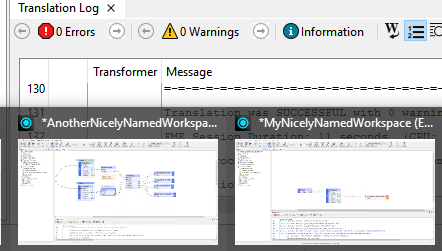
Change the windows toolbar hover preview to show the name of the workspace rather than the input and output readers/writer types.
The way it currently is means that users need to click into each workspace to see which one is which whenever they focus away from FME and there is more than one workspace open which is tedious and time consuming.

If it simply showed the name of the workspace first, it would be much easier to know which workspace a user is clicking on rather than trying to remember ‘None → None’ is the WorkspaceA.fmw or ‘MSSQL_ADP → TEXTLINE‘ is WorkspaceB.fmw. or having to click to expand it and look at the top bar.


4 replies

ebygomm
Influencer
Forum|alt.badge.img+46
  • Influencer
  • April 4, 2025

If you set the Workspace Name Parameter in the Navigator you will see the name in the hover


JennaKAtSafe
Safer
Forum|alt.badge.img+8

Hi ​@kduffy, the work around shared by ​@ebygomm would be your best bet for now.

I definitely hear your frustration on this! I’ll go ahead and close this Idea for votes for the time being, but we’ll keep it in mind when revisiting general usability improvements.

Thanks again for taking the time to share your feedback!


JennaKAtSafe
Safer
Forum|alt.badge.img+8
NewArchived

danilo_fme
Celebrity
Forum|alt.badge.img+52
  • Celebrity
  • April 14, 2025
NewArchived

Thanks for update.