Released

Provide setting to allow transformers to be expanded horizontally by default so

Related products:FME Form
  • January 24, 2017
  • 6 replies
  • 62 views

Forum|alt.badge.img+7

***Note from Migration:***

Original Title was: Provide setting to allow transformers to be expanded horizontally by default so their complete name is readable


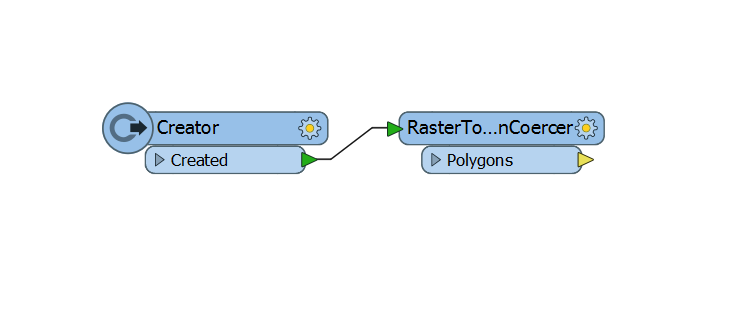
I have no idea if this is just me but I make sure the name of every transformer is completely visible. For transformers with longer names, this requires me to double click the right side expanding it so the complete name is readable.
Can't this functionality be default when adding a transformer to the workspace?

This post is closed to further activity.
It may be an old question, an answered question, an implemented idea, or a notification-only post.
Please check post dates before relying on any information in a question or answer.
For follow-up or related questions, please post a new question or idea.
If there is a genuine update to be made, please contact us and request that the post is reopened.

6 replies

Forum|alt.badge.img+7
Update: Create a workspace setting that allows you to activate this functionality or not depending on your preference.


  • January 31, 2017

I would also ask to automatically expand the attributes:

'


nathanatsafe
Safer
Forum|alt.badge.img+9

I like this! This would really improve legibility and accessibility for new users who are learning transformer names and workflows.


rylanatsafe
Safer
Forum|alt.badge.img+14

This isn't a solution, but I did find it helpful to change the "Truncate Names On" setting in FME Options > Appearance.

'


jhawks
Contributor
Forum|alt.badge.img+7
  • Contributor
  • March 1, 2018

Yes, definitely want this, I'm creating a workspace with dozens of readers. Would really like this capability!


debbiatsafe
Safer
Forum|alt.badge.img+22
  • Safer
  • March 13, 2019

This Idea has been implemented in FME 2019.0. Options for auto-sizing Workbench canvas items has been added (options are 'Fixed Width' and 'Size to Text'). Users can also choose whether to size to attribute length (options are 'Ignore Attributes' or 'Include Attributes'). If you want to size to attribute length, please select 'Include Attributes' for Text Size Calculation option. Please note there is a max size of 150 characters to avoid overly large canvas objects.

'

By default, new reader/writer feature types and transformers will be sized to fit the text (ignore attributes).

Please note that this is a beta feature and its functionality and appearance are subject to change as the product continues to evolve before the official release.

Should this feature or its implementation not address your concerns, related to this Idea posting, please let us know by leaving a comment.