Archived

Make bookmarks in bookmarks available in Bookmark Navigator

Related products:FME Form
  • March 13, 2019
  • 3 replies
  • 73 views

gabriel_hirsch
Contributor
Forum|alt.badge.img+14

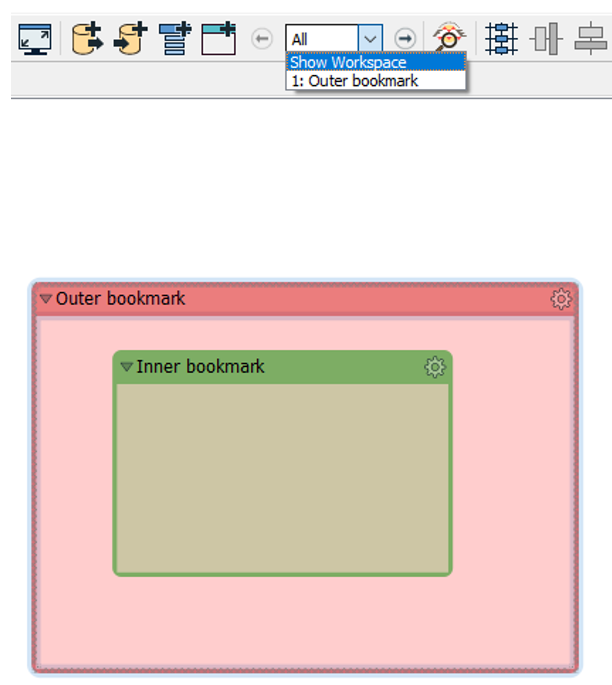
When you have a bookmark inside another bookmark, the Bookmark Navigator doesn't list the bookmarks inside the outer bookmark (see the attached image). I suggest that the Bookmark Navigator also would list the bookmarks inside other bookmarks. This is useful when dealing with large workspaces with many nested bookmarks.

3 replies

joeri
Contributor
Forum|alt.badge.img+6
  • Contributor
  • August 13, 2020

Linked issue: the bookmark lsit in the general navigator window will show the "Inner bookmark" twice:

  • once on the main level
  • once as sub-bookmark


'>


tomf
Supporter
Forum|alt.badge.img+23
  • Supporter
  • January 14, 2021

This can be done already.

Open the parameters for the Inner Bookmark and change the Bookmark Navigator parameter (requires the Bookmark Navigator to be on the Toobar) to "Include". Equally you can choose to ignore the Outer Bookmark by the same method, just set it to Exclude.

'>

By default all outer bookmarks are included and all nested, or inner, bookmarks are excluded, but you do have the ability to change this.


LizAtSafe
Safer
Forum|alt.badge.img+21
  • Safer
  • April 5, 2025
OpenArchived