Gathering Interest

Coordinate extractor - first and last coordinates only

Related products:Transformers
  • February 14, 2017
  • 7 replies
  • 140 views

ebygomm
Evangelist
Forum|alt.badge.img+54

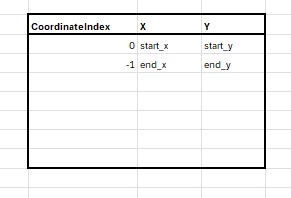
Add an additional option to the coordinate extractor to allow extraction of start and end coordinates/multiple specified coordinates


7 replies

revesz
Supporter
Forum|alt.badge.img+22
  • Supporter
  • February 15, 2017
Do you mean extracting multiple coordinates? (You can use -1 in the coordinate index for the last coordinate.)


ebygomm
Evangelist
Forum|alt.badge.img+54
  • Author
  • Evangelist
  • February 16, 2017
Yes, currently you can specify a coordinate, e.g. 0 for first and -1 for last, or get all coordinates, but if you want just the first and last coordinates you either need to use two coordinate extractors or extract all coordinates and identify the first and last from the list produced.


dellerbeck
Contributor
Forum|alt.badge.img+7
  • Contributor
  • February 11, 2021

Simple, add a coordinate extractor and return the -1 X \\ Y to end attributes. Right click and add an X \\ Y begin attribute, for the values use @XValue() and @YValue(). These will extract the begin index of a line.


'>

'>


trevorm
Contributor
Forum|alt.badge.img+3
  • Contributor
  • October 15, 2021

First and Last with x,y,z,m (measure) should also be considered as it becomes more and more popular with LRS / Routes.


I don't know if this solution will work for everyone, but I thought I would comment the LRS_GetRouteMeas does what this request wanted for me.

'>


LizAtSafe
Safer
Forum|alt.badge.img+25
Open→Gathering Interest

andrewgmurphy
Contributor
Forum|alt.badge.img+4

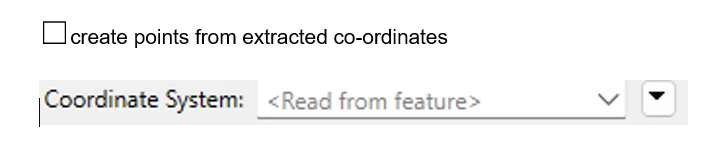
Definitely a thumbs up for this one. For topology checks being able to extract the First and Last in one transformer rather than having to chain 2 together makes sense. Even if there was a table interface where you could list the vertices you wanted maybe defaulting to start and end in the tool. It would also be good if there was checkbox option to “create points from extracted vertices”.

Why use 4 transformers when 1 will do!


daveatsafe
Safer
Forum|alt.badge.img+24

To extract the endpoint geometry, you can use a pair of Snippers in parallel. In the first, set the Snipping Mode to Vertex, and the Start and End Vertex to 0 to get the start point as a point. In the second, set the Snipping Mode to Vertex, and the Start and End Vertex to -1 to get the end point as a point.