

In FME 2017 there was an easy way to edit a Bookmark's "description". The Description is the area directly under the bookmark title where you could add more detail about what the bookmark does.
In 2018 the description is no longer easily accessible. It can still be accessed by using the shortcut key Ctrl-Enter when the bookmark is selected but there is no right-click menu option or any other way of getting at it. According to Safe, this is by design, as annotations offer greater flexibility in formatting included text but I would argue that, with a small change to collapsible bookmark behaviour, the Description field could still be useful.
The bookmark name is limited in length to the width of the bookmark and is therefore limited in the amount of information it can contain. I commonly use Bookmark descriptions to provide more context about what is going on inside a bookmark. See below (bookmark content not complete).
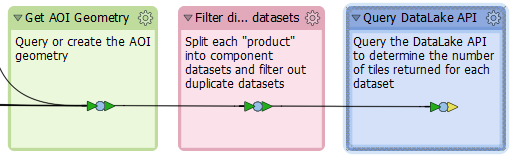
The collapsed bookmarks in 2018 look like this (unfortunately they don't collapse very nicely):

They should probably collapse to look like this:

It would be great if there could be an option to display the bookmark description text in the collapsed bookmark so that it's easier to understand what's going on. (ie. they should look more like my first image, above, but with the transformers and annotation content collapsed)