Released

Allow to set style to individual cells with ExcelStyler

Related products:Transformers
  • January 21, 2018
  • 5 replies
  • 93 views

takashi
Celebrity

From this Q&A: Style Excel cell values

It would be great if the @CurrentAttribute() function could be applicable in a conditional value setting in order to set style individual cells conditionally. For example, allow this setting to set background color to A, B, C, D, and E columns separately according to each value (currently this setting is invalid).
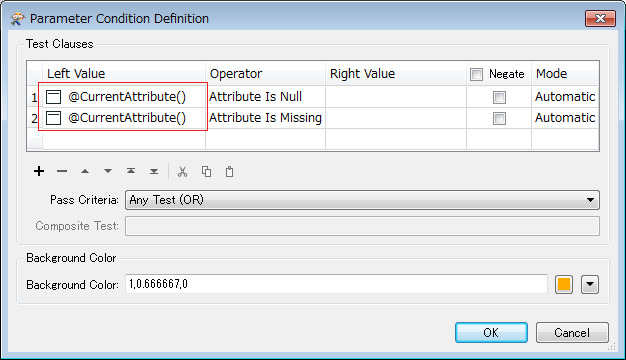
Expected Result:

5 replies

salvaleonrp
Enthusiast
Forum|alt.badge.img+20
  • Enthusiast
  • January 13, 2020

My use case is the opposite condition, where I have a specific string pattern in my cell, i.e a pair of brackets with +/- integers inside. Operation options similar to the TestFilter would be nice to have.


LizAtSafe
Safer
Forum|alt.badge.img+18
  • Safer
  • July 24, 2025
OpenReleased

PierreAtSafe
Safer
Forum|alt.badge.img+8

I've moved this Idea to released:
The ExcelStyler allows for individual cell formatting. For dynamic formatting, the ExcelConditionalFormatter allows for dynamic styling of cell depending on values. I believe this will allow you to solve the issue described here albeit in a different way.

Let me know if that's not enough to solve your issue!


reedwhit
Contributor
Forum|alt.badge.img+13
  • Contributor
  • September 9, 2025

Good day!!  The excel Styler is working great….   However, I’m  not finding a way to set the location of the cell border (right, left, top, bottom, ...) any suggestions would be appreciated.   


PierreAtSafe
Safer
Forum|alt.badge.img+8
  • Safer
  • September 10, 2025

Hi ​@reedwhit we don’t have the ability to select the position of the border itself with the ExcelStyler (the style of the border will be applied to the 4 sides of the cell). It’s a pretty niche request that would make the UI a tad bit more complicated. That being said, depending on your workflow you could get around that limitation using a template. See https://support.safe.com/hc/en-us/articles/25407596375309-Using-a-Template-File-when-Writing-Excel-Data.

There might be other tricks that you could use, but I’d suggest asking your question in https://community.safe.com/fme-form-5