




In the Esri ArcGIS Online (AGOL) Feature Service Reader, allow connecting to a feature service via entering the AGOL Item ID as a value. This could be a seperate parameter field or maybe this could be an option via the text editor for the Feature Service parameter field?
Currently FME populates a list of feature services retrieved from AGOL, however you cannot find a feature service via its AGOL Item ID.
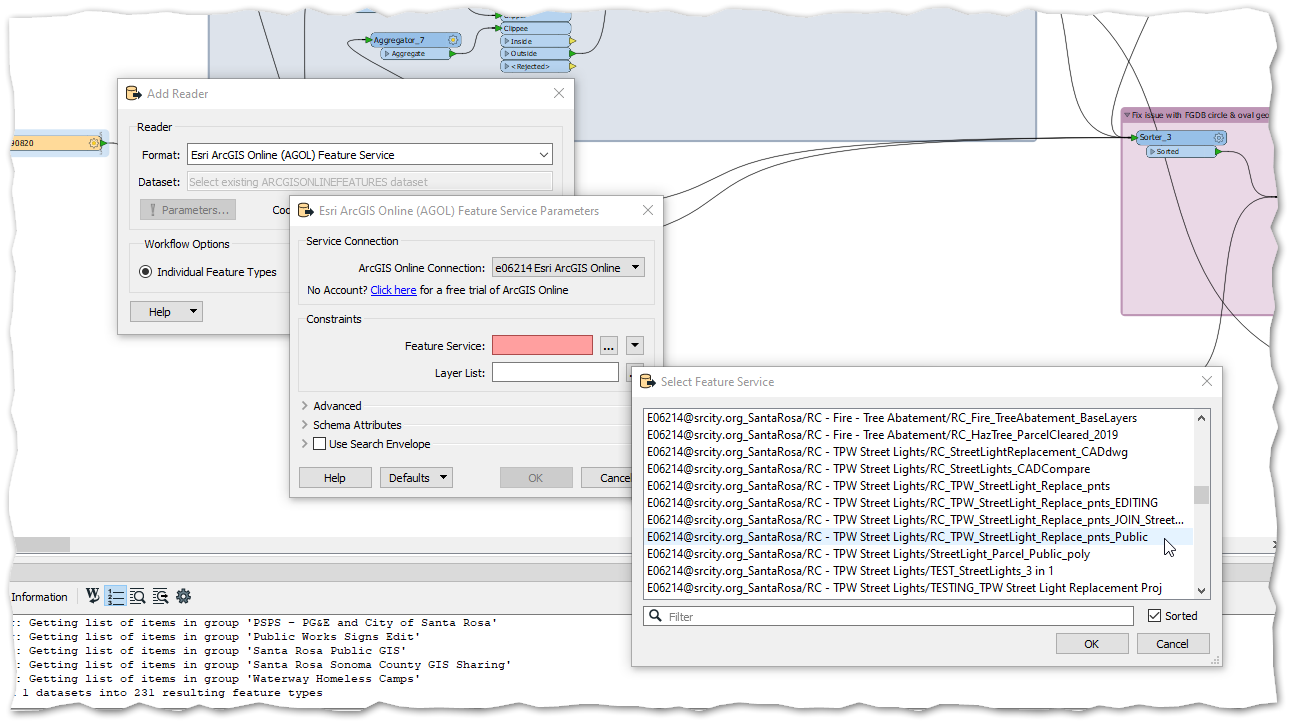
While the pre-populated list is great, the list can be very long both to generate and to sift through. Often to be certain I'm selecting the correct Item, I have to hunt the feature service down in AGOL to figure out which folder it is in. It would be helpful to have the option of simply pasting the Items unique global ID as a value.
The screen capture below clarifies how the current lookup functions, as an example I am selecting a feature service titled "RC_TPW_StreetLight_Replace_pnts_Public"
Screen capture below clarifies the AGOL Item ID I am referring to. In this case, viewing the item titled "RC_TPW_StreetLight_Replace_pnts_Public" in AGOL exposes the ID as 4707e815a61c47cfbf8438e528db5aa0

Thank you for considering this idea!
Edited for clarity