



Released

Adjust the output port order (reorder ports visually by moving them up or down)

Related products:FME Form
  • November 8, 2015
  • 18 replies
  • 123 views

taojunabc
Participant
Forum|alt.badge.img+6

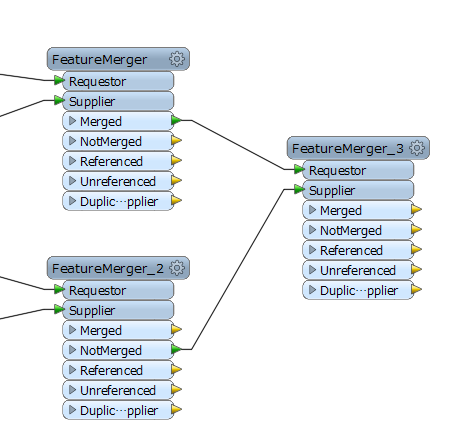
In the current version of the FME(2015.1.2.1), it is not able to adjust the order of the transformer's port, so the situation as the following figure, will produce a line of cross.If allow the user to adjust the order of the port, Will be able to reduce the occurrence of this situation.

This post is closed to further activity.
It may be an old question, an answered question, an implemented idea, or a notification-only post.
Please check post dates before relying on any information in a question or answer.
For follow-up or related questions, please post a new question or idea.
If there is a genuine update to be made, please contact us and request that the post is reopened.

18 replies

fmelizard
Safer
Forum|alt.badge.img+22
  • Safer
  • November 9, 2015
Avoiding crossing the streams is definitely something worthwhile. I think this idea has alot of merit and we'll look into it.

Forum|alt.badge.img+2
  • November 26, 2015
Really need this today!

mark2atsafe
Safer
Forum|alt.badge.img+59
  • Safer
  • November 26, 2015
Already filed as PR#54105. This page added so they know to respond if and when it is implemented.

davideagle
Contributor
Forum|alt.badge.img+22
  • Contributor
  • December 1, 2015

Absolutely agree. The ability to reorder ports on both the input and output side would really help to enable tidier workspaces.


taojunabc
Participant
Forum|alt.badge.img+6
  • Author
  • Participant
  • December 1, 2015

Thanks for your comments.

In addition to the above, there is a case I think can be improved.It will also help to make the canvas clean and tidy too.

For example, I often use FeatureMerger, but I use the Merged port more often. Even so, I can't hide the other 4 ports, which makes a lot of extra space to be occupied.

I want to be able to provide users with a function that can hide unnecessary ports.

'


erik_jan
Contributor
Forum|alt.badge.img+26
  • Contributor
  • December 1, 2015

Good idea!


Forum|alt.badge.img+5
  • January 8, 2016

Would be really useful, also being able to hide or minimise some of the unused ports might be good as well.

I also think some kind of graphic that helps clear up crossed streams would be good, almost like representation in cartography for roads and bridges, to make crossed lines a little easier to follow. OK bad example but kinda like below;

'


davideagle
Contributor
Forum|alt.badge.img+22
  • Contributor
  • January 8, 2016

"Try to imagine all life as you know it stopping instantaneously and every molecule in your body exploding at the speed of light."

"Total protonic reversal!"


Forum|alt.badge.img+5
  • January 12, 2016

Ghostbuster nerd out! Showing your age there Dave!


courtney_m
Contributor
Forum|alt.badge.img+23
  • Contributor
  • January 12, 2016

This would be really helpful!


fmelizard
Safer
Forum|alt.badge.img+22
  • Safer
  • February 17, 2016

It's in FME 2016.1 beta! Just right click on a port and you can move it up or down. Hiding seems a bridge too far for now though. If folks like that please file a separate idea.


taojunabc
Participant
Forum|alt.badge.img+6
  • Author
  • Participant
  • February 17, 2016

Oh,It's really a good news, I already tried it. Seems everything is perfect.

Now, it seems can only through the right-click menu operation, if can use Ctrl + left mouse button to move it too may be more convenient.


fmelizard
Safer
Forum|alt.badge.img+22
  • Safer
  • March 29, 2016

Just to follow-up on Dale's comment - this is now in FME 2016.1 due for release this week:

'


takashi
Celebrity
  • March 31, 2016

wow, fantastic! Any input/output port can be moved up down, in 2016.1 beta.


fmelizard
Safer
Forum|alt.badge.img+22
  • Safer
  • April 1, 2016

Still don't have your 'hide' option...but we'll keep thinking....


Forum|alt.badge.img+1

This has been released as part of FME 2016.1 . Visit http://www.safe.com/downloads to download and try it.


zzupljanin
Contributor
Forum|alt.badge.img+5
  • Contributor
  • November 3, 2016

but there's a problem. If you rearange all those port, then try to open fmw in 2016.0 or earlier, all ports get to default position, but there are no crossings! Basically older version restarts ports of transformer but preserves connections, which is wrong. Example (looking at picture of this Idea): You upped Line port of TopologyBuilder so connections are now parallel, and saved fmw. If you open fmw in 2016.0 connections are still parallel but Node and Line port are reverted to default (instead FeatureMerger try SpatialFilter since version error will pop up while opening).

So, I was thinking, that it'll be a good idea if, like in every case earlier, some error message should pop up (when opening fmw in 2016.0) so that you know that ports are reverted. What do you guys think?


fmelizard
Safer
Forum|alt.badge.img+22
  • Safer
  • November 5, 2016


I think you get a warning when you open in an older workbench, but yes, it would be great if we could travel back in time and make that warning in FME 2016.x into a flat-out refusal. Yikes. That is really bad. I do not think we can do anything about this but I'll forward to the team.