



Open

Add [Help] button to Custom Transformer Parameters Dialog

Related products:FME Form
  • April 17, 2016
  • 2 replies
  • 47 views

takashi
Celebrity

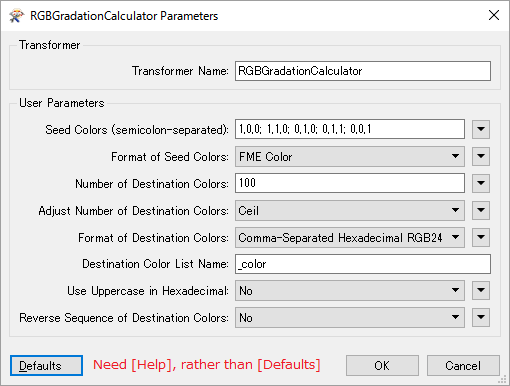
In FME 2016.1 RC, I found that the user has to click [Help] button or an equivalent command to access the help doc of a transformer. It's good for regular transformers, but custom transformers don't have [Help] button, so you cannot change the Help window to the help doc for a custom transformer while editing its parameters. [Defaults] button in the parameters dialog of custom transformers is useless, but [Help] button might be helpful.

2 replies

geolassi
Contributor
Forum|alt.badge.img+8
  • Contributor
  • May 3, 2016

When Help panel was removed, it affected also Custom Transformers. Before you could write the description, usage etc for the custom transformer, but now they are a bit useless, since there is no Help panel. At least a Help button would be needed.


jdh
Contributor
Forum|alt.badge.img+40
  • Contributor
  • May 10, 2016

You can pull up the description of the custom transformer in the help page by clicking on the transformer in the Transformer Gallery and pressing F1, or right clicking and pressing help.


It's annoying that it doesn't work on transformers in the canvas, but at least the information is findable.






